Artificial intelligence (AI) is changing the way students learn, research, write and prepare for examinations. In 2026, students no longer have to rely entirely on expensive software or private tutors to get additional academic support.
There are now many free AI tools for students that can explain difficult topics, summarize lecture notes, help with research, improve writing, transcribe lectures, solve mathematical problems and even assist with programming.
The important thing, however, is to use AI as a learning assistant—not as a replacement for your own thinking and academic work.
In this guide, we look at 10 of the best free AI tools students can use in 2026, including options that are useful for secondary school students, university students, polytechnic students, researchers and coding students.
Quick Comparison: Best Free AI Tools for Students in 2026
| Rank | AI Tool | Best For | Free Option |
|---|---|---|---|
| 1 | ChatGPT | General studying and explanations | Yes |
| 2 | Google Gemini | Research and learning | Yes |
| 3 | NotebookLM | Notes, PDFs and revision | Yes |
| 4 | Perplexity | Research with sources | Yes |
| 5 | Grammarly | Writing and proofreading | Yes |
| 6 | QuillBot | Paraphrasing and summarising | Yes |
| 7 | Canva | Presentations and visual projects | Yes |
| 8 | Otter.ai | Lecture transcription | Yes |
| 9 | Wolfram Alpha | Mathematics and science | Basic free access |
| 10 | GitHub Copilot | Coding and programming | Yes |
Free features and usage limits can change, so students should check each service’s current terms before relying on a particular feature.
1. ChatGPT – Best Overall AI Tool for Students

Best for: Explaining difficult topics, brainstorming, revision, writing assistance, practice questions and study planning.
ChatGPT is arguably the most versatile AI assistant available to students.
A student can use it to understand difficult concepts, generate practice questions, create revision plans, brainstorm project topics and receive explanations at different levels of difficulty.
For example, instead of asking:
“Explain photosynthesis.”
You could ask:
“Explain photosynthesis to a JSS student using simple examples, then give me five questions to test my understanding.”
That type of prompt turns ChatGPT from a simple question-answering tool into a personal study assistant.
ChatGPT’s free tier also provides access to several useful capabilities, although usage limits and available models can change over time.
What students can use ChatGPT for
- Understanding difficult subjects
- Creating revision notes
- Generating practice examinations
- Brainstorming project topics
- Creating study timetables
- Learning programming
- Checking explanations
- Preparing for interviews
- Practising foreign languages
Tip: Ask ChatGPT to explain why an answer is correct rather than simply requesting the answer.
2. Google Gemini – Excellent for Research and Learning

Best for: Research, explanations, brainstorming, documents and general academic assistance.
Google Gemini is Google’s AI assistant and is another strong option for students looking for a free AI tool.
Students can use Gemini to brainstorm ideas, simplify complicated concepts, organize information and work with documents and images.
Google has also introduced education-focused Gemini capabilities. Its education offerings include tools designed around learning, while Gemini’s free consumer access can be used with a personal Google account.
One important point for students in 2026 is that special student promotions are not necessarily available in every country or at all times. For example, Google’s previous free student upgrade was limited to selected countries and had a specific eligibility period.
Students can use Gemini to:
- Explain difficult topics
- Generate study questions
- Brainstorm essay topics
- Analyze information
- Summarize content
- Work with images and documents
- Develop study plans
Best for: Students already using Google services such as Google Docs and Google Drive.
3. NotebookLM – Best AI Tool for Lecture Notes and PDFs
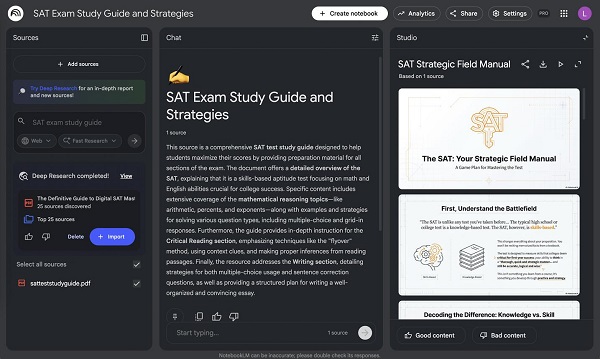
Best for: Studying from your own textbooks, lecture notes, PDFs and research materials.
Google NotebookLM is particularly useful because it can work from materials that you provide.
Instead of asking a general AI about a subject, you can upload relevant course materials and ask questions about those materials.
Google describes NotebookLM as a free AI research and learning partner that can work with PDFs, websites, YouTube videos, Google Docs and other sources. It can create summaries, study guides and quizzes based on the information provided.
Why students should try NotebookLM
Imagine you have a 100-page lecture PDF and an examination is approaching.
You can use NotebookLM to:
- Summarize the lecture
- Identify important topics
- Generate revision questions
- Create study guides
- Ask questions about the material
- Find information within your sources
- Create different ways of reviewing the material
This makes NotebookLM particularly useful for university students, researchers and students preparing for examinations.
Best for: Students who have lots of lecture notes and PDF materials.
4. Perplexity – Best for Research With Sources
Best for: Online research, fact-checking and finding sources.
Perplexity combines AI with web search to provide answers accompanied by sources.
This can make it useful when researching topics for assignments, presentations and projects.
For example, rather than asking only:
“What are the causes of climate change?”
A student can ask:
“What are the major causes of climate change? Give me recent evidence and sources that I can verify.”
Perplexity’s Learn Mode is another useful student-focused feature. Perplexity says Learn Mode is designed to encourage interactive learning instead of simply giving students answers.
Perplexity is useful for:
- Researching project topics
- Finding sources
- Fact-checking
- Exploring unfamiliar subjects
- Comparing information
- Developing research questions
- Learning through guided questions
Important: Never copy AI-generated references blindly. Open the cited source and confirm that it actually supports the claim.
5. Grammarly – Best AI Tool for Writing
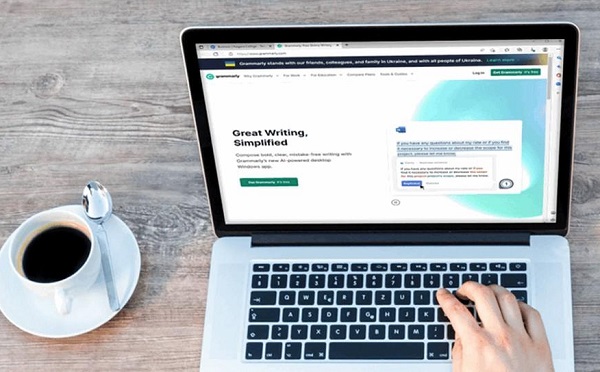
Best for: Essays, assignments, reports, grammar and writing improvement.
Grammarly is one of the most useful tools for students who want to improve their writing.
Its free offering provides writing assistance, while Grammarly also offers AI features for brainstorming, rewriting, proofreading and other writing tasks. Grammarly explicitly provides a free student sign-up option.
Students can use it to identify:
- Grammar mistakes
- Spelling problems
- Awkward sentences
- Clarity issues
- Wordiness
- Tone problems
For example, after writing an essay yourself, you can use Grammarly to identify grammatical problems without asking AI to write the entire essay for you.
Good uses for Grammarly
Before submitting an assignment:
- Write your assignment yourself.
- Check the structure and arguments.
- Use Grammarly to identify language errors.
- Correct the mistakes.
- Read the final version yourself.
This approach allows AI to support your writing without replacing your own ideas.
6. QuillBot – Best for Paraphrasing and Summarising
Best for: Paraphrasing, rewriting and improving readability.
QuillBot is popular among students who work with academic articles, reports and research materials.
Its free paraphrasing tool allows users to rephrase up to 125 words at a time, with Standard and Fluency modes available for free.
Students can use QuillBot when they need to understand or reword information in their own writing.
For example, if you read a complicated academic paragraph, you can use a paraphrasing tool to help make the language easier to understand.
QuillBot can help students with:
- Paraphrasing
- Improving sentence structure
- Simplifying complicated language
- Summarising information
- Checking grammar
- Improving readability
Important academic warning
Paraphrasing does not remove the need to cite the original source.
If you use someone else’s ideas, data or research findings, you should still provide the appropriate citation even if the wording has been changed.
7. Canva – Best for Presentations and Visual Projects
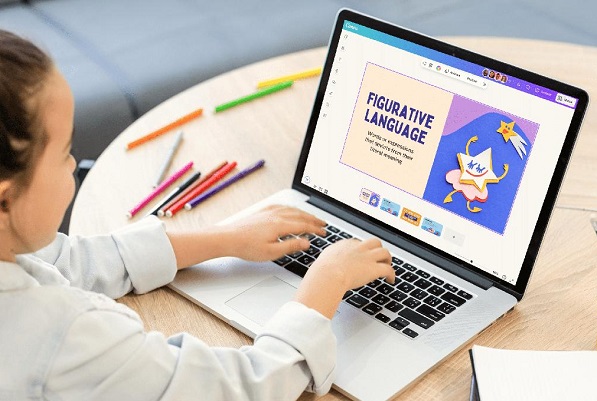
Best for: Presentations, posters, infographics, project designs and visual assignments.
Canva is more than a graphic design platform. It has increasingly incorporated AI-powered features that can help students create and organize visual content.
Students can use Canva for:
- PowerPoint-style presentations
- School posters
- Infographics
- Research presentations
- Project covers
- CVs and portfolios
- Educational diagrams
- Social media designs for school organizations
Canva offers a free plan, while education access varies depending on the student’s level and institution. Canva Education is free for eligible K-12 students and schools, while university students can use Canva Free and may receive premium access through their institution’s Canva for Campus arrangement.
Best for: Students who want their assignments and presentations to look professional.
8. Otter.ai – Best for Turning Lectures Into Notes
Best for: Lecture transcription, meeting notes and recorded discussions.
Otter.ai can convert spoken conversations into searchable text.
This can be particularly useful for students who attend online classes, group discussions, interviews or revision sessions.
Otter’s current free Basic plan includes 300 transcription minutes per month, although other limits apply, including restrictions on imported files.
Students can use Otter.ai to:
- Transcribe lectures
- Record discussions
- Create searchable notes
- Review important points from conversations
- Capture ideas during group projects
For example, after a study group session, students can use a transcription to identify the topics discussed and create revision notes.
Remember: Always follow your school or lecturer’s rules regarding recording classes or other people.
9. Wolfram Alpha – Best for Mathematics and Science
Best for: Mathematics, equations, calculations and STEM subjects.
📖 Related Reads
Wolfram Alpha is a computational knowledge engine that can be especially useful for students studying mathematics, physics, statistics, engineering and other technical subjects.
Instead of simply asking an AI chatbot to solve a complicated equation, students can use a computational tool designed specifically for mathematical and scientific problems.
Useful areas include:
- Algebra
- Calculus
- Statistics
- Physics
- Engineering calculations
- Graphs
- Equations
- Unit conversions
The key advantage is that students can use such tools to check their calculations and understand mathematical procedures.
However, don’t use it simply to copy answers. Try solving the problem yourself first and then use the tool to check your work.
10. GitHub Copilot – Best Free AI Tool for Coding Students

Best for: Programming, debugging and learning to code.
GitHub Copilot is particularly valuable for computer science, software engineering and IT students.
GitHub currently provides a Copilot Free tier with limited usage, while verified students can access the GitHub Copilot Student plan for free. GitHub says the free individual plan includes up to 2,000 code completions per month, while verified students receive access to Copilot’s student benefits.
Students can use Copilot to:
- Generate code suggestions
- Understand unfamiliar code
- Debug programming errors
- Complete repetitive code
- Learn programming concepts
- Generate examples
- Explore different programming approaches
For example, a beginner learning Python could ask an AI coding assistant to explain what a particular function does rather than simply copying the generated code.
Best for: Computer science and programming students.
Which Free AI Tool Should Students Use?
The best choice depends on what you are trying to accomplish.
For general studying
ChatGPT is an excellent starting point because it can handle many different academic tasks.
For studying your own lecture notes
Choose NotebookLM.
For research and sources
Try Perplexity.
For writing essays and assignments
Use Grammarly alongside your own writing.
For paraphrasing
QuillBot is a useful option.
For presentations
Try Canva.
For recorded lectures
Use Otter.ai.
For mathematics
Try Wolfram Alpha.
For programming
GitHub Copilot is particularly useful.
For general Google-based research and learning
Gemini is worth trying.
Best Free AI Combination for Students in 2026
You don’t need to use all 10 tools.
A simple AI study toolkit could look like this:
ChatGPT + NotebookLM + Perplexity + Grammarly
Each tool has a different role:
ChatGPT → Understand
Ask questions and get explanations.
NotebookLM → Study
Upload your notes and course materials.
Perplexity → Research
Find information and verify sources.
Grammarly → Improve
Check your writing before submission.
For students studying programming, add GitHub Copilot. For mathematics and science, add Wolfram Alpha.
This approach is usually more useful than constantly jumping between dozens of AI websites.
How to Use AI Without Cheating
One of the biggest concerns surrounding AI in education is academic integrity.
AI can be extremely useful, but students should understand the difference between using AI to learn and using AI to submit work they did not produce.
Good uses of AI
- Asking for explanations
- Generating practice questions
- Creating revision materials
- Checking grammar
- Brainstorming ideas
- Finding potential research directions
- Checking your calculations
- Debugging code
- Summarizing your own notes
Risky uses of AI
- Submitting an AI-generated essay as your own
- Inventing references
- Copying answers without understanding them
- Using AI during examinations when prohibited
- Paraphrasing someone else’s work without citation
- Giving AI confidential school or personal information
A good rule is simple:
Use AI to help you understand the work, not to avoid doing the work.
Universities and schools can have different AI policies, so students should always check the rules for their particular course or assignment. Educational guidance also recommends using AI to enhance rather than replace students’ own work.
Tips for Getting Better Results From AI
The quality of an AI response often depends on the quality of your prompt.
Instead of:
“Teach me mathematics.”
Try:
“Teach me quadratic equations as if I am a secondary school student. Explain the concept step by step, give me three worked examples, then give me five practice questions without showing the answers.”
Instead of:
“Summarize this.”
Try:
“Summarize these lecture notes into 10 key points. Identify definitions, important formulas and topics I should revise before an examination.”
A useful student prompt formula
Role + Task + Context + Format + Difficulty
For example:
“Act as a university mathematics tutor. Explain integration to a first-year student. Use simple examples, show each step and finish with five practice questions.”
This will usually produce a much more useful response than a two-word prompt.
Final Verdict: The Best Free AI Tools for Students in 2026
AI has become one of the most useful technologies available to students, but the best tool depends on the task.
If you only want to start with three tools, choose:
1. ChatGPT – for learning and explanations
2. NotebookLM – for studying your own materials
3. Perplexity – for research and source discovery
Then add Grammarly for writing, Canva for presentations, Wolfram Alpha for mathematics or GitHub Copilot for programming.
The goal should not be to let AI do everything for you. The smarter approach is to use these tools as digital tutors, research assistants, writing coaches and productivity tools while keeping your own reasoning, originality and understanding at the centre of your education.
Frequently Asked Questions
What is the best free AI tool for students in 2026?
ChatGPT is one of the best all-purpose options because it can help with explanations, brainstorming, revision, writing, coding and many other academic tasks. However, NotebookLM may be better for students who primarily want to study from their own lecture notes and PDFs.
What is the best free AI tool for research?
Perplexity is a strong choice because it combines AI answers with web sources. Students should still open and verify the cited sources before using them in academic work.
Is NotebookLM free for students?
Yes. Google’s current education information describes Gemini Notebook/NotebookLM as free of charge, with the ability to work from uploaded sources such as PDFs, websites and Google Docs.
Can students use Grammarly for free?
Yes. Grammarly offers a free student sign-up and free writing assistance, although some advanced features require a paid plan.
Is QuillBot free?
Yes. QuillBot’s free Paraphraser currently supports up to 125 words per input, with Standard and Fluency modes available without payment.
Is GitHub Copilot free for students?
Yes. Verified students can access GitHub Copilot’s student benefits for free. GitHub also offers a separate limited Copilot Free plan for individual users.
Can AI replace a teacher?
No. AI can explain concepts and provide additional practice, but it can make mistakes and does not replace the expertise, feedback and context provided by a qualified teacher or lecturer.
Should students use AI to write assignments?
Students should first check their school’s or lecturer’s AI policy. Where AI is permitted, it is generally safer and more educational to use it for brainstorming, research assistance, explanations, feedback and proofreading while ensuring the final work reflects the student’s own understanding and follows required citation rules.