If you have been offered admission through JAMB and need your official JAMB admission letter, you can print it online through the JAMB e-Facility portal.
The admission letter is an important document that confirms the institution and programme for which JAMB has admitted you. JAMB states that valid admissions must come through its system and be printable from e-Facility.
In this guide, we explain how to print your JAMB admission letter online, the required details, the current cost, and what to do if you experience problems.
What Is a JAMB Admission Letter?
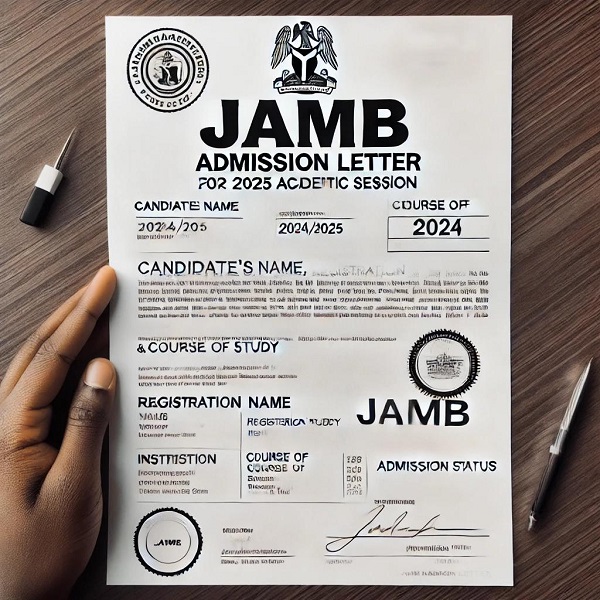
A JAMB admission letter is an official document showing that a candidate has been offered admission through the Joint Admissions and Matriculation Board.
It normally contains important information such as:
- Candidate’s name
- JAMB registration number
- Examination year
- Institution admitted to
- Course or programme
- Admission details
- Other relevant information about the admission
JAMB’s official guidance states that admissions offered by institutions must come from JAMB and be printable through the e-Facility platform.
How Much Does JAMB Admission Letter Printing Cost?
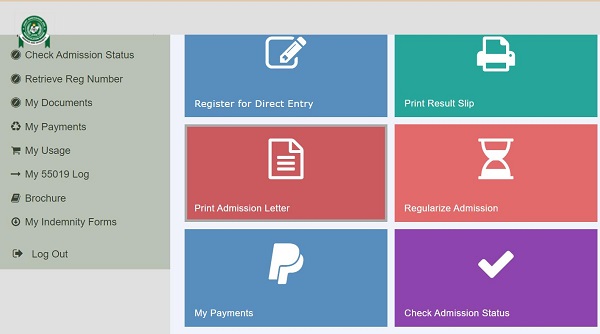
According to JAMB’s 2026 training manual, the official portal charge for printing a coloured JAMB admission letter is ₦1,000. Additional service charges may apply when the service is processed through a JAMB-approved centre. The 2026 manual lists ₦200 for PRC/PTC centres and ₦300 for non-JAMB centres.
Therefore, candidates should check the amount displayed on the official JAMB portal before completing payment.
What You Need Before Printing Your JAMB Admission Letter
Before starting the process, make sure you have:
- Your JAMB profile email address
- Your JAMB e-Facility password
- Your JAMB registration number
- Your examination year
- A phone, tablet or computer with internet access
- A means of making the required online payment
- Access to a printer, if you want a physical copy immediately
How to Print Your JAMB Admission Letter Online
Follow these steps to print your admission letter.
Step 1: Visit the JAMB e-Facility Portal
Go to the official JAMB e-Facility portal.
The official login page requires your registered email address and password.
Image suggestion: Use a screenshot or original illustration showing the JAMB e-Facility login page.
Alt text: JAMB e-Facility login page for printing admission letter
Step 2: Log In to Your JAMB Profile
Enter the email address and password associated with your JAMB profile.
Click Login to access your dashboard.
If you have forgotten your password, use the password-reset option provided on the official portal.
Important: Do not give your JAMB password to another person unnecessarily. JAMB advises candidates to keep their security details confidential.
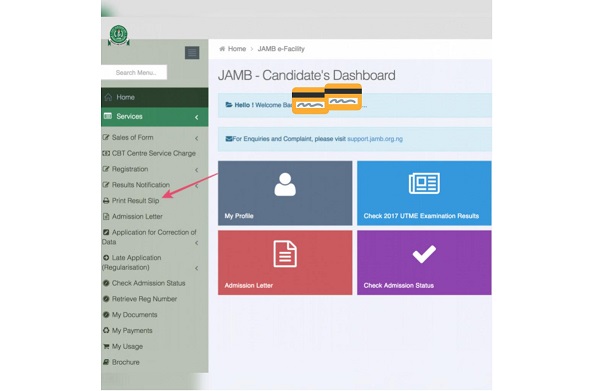
Step 3: Select “Print Admission Letter”
After logging in, you will be taken to your JAMB dashboard.
Look through the available services and select Print Admission Letter.
JAMB’s official admission-letter instructions identify Print Admission Letter as the service candidates should select from the dashboard.
Step 4: Generate the Transaction
After selecting the admission-letter printing service, the system may generate a transaction ID for the request.
Review the information displayed carefully.
The transaction ID can be useful when following up on a payment or transaction problem. JAMB’s published admission-letter instructions state that the transaction ID is displayed during the process and sent to the candidate’s registered email address.
Step 5: Make the Required Payment
Proceed to the payment section and select the payment method available on the official portal.
For 2026, JAMB lists the Admission Letter portal charge as ₦1,000.
Complete the payment and wait for the transaction to be confirmed.
Do not pay someone who claims they can print the letter through an unofficial JAMB website.
Step 6: Enter Your Examination Year
After successful payment, the system will request your examination information.
Enter the appropriate examination year.
For example, a candidate admitted from the 2026 UTME admission cycle should select the applicable 2026 examination year when prompted.
Step 7: Enter Your JAMB Registration Number
Enter your correct JAMB Registration Number in the required field.
Check the number carefully before submitting it.
JAMB’s official admission-letter instructions specifically require the candidate’s Year of Exam and JAMB Registration Number before the admission letter can be generated.
Step 8: Generate Your Admission Letter
Click the button provided to generate or print your admission letter.
If your admission has been successfully processed, your admission details should appear on the screen.
📖 Related Reads
Check the following information carefully:
- Your name
- JAMB registration number
- Institution
- Course/programme
- Examination year
- Admission details
If everything is correct, proceed to print the document.
Step 9: Print or Save the Admission Letter as PDF
You can either:
- Print the admission letter directly using a printer, or
- Save/download it as a PDF and print it later.
It is advisable to keep a digital copy on your phone, computer or cloud storage in addition to the physical copy.
Can I Print My JAMB Admission Letter With My Phone?
Yes. You can access the JAMB e-Facility portal using a smartphone with an internet connection.
However, if you need a physical copy, you will eventually need access to a printer or a JAMB-approved centre.
A computer may be more convenient when downloading or printing the document because it provides better control over the print settings.
What If I Cannot Find “Print Admission Letter”?
If you log into your JAMB profile and cannot immediately find the service, check the complete list of available services on your dashboard.
JAMB’s e-Facility provides several post-registration services, and the available options can depend on the candidate’s profile and the service being requested.
If you continue to experience problems, use JAMB’s official support system to raise a complaint or enquiry.
What If My Admission Letter Is Not Available?
If you cannot generate your admission letter, first confirm that:
- You have actually been offered admission through JAMB.
- You have accepted the admission offer where required.
- Your admission details are correctly reflected in your JAMB profile.
- You selected the correct examination year.
- You entered the correct JAMB registration number.
- Your payment was successfully completed.
JAMB’s admission guidelines make clear that valid institutional admissions must be processed through JAMB and reflected on its e-Facility platform.
If your school has given you an admission offer but your JAMB record has not been updated, contact the institution’s admission office and, where necessary, JAMB support.
Can I Print an Admission Letter Without JAMB Admission?
Generally, the admission letter printing service is intended for candidates whose admission has been processed through JAMB.
JAMB has emphasized that an admission offered outside its system is not recognised as a valid JAMB admission.
If you have only received information from your school but cannot find the corresponding JAMB admission record, verify your admission status through your JAMB profile before assuming that the JAMB admission letter is ready.
Why Is My Admission Letter Important?
Your admission letter can be required during various stages of your academic journey, including:
- School clearance
- Registration
- Admission verification
- Matriculation documentation
- Student records
- NYSC-related documentation
JAMB’s matriculation-list service specifically instructs candidates to print their admission letter and result slip and have the documents verified with their institution’s admission officer.
Tips for Printing Your JAMB Admission Letter
1. Use the Official JAMB Website
Always start from JAMB’s official e-Facility portal rather than a website claiming to be the JAMB portal.
2. Check Your Details Before Printing
Carefully review your name, institution and course before printing.
3. Keep a Digital Copy
Save a PDF copy of your admission letter so you can print another copy when necessary.
4. Keep Your Payment Information
Keep your transaction details and payment confirmation until the admission-letter printing process is completed.
5. Avoid Fraudsters
Be cautious of anyone promising to “upgrade” your admission or generate a fake JAMB admission letter.
Only documents generated through the official JAMB system should be relied upon for admission verification.
Frequently Asked Questions
How do I print my JAMB admission letter online?
Log into the official JAMB e-Facility portal, select Print Admission Letter, complete the required payment, enter your examination year and JAMB registration number, then generate and print the letter.
How much is JAMB admission letter printing in 2026?
JAMB’s 2026 training manual lists the portal charge for a coloured admission letter as ₦1,000, with additional centre service charges potentially applying.
Can I save my JAMB admission letter as PDF?
Yes. After generating the admission letter, you can use your browser’s print option to save the document as a PDF if the portal provides the document in a printable format.
Can I print my JAMB admission letter with my phone?
Yes. You can access JAMB e-Facility using a smartphone. You will need access to a printer if you want a physical copy.
What if JAMB says my admission letter is unavailable?
Confirm that your admission has been processed and that the correct examination year and registration number are being used. If the problem continues, contact your institution or JAMB through its official support channel.
Is the JAMB admission letter the same as the school’s admission letter?
No. They are related but are not necessarily the same document. The JAMB admission letter is issued through JAMB’s admission system, while an institution may also provide its own admission notification or letter.
Conclusion
Printing your JAMB admission letter online is a straightforward process once your admission has been properly processed on the JAMB system.
The basic process is to log into JAMB e-Facility → select Print Admission Letter → make the required payment → enter your examination year and registration number → generate the letter → print or save it as PDF.
For the 2026 cycle, JAMB’s official information lists the admission-letter portal charge at ₦1,000. Always check the amount displayed on the official portal before making payment because applicable service charges may vary depending on where the service is processed.
Official JAMB e-Facility: Login to JAMB e-Facility