Buying a new smartphone can be exciting, but getting a fake, refurbished, cloned, or tampered-with phone can turn that excitement into a costly problem. This is especially important when buying smartphones from physical shops, online marketplaces, roadside dealers, or individual sellers.
The good news is that you do not have to be a smartphone expert to check if a phone is original. There are several simple checks you can perform before handing over your money.
You can verify the phone’s IMEI number, compare the device information with its packaging, inspect the operating system, test important hardware features, check the serial number, and pay attention to the seller and price.
In this guide, we explain how to check if a smartphone is original before buying, including practical checks you can perform on Android phones and iPhones.
Why You Should Check if a Smartphone Is Original
Counterfeit smartphones can sometimes look almost identical to genuine devices. A fake phone may copy the design, logo, packaging, wallpapers, and even the user interface of a popular smartphone.
However, counterfeit devices often use cheaper components and may have significantly lower performance, battery life, camera quality, security, and durability.
There are also phones that are not completely fake but have been refurbished, repaired, repackaged, or modified and sold as new.
Checking a phone before buying helps you avoid:
- Counterfeit smartphones
- Cloned devices
- Refurbished phones sold as new
- Phones with replaced parts
- Phones with mismatched IMEI numbers
- Devices with fake specifications
- Phones that have been heavily repaired
- Region-locked or network-restricted devices
1. Check the IMEI Number
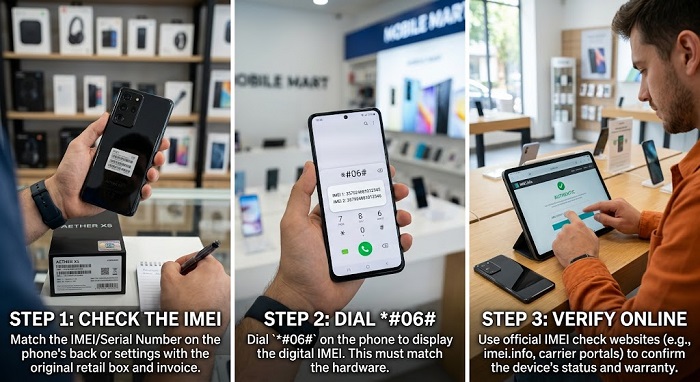
One of the easiest ways to check a smartphone is by verifying its IMEI (International Mobile Equipment Identity) number.
The IMEI is a unique identification number associated with a mobile device. Most smartphones have an IMEI number that can be displayed directly from the phone.
How to check the IMEI
On many Android phones, open the phone dialer and enter:
*#06#
The device should display its IMEI number.
You can also find the IMEI under:
Settings → About Phone → IMEI
The exact location may vary depending on the manufacturer.
On an iPhone, go to:
Settings → General → About
Look for the IMEI and Serial Number.
Compare the IMEI numbers
Do not stop after displaying the IMEI.
Compare the number shown on the phone with the IMEI printed on the original box or device label where applicable.
If the numbers do not match, be careful.
An IMEI mismatch can indicate that the phone or its packaging has been changed, the device has been repaired, or something about the device’s history needs further investigation.
For dual-SIM smartphones, you may see two IMEI numbers.
Important: An IMEI number matching the box does not automatically prove that a phone is genuine. Treat IMEI verification as one part of a complete inspection.
2. Check the Phone’s Serial Number
The serial number is another important identifier.
Manufacturers use serial numbers to identify individual devices. Depending on the manufacturer, you may be able to use the serial number to check device information or warranty status through the manufacturer’s official website.
Before buying, locate the serial number in the phone’s settings and compare it with the information supplied with the device.
For an iPhone, you can find it under:
Settings → General → About
For Android phones, check:
Settings → About Phone
The exact menu may differ between brands such as Samsung, Xiaomi, TECNO, Infinix, Google Pixel, OPPO, and others.
3. Verify the Phone on the Manufacturer’s Website
One of the most reliable ways to investigate a smartphone is to use the manufacturer’s official website where device verification, warranty checking, or serial-number lookup is available.
For example, some manufacturers provide online services that allow customers to check information associated with a device.
If the manufacturer provides such a service, enter the device’s serial number or other requested information carefully.
Pay attention to whether:
- The device is recognised.
- The model corresponds with the phone you are holding.
- The serial number is valid.
- Warranty information appears where applicable.
- The information corresponds with the phone’s specifications.
Avoid relying on an unfamiliar third-party website simply because it claims to “verify” a phone.
4. Compare the Phone Model With Its Specifications
A fake smartphone may look convincing on the outside but have completely different hardware inside.
Go to:
Settings → About Phone
Check information such as:
- Model name
- Model number
- Android version or iOS version
- RAM
- Storage
- Processor information where available
- Display information
- Build number
You can then compare the information with the specifications officially advertised for that model.
For example, if a seller says a particular smartphone has 256GB of storage but the device reports 64GB, that is a major warning sign.
Similarly, if a phone advertised with a particular processor reports completely different hardware, investigate before buying.
5. Check the Storage Capacity
Fake smartphones sometimes report specifications that are much higher than the actual hardware.
A device might be advertised as having 256GB storage, while the actual usable storage is significantly lower.
Do not rely solely on what the seller tells you.
Check the storage from the phone’s settings.
You can also test the device by transferring files or using a reputable hardware-information application to inspect the storage and other hardware information.
If the reported specifications do not match the manufacturer’s official specifications, avoid the purchase unless the seller can clearly explain the discrepancy.
6. Test the Display
A genuine smartphone should have a display appropriate to its model.
Before buying, inspect the screen carefully.
Look for:
- Dead pixels
- Bright or dark spots
- Uneven brightness
- Screen flickering
- Poor viewing angles
- Touchscreen problems
- Unusual colour reproduction
- Scratches or cracks
Open a plain white image and a dark image to inspect the screen.
Then slowly move your finger across every part of the touchscreen to make sure touch input works properly.
On a supposedly new phone, visible damage or significant screen defects should be treated as a warning.
7. Test the Cameras
The camera is another area where counterfeit phones can easily fail.
Open the camera application and test:
- Front camera
- Main camera
- Ultrawide camera where available
- Telephoto camera where applicable
- Flash
- Video recording
- Autofocus
- Camera switching
Do not assume that a phone with several camera lenses automatically has all the advertised camera functions.
Some counterfeit devices have multiple lenses for appearance, while only one or two may actually work.
Take photos and zoom into them to examine the quality.
If a phone is advertised with a high-resolution camera but produces extremely poor images, investigate further.
8. Test the Fingerprint Sensor and Face Unlock
If the smartphone model is supposed to have a fingerprint scanner, test it.
Register a fingerprint and unlock the device several times.
For phones with Face Unlock or other biometric authentication, test those features as well.
A feature that is advertised for the specific model but does not work correctly could indicate a hardware problem, replaced component, software modification, or counterfeit device.
9. Check the Battery Information
Battery health and capacity can reveal useful information, particularly when buying an expensive smartphone.
For iPhones, battery information can be checked through:
Settings → Battery → Battery Health & Charging
If you are buying an iPhone advertised as brand new, but its battery health indicates significant previous use, ask questions before paying.
For Android devices, battery information varies by manufacturer. Some brands provide battery health information directly through the settings.
Remember that battery condition alone cannot determine whether a phone is fake. A genuine phone can also have a worn battery if it has been used previously.
10. Check for Signs That the Phone Has Been Used
If you are paying for a brand-new smartphone, inspect the physical condition carefully.
Look for:
- Scratches around the charging port
- Worn buttons
- Dust inside openings
- Scratches around the SIM tray
- Signs of previous screen replacement
- Marks around screws
- Worn protective films
- Fingerprints or excessive handling marks
- Damaged seals or packaging
A phone that is advertised as “brand new” but has obvious signs of use deserves further investigation.
However, do not automatically conclude that a phone is fake because its packaging has been opened. Some legitimate sellers open phones to inspect them, activate them, or demonstrate them to customers.
The key issue is whether the seller accurately describes the phone’s condition.
11. Check the Operating System
A counterfeit smartphone may use a modified version of Android designed to look like another operating system.
For example, a fake iPhone may use Android software with an interface designed to resemble iOS.
Check the phone’s actual operating system.
On Android, go to:
Settings → About Phone
On an iPhone, go to:
Settings → General → About
📖 Related Reads
Look for inconsistencies between the advertised device and the operating system.
Also pay attention to the quality of menus, animations, icons, fonts, settings and system applications.
Poor translations, strange icons, unusual advertisements, missing features and badly designed menus can be warning signs.
12. Check Google Play Protect on Android
If you are buying an Android smartphone, open the Google Play Store and check whether Google Play Protect is available and functioning normally.
You can find it through:
Google Play Store → Profile icon → Play Protect
Play Protect helps protect Android users from potentially harmful applications.
If the phone behaves unusually, cannot access legitimate Google services when it should, or appears to have an abnormal software environment, investigate further.
Be aware that the presence of Google Play Store alone is not proof that the phone is genuine, because counterfeit devices can be modified to imitate legitimate Android software.
13. Check the App Store and Apple Services on an iPhone
If you are buying an iPhone, make sure the device behaves like a genuine iPhone.
Check important Apple features such as:
- App Store
- Apple ID
- iCloud
- FaceTime where supported
- iMessage
- Find My
- Software Update
- Settings menus
A fake iPhone may have icons that look like Apple’s applications but may not provide the same functionality.
Try accessing the App Store and checking for software updates.
Also verify the model and serial number under Settings → General → About.
14. Test Wi-Fi, Bluetooth, GPS and Mobile Network
Do not only inspect the phone’s appearance.
Test its connectivity.
Insert your SIM card where appropriate and check whether the phone can:
- Make calls
- Receive calls
- Send SMS
- Connect to mobile data
- Connect to Wi-Fi
- Pair with Bluetooth devices
- Detect location using GPS
If possible, test both SIM slots on a dual-SIM device.
A phone may look perfect but have connectivity problems because of hardware damage, software modifications, network restrictions or other issues.
15. Check the Charger and Accessories
The accessories can also provide clues.
Inspect:
- Charger
- USB cable
- Earphones, where supplied
- SIM ejector tool
- Manuals
- Packaging
- Labels
Look for poor printing, spelling errors, inconsistent logos, low-quality materials and suspicious packaging.
However, keep in mind that accessories can be replaced independently. A genuine smartphone can be supplied with a third-party charger, particularly if the seller is offering a used or refurbished device.
Therefore, accessory inspection should support your investigation rather than serve as the only authenticity test.
16. Be Careful With Extremely Cheap Phones
Price is one of the simplest warning signs.
If a smartphone normally sells for significantly more than the price being offered, ask why.
For example, if several reputable sellers are selling a particular model for around ₦500,000 but someone is offering a supposedly brand-new unit for ₦250,000, do not immediately assume you have found a bargain.
The phone could be:
- Used
- Refurbished
- Repaired
- Imported from another market
- Missing important accessories
- Locked
- Counterfeit
- A different model disguised as the advertised model
A low price does not automatically mean a phone is fake, but an unusually low price deserves careful investigation.
17. Buy From a Reputable Seller
The seller matters almost as much as the phone.
Where possible, buy from established retailers, authorised dealers, reputable online stores or sellers with a verifiable business history.
Before paying, ask questions such as:
- Is the phone brand new or used?
- Is it refurbished?
- Is there a warranty?
- Can I inspect and test it before payment?
- Can I verify the IMEI and serial number?
- What happens if the device develops a problem?
- Is the phone network-unlocked?
Be cautious if a seller refuses to let you inspect the phone or becomes uncomfortable when you request basic verification.
18. Ask for a Receipt
Always request a proper receipt when purchasing an expensive smartphone.
The receipt should ideally contain relevant details such as:
- Seller’s business name
- Date of purchase
- Phone model
- Amount paid
- IMEI or serial number where appropriate
- Warranty information
Keep the receipt after the purchase.
It can be useful if you later experience a warranty issue or discover a problem with the device.
19. Check Whether the Phone Is Refurbished
A refurbished phone is not necessarily bad.
In fact, a professionally refurbished genuine smartphone can be a good way to save money.
The problem occurs when a refurbished phone is presented to the buyer as brand new.
Ask the seller directly whether the phone is:
- Brand new
- Used
- Refurbished
- Open-box
- Repaired
If you are buying a used smartphone, inspect the battery, display, cameras, charging port, buttons and general condition carefully.
You should also adjust your expected price based on the phone’s actual condition.
20. Don’t Rely on One Test
This is perhaps the most important rule when trying to check if a phone is original.
There is no single test that should be treated as absolute proof.
For example, a valid IMEI does not automatically mean the phone is genuine. Likewise, good packaging does not prove authenticity.
Use several checks together:
- Check the IMEI.
- Check the serial number.
- Compare the phone with the manufacturer’s specifications.
- Verify the device where the manufacturer provides an official verification service.
- Test the hardware.
- Check the operating system.
- Inspect the physical condition.
- Check the battery and storage.
- Test network and connectivity.
- Buy from a trustworthy seller.
The more checks the device passes, the more confidence you can have in your purchase.
Quick Checklist: How to Check if a Phone Is Original
Before paying for a smartphone, use this checklist:
☑ Dial *#06# to display the IMEI.
☑ Compare the IMEI with the information supplied with the device.
☑ Check the serial number.
☑ Confirm the model number.
☑ Compare the specifications with the manufacturer’s official specifications.
☑ Check the storage capacity.
☑ Test the touchscreen.
☑ Test all cameras.
☑ Test the fingerprint scanner or Face Unlock.
☑ Test Wi-Fi and Bluetooth.
☑ Test SIM, calls and mobile data.
☑ Check the operating system.
☑ Inspect the phone for signs of previous use.
☑ Check battery condition.
☑ Inspect the charger and accessories.
☑ Ask whether the phone is new, used or refurbished.
☑ Request a receipt.
☑ Avoid deals that appear suspiciously cheap.
What Should You Do If You Discover That a Phone Is Fake?
If you discover that a smartphone is counterfeit before payment, do not buy it.
If you have already purchased it, document the problem. Keep your receipt, packaging, messages with the seller and other evidence of the transaction.
Contact the seller and request a resolution. If the seller refuses to cooperate, consider reporting the transaction to the relevant platform or consumer-protection authority.
Do not attempt to resell a counterfeit phone as an original device.
Final Thoughts
Knowing how to check if a smartphone is original before buying can save you hundreds of thousands of naira and prevent problems later.
Do not be impressed by attractive packaging, a familiar logo or a very low price. Take a few minutes to verify the IMEI, serial number, model, specifications, software and hardware.
If you are buying an expensive smartphone, especially an iPhone or flagship Android device, test the phone thoroughly before making payment.
Most importantly, purchase from a reputable seller and make sure the seller clearly states whether the device is new, used, refurbished or repaired.
A few minutes of careful checking before payment can save you from buying a counterfeit or misrepresented smartphone.
Frequently Asked Questions
How can I check if my phone is original?
Start by checking the IMEI using *#06#, then compare it with the device information and verify the model, serial number and specifications. You should also test the hardware and software before buying.
Can IMEI prove that a phone is original?
Not by itself. An IMEI is useful for identifying a device, but it should be combined with other checks such as serial-number verification, specification checks and physical inspection.
How do I check a phone’s IMEI?
On many phones, dial *#06#. You can also find the IMEI in the phone’s settings under the device information or About section.
How can I tell if an iPhone is original?
Check the serial number and IMEI under Settings → General → About, inspect the operating system and Apple services, check the model information and test the phone’s hardware. Where available, use Apple’s official device-support and verification resources.
Can a fake phone have a valid IMEI?
Yes. Therefore, do not rely on an IMEI check alone. A counterfeit or improperly modified device can sometimes display an IMEI that appears valid.
Is a refurbished phone the same as a fake phone?
No. A refurbished phone can be a genuine device that has been repaired or restored. The important thing is that the seller should clearly disclose its condition instead of selling it as a brand-new phone.
Should I buy a smartphone if the IMEI on the phone and box do not match?
You should be very cautious. Ask the seller for an explanation and investigate the device thoroughly. If the seller cannot provide a satisfactory explanation, it is safer not to buy the phone.