Starting a blog does not have to be expensive or complicated. In 2026, you can create a professional-looking website with Blogger, Google’s free blogging platform, without purchasing web hosting or learning advanced programming.
Blogger allows you to create and manage a blog, publish articles, customise its appearance and connect a custom domain. Google also provides built-in settings for search visibility, HTTPS, custom domains, search descriptions and other important features.
Whether you want to start a technology blog, news website, personal blog, educational platform, lifestyle website or business blog, Blogger can be a practical starting point.
In this guide, TechFalz explains how to create a professional blog with Blogger in 2026.
What Is Blogger?
Blogger is a free blogging platform operated by Google that allows users to create and manage blogs online.
A new Blogger site can initially use a free address such as:
yourblog.blogspot.com
You can also connect a custom domain, such as:
www.yourblog.com
A custom domain can make your blog look more professional and easier for readers to remember.
Google’s official Blogger documentation confirms that users can create a blog by signing in, selecting New blog, entering a name, choosing a blog address and saving it.
Why Use Blogger in 2026?
There are several reasons someone may choose Blogger instead of building a website from scratch.
1. It is easy to set up
You do not need to install a web server or configure a hosting account before creating your first blog.
2. It is suitable for beginners
The Blogger dashboard provides tools for creating posts, managing pages, changing themes and configuring important website settings.
3. Hosting is included
Blogger hosts the blog, meaning beginners do not have to purchase separate web hosting simply to get started.
4. You can use a custom domain
Although a Blogspot address is available, Blogger also supports custom domains.
5. It supports SEO settings
Blogger provides settings that can help search engines discover your website, including search visibility, search descriptions and custom URLs.
Step 1: Choose a Profitable Blog Niche
Before opening Blogger, decide what your blog will be about.
Your niche is the main subject or category that your website focuses on.
Examples include:
- Technology
- Education
- Business
- Personal finance
- Entertainment
- Health and wellness
- Travel
- Fashion
- Sports
- Tutorials
- Career advice
- Digital marketing
- News and current affairs
For a professional blog, avoid creating a website that publishes completely unrelated topics without a clear editorial direction.
For example, instead of creating a blog that randomly publishes football news, cooking recipes, smartphone reviews and school assignments, you could focus specifically on:
Technology and Digital Skills for Nigerians
This gives readers and search engines a clearer understanding of what your website is about.
How to Choose the Right Niche
Ask yourself:
- What topics do I understand?
- What can I consistently write about?
- Are people searching for information about this topic?
- Can I produce original and useful content?
- Are there opportunities to monetise the blog?
The most important factor is sustainability. A blog needs regular, useful content to grow.
Step 2: Choose a Professional Blog Name
Your blog name is an important part of your brand.
A good name should be:
- Short
- Easy to remember
- Easy to spell
- Relevant to your niche
- Easy to pronounce
- Suitable for a future custom domain
For example, if you want to create a technology blog, names such as:
TechGuide Nigeria
TechFalz
may communicate the site’s purpose better than a random name.
Before settling on a name, search Google and social media to see whether another established website is already using it.
You should also check whether the corresponding domain name is available.
Step 3: Create Your Blogger Blog
Once you have chosen your niche and blog name, you can create the blog.
Go to Blogger and sign in with your Google account.
From the Blogger dashboard:
- Click the Down arrow in the upper-left area.
- Select New blog.
- Enter your blog name.
- Click Next.
- Choose your Blogspot address.
- Click Save.
These are the current basic steps documented by Google for creating a Blogger blog.
Your temporary address may look like:
mytechblog.blogspot.com
You can later replace this with a custom domain.
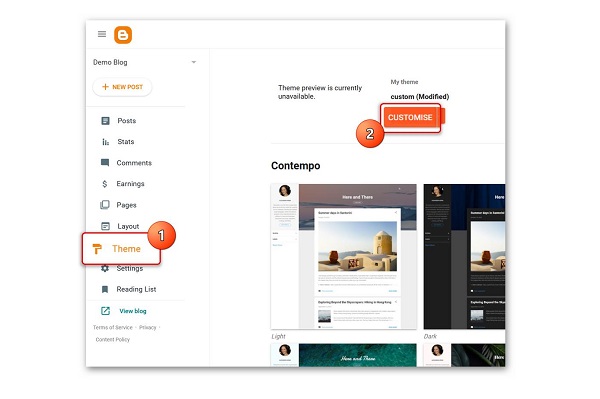
Step 4: Choose a Professional Blogger Theme
After creating the blog, the next step is to improve its appearance.
Blogger provides themes that control the overall appearance of your website.
When choosing a theme, look for one that is:
- Mobile responsive
- Fast-loading
- Easy to navigate
- Clean and uncluttered
- Suitable for your niche
- Compatible with advertisements
- Easy to customise
A professional technology or news blog should normally have clear navigation, readable typography, prominent article images and well-organised categories.
Do not focus only on making the website visually attractive. Usability should come first.
A beautiful website that is difficult to navigate can lose readers quickly.
Step 5: Create a Professional Header
Your header is one of the first areas visitors see.
It should normally contain:
- Your logo
- Blog name
- Navigation menu
- Important links
- Search option where appropriate
For example:
TECHFALZ
Home | Technology | How-To | AI | Business | Contact
Keep the header simple.
Avoid filling the top of the website with too many banners, animations or unnecessary widgets.
Step 6: Create Essential Pages
A professional blog should not consist only of articles.
Create important static pages such as:
About Us
Explain who operates the website and what readers can expect.
Contact Us
Provide a method for readers, businesses or advertisers to contact you.
Privacy Policy
Explain how your website handles visitor information.
Disclaimer
Explain the nature and limitations of information published on the website where appropriate.
Terms and Conditions
Set out important rules concerning use of your website.
For a blog intended for Google AdSense, these pages are also useful for demonstrating that the website has a clear identity and professional structure.
Step 7: Configure Your Blogger Settings
Blogger includes several settings that are important for a professional website.
Go to:
Blogger Dashboard → Settings
Review the following sections.
Blog Title
Use the official name of your website.
Description
Write a short description explaining what your blog publishes.
For example:
TechFalz provides technology news, tutorials, digital guides, AI updates and practical internet tips for readers in Nigeria and beyond.
Blog Language
Select the primary language used by your website.
Favicon
Upload a small version of your logo as your website favicon.
Blogger’s settings include options for the blog title, description, language and favicon.
Step 8: Make Your Blog Visible to Search Engines
One of the most important settings is search-engine visibility.
Go to:
Settings → Privacy → Visible to search engines
Make sure this option is enabled.
Google’s Blogger documentation specifically recommends enabling Visible to search engines to allow search engines to find your blog.
Without proper search visibility, your content may not be discoverable as expected.
Step 9: Write a Search Description
Blogger provides a Meta tags → Enable search description setting.
Enable it and write a concise description of your blog.
For example:
TechFalz publishes technology news, AI guides, smartphone tips, digital tutorials and practical online guides for Nigerians.
This gives search engines additional context about the overall subject of your website. Blogger officially provides this search-description setting.
Remember that a search description does not guarantee a particular Google ranking.
Step 10: Connect a Custom Domain
If you want your Blogger website to look more professional, consider purchasing a custom domain.
Instead of:
myblog.blogspot.com
you could use:
www.myblog.com
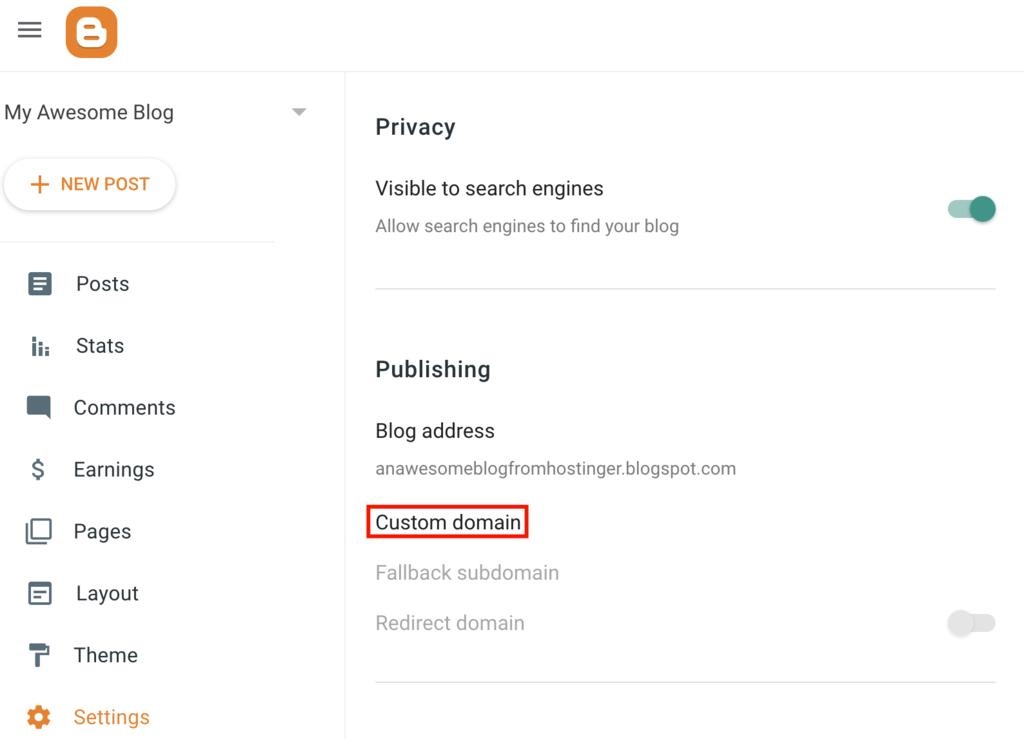
Blogger supports custom domains through its Settings → Publishing → Custom domain section.
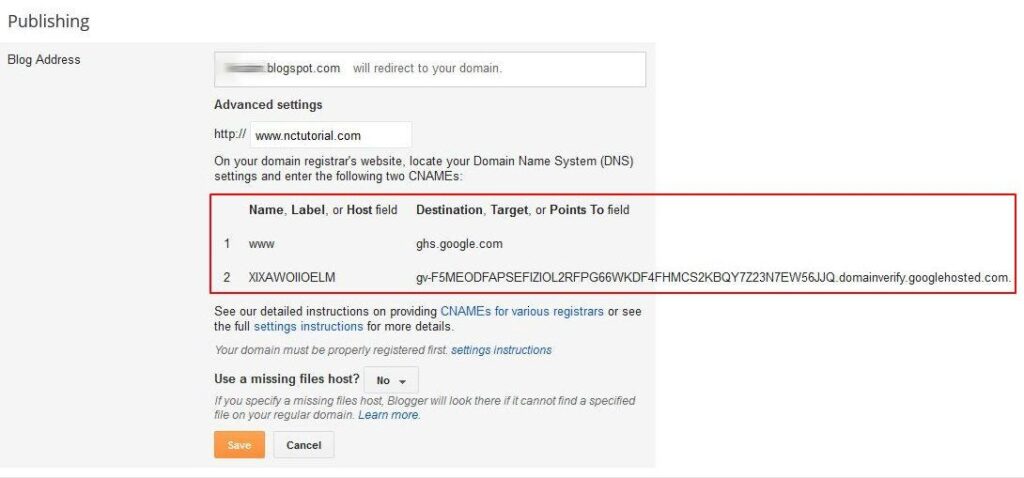
Google explains that when you connect an external domain, Blogger provides the CNAME information needed to associate the domain with your blog. DNS changes may take time to propagate.
Important
Do not randomly copy DNS records from another website.
When setting up a custom domain, use the CNAME information displayed specifically for your Blogger blog.
📖 Related Reads
This is especially important because Blogger provides a unique security CNAME for the domain connection.
Step 11: Enable HTTPS
Security is important for every professional website.
Blogger supports HTTPS, which encrypts communication between visitors and the website.
For a custom-domain blog, go to the Blogger settings and check:
HTTPS Availability
Then enable:
HTTPS Redirect
Google explains that HTTPS helps protect visitors and makes it more difficult for attackers to intercept or modify information exchanged with the website.
If your blog uses a Blogspot address, HTTPS is automatically enabled.
Step 12: Create Your Main Navigation Menu
Your navigation menu helps visitors find important sections of the website.
A technology blog could use:
Home | AI | Smartphones | How-To | Apps | Internet | Reviews
An education blog could use:
Home | JAMB | WAEC | Scholarships | Admissions | Education News
Do not create dozens of categories simply because Blogger allows you to.
Use categories that represent major content areas.
Step 13: Create Your First Blog Post
Now you can start publishing content.
From the Blogger dashboard:
Posts → New Post
Create a useful article based on your selected niche.
A professional article should normally contain:
- A clear title
- Introduction
- Subheadings
- Short paragraphs
- Relevant images
- Lists where appropriate
- Internal links
- External references where necessary
- Conclusion
Avoid publishing articles that simply rewrite another website’s content.
Instead, add original explanations, examples, research and useful information.
Step 14: Optimise Your Blog Posts for SEO
Search engine optimisation can help search engines understand your content.
Google’s Blogger guidance recommends using relevant keywords in post titles and text and keeping titles concise. It also allows you to create custom post URLs.
Use descriptive titles
Instead of:
My New Phone
use:
How to Transfer WhatsApp Chats to a New Android Phone
Use headings
Break long articles into sections using H2 and H3 headings.
Use a custom permalink
For example:
/2026/09/create-blogger-blog.html
is less descriptive than a clean, topic-focused URL where Blogger’s available permalink settings allow it.
Add image ALT text
Describe what each important image shows.
For example:
Blogger dashboard showing how to create a new blog
Add internal links
Link related articles together.
For example, an article about creating a Blogger website could link to another article about creating an XML sitemap for Blogger.
Step 15: Add High-Quality Images
Images make articles easier to understand and can improve the overall appearance of your blog.
For a professional Blogger website:
- Use relevant images
- Optimise large images before uploading
- Use descriptive filenames
- Add ALT text
- Avoid using copyrighted images without permission
- Use a consistent visual style
For example, an article about Blogger could contain screenshots of the Blogger dashboard showing the relevant steps.
Screenshots are particularly useful for how-to articles because readers can compare their own Blogger dashboard with the instructions.
Step 16: Connect Google Search Console
Google Search Console is an important tool for monitoring how your website appears in Google Search.
Blogger’s settings include a Google Search Console connection option.
After connecting your blog, you can use Search Console to monitor things such as:
- Search queries
- Clicks
- Impressions
- Indexed pages
- Search performance
- Potential indexing problems
Do not expect a new blog to immediately receive significant Google traffic. Search visibility normally takes time and depends on content quality, competition, technical factors and other signals.
Step 17: Add Google Analytics
If you want detailed information about visitors, you can connect Google Analytics.
Blogger includes a Google Analytics property setting in its configuration.
Analytics can help you understand:
- How many visitors your blog receives
- Which articles attract visitors
- Where visitors come from
- How users interact with your website
- Which pages are most popular
This information can help you decide what content to publish next.
Step 18: Create a Consistent Content Strategy
A professional blog is not built simply by creating a Blogger account.
You need a content strategy.
For example, a technology blog could publish:
Monday: Smartphone tips
Tuesday: AI tutorial
Wednesday: Technology news
Thursday: How-to guide
Friday: App or software guide
You do not necessarily need to publish every day.
It is better to publish fewer useful and original articles consistently than to fill your website with low-quality content.
Step 19: Make Your Blogger Blog Mobile-Friendly
A large percentage of internet users access websites from smartphones.
Before publishing your blog widely, test it on:
- Android phones
- iPhones
- Tablets
- Desktop computers
Check:
- Font size
- Menu usability
- Image sizes
- Page width
- Advertisement placement
- Buttons
- Article spacing
- Loading performance
Your website should be easy to read without forcing visitors to zoom in.
Step 20: Prepare the Blog for AdSense
If your goal is to monetise the blog with Google AdSense, build the website around useful content and a good user experience, rather than creating a site primarily for advertisements.
Before applying, make sure your blog has:
- Original and useful content
- Clear navigation
- About page
- Contact page
- Privacy Policy
- Appropriate site structure
- Consistent publishing
- No obvious copyright violations
- No misleading content
- A professional design
- Good mobile usability
Do not fill every section of your website with ads.
The reader should always be able to find and consume the actual content easily.
Common Mistakes to Avoid When Creating a Blogger Blog
1. Choosing a poor domain name
Avoid extremely long or difficult-to-spell domain names.
2. Using a cluttered theme
Too many widgets, animations and advertisements can make your website look unprofessional.
3. Copying articles
Copied content gives your blog little reason to compete with the original source.
4. Publishing without editing
Always check grammar, spelling, formatting and factual accuracy before publishing.
5. Ignoring mobile users
A website that looks good only on desktop computers is not professionally designed.
6. Using random categories
Create categories based on the actual subjects you cover.
7. Ignoring SEO
Use descriptive titles, URLs, headings, image ALT text and internal links.
8. Changing your domain unnecessarily
Choose your domain carefully before investing heavily in building your website.
Blogger vs WordPress: Which Should You Choose?
Blogger is an excellent option for beginners who want to start a blog without managing web hosting.
WordPress, particularly self-hosted WordPress, provides greater flexibility and access to a much larger ecosystem of plugins and themes.
Choose Blogger if:
- You want a simple blogging platform.
- You are a beginner.
- You want to minimise hosting costs.
- You do not want to manage a server.
- Your main focus is publishing articles.
Consider WordPress if:
- You need extensive customisation.
- You want advanced plugins.
- You are building a large publishing platform.
- You need complex website functionality.
- You want greater control over the underlying website environment.
Neither platform automatically guarantees traffic or success. Your content, strategy, user experience and consistency remain important.
How Much Does It Cost to Create a Blogger Blog?
You can create a basic Blogger blog without paying for web hosting.
The Blogspot address is provided as part of the Blogger service.
However, you may choose to purchase a custom domain.
You may also spend money on:
- Premium Blogger templates
- Logo design
- Graphic design
- Content creation
- SEO services
- Email services
- Advertising and promotion
Therefore, the cost of starting a Blogger website can range from almost nothing to significantly more depending on how professional and extensive you want the project to become.
Frequently Asked Questions
Is Blogger still available in 2026?
Yes. Blogger remains an active Google blogging platform with current documentation and support resources.
Can I create a Blogger blog for free?
Yes. You can create a blog using a Blogspot address without purchasing web hosting.
Can I use my own domain on Blogger?
Yes. Blogger supports custom domains.
Is Blogger good for SEO?
Blogger provides several SEO-related settings, including search-engine visibility, search descriptions and custom post URLs. However, having these features does not guarantee search rankings.
Can I monetise a Blogger blog?
Yes, Blogger can be used to build a website that generates revenue through advertising and other legitimate monetisation methods, subject to the applicable platform and advertising policies.
Can I use Blogger for a professional business website?
Yes. With a custom domain, professional design, clear navigation, useful content and appropriate business pages, Blogger can be used for certain business and publishing websites.
Does Blogger provide HTTPS?
Yes. Blogspot addresses use HTTPS automatically, while custom-domain blogs have HTTPS availability and redirect settings.
Final Thoughts
Creating a professional blog with Blogger in 2026 is still a relatively straightforward way to establish an online presence.
The technical setup is only the beginning. A successful blog needs a clear niche, professional design, useful original content, good navigation, mobile responsiveness and a consistent publishing strategy.
Start with the free Blogger platform, configure the important settings, connect a custom domain when you are ready, optimise your content for search engines and focus on providing genuine value to your readers.
If you approach Blogger as a serious publishing platform rather than simply a place to post random articles, it can become the foundation for a credible website and online brand.
Official Blogger resources: Google provides current documentation covering blog creation, settings, custom domains, HTTPS and search visibility.