Choosing the right platform is one of the first decisions you need to make when starting a new website. Two of the most popular options are Blogger and WordPress.
Blogger has remained a popular choice for people who want a simple and free way to start publishing online, while WordPress has grown into a powerful platform for blogs, business websites, online stores, news websites, portfolios and many other types of sites.
But which one is better for a new website in 2026?
The answer depends on what you want to build, your budget, your technical skills and how much control you want over your website.
In this guide, we compare Blogger and WordPress based on ease of use, cost, hosting, design, SEO, customization, security, monetization, performance and long-term growth.
Blogger vs WordPress: What Is the Difference?
Before comparing them, it is important to understand that WordPress has two major versions.
Blogger is Google’s hosted blogging platform. Google provides the hosting infrastructure, while you manage your blog through the Blogger dashboard.
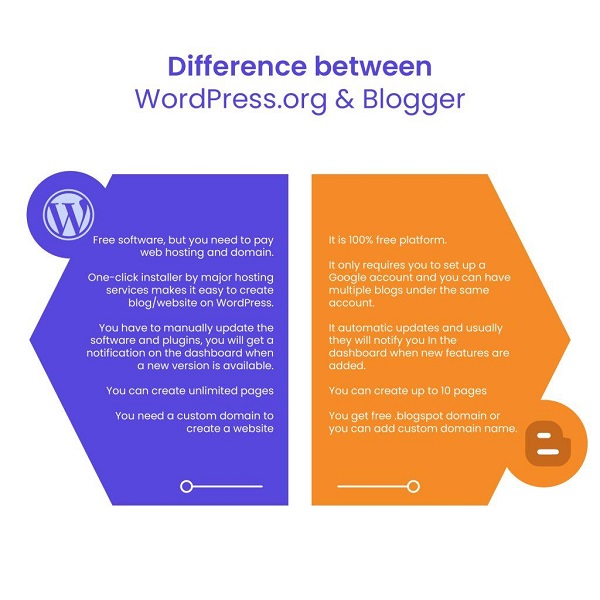
WordPress.org is open-source website software that you download and install on a web host. You normally need a domain name and web hosting, and you are responsible for managing the website.
There is also WordPress.com, which is a hosted WordPress service. It handles hosting and much of the technical infrastructure for you.
Therefore, when people compare Blogger with WordPress, they are usually talking about Blogger vs self-hosted WordPress.org.
Blogger vs WordPress at a Glance
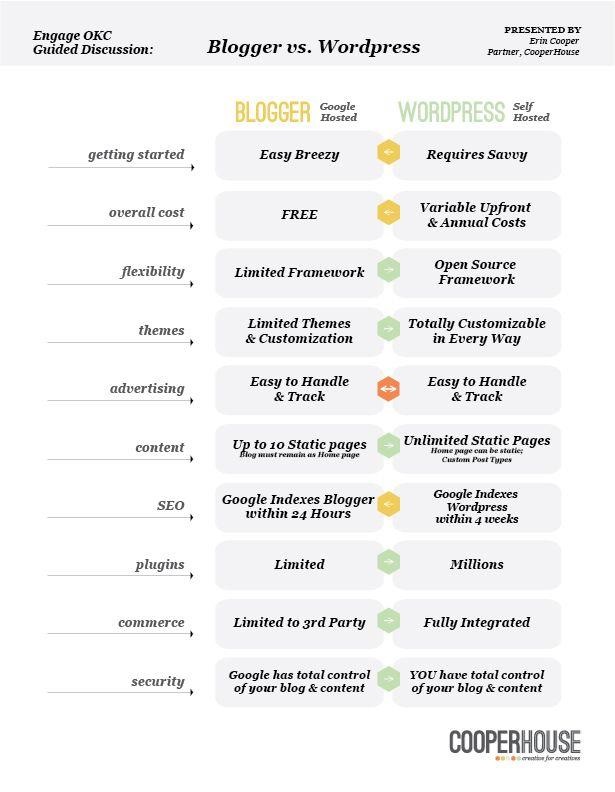
| Feature | Blogger | WordPress.org |
|---|---|---|
| Starting cost | Free platform | Software is free, but hosting costs money |
| Hosting | Included | You choose and pay for hosting |
| Domain | Blogspot subdomain or custom domain | Custom domain recommended |
| Ease of use | Very easy | Easy to moderate |
| Themes | Available | Thousands of themes |
| Plugins | No traditional plugin ecosystem | Huge plugin ecosystem |
| Customization | Moderate | Very high |
| SEO control | Good basic options | Extensive |
| Security management | Mostly handled by Google | Site owner manages more of it |
| Backups | Easier | Usually managed by owner/host |
| Online stores | Limited | Excellent with the right setup |
| Large websites | Possible but limited | Excellent |
| Technical control | Limited | Extensive |
| Best for | Simple blogs | Blogs, businesses and scalable websites |
1. Which Is Easier to Use?
If your main priority is simplicity, Blogger has an advantage.
Blogger is designed around publishing blog posts without requiring you to understand servers, databases, hosting control panels or complicated website configurations.
After creating a Blogger account, you can choose a theme, create pages and start publishing posts.
This makes Blogger particularly suitable for beginners who want to concentrate on writing rather than website administration.
WordPress is also relatively easy to use, but self-hosted WordPress gives you considerably more options. You may need to configure hosting, install WordPress, select a theme, configure plugins and take care of maintenance.
Winner: Blogger
For someone creating their first simple blog, Blogger is generally easier to get started with.
2. Which Is Cheaper?
This depends on how you build the website.
Blogger itself can be used without paying for hosting. You can start with a Blogspot address, although a custom domain is preferable if you want the site to look more professional.
With self-hosted WordPress, the WordPress software itself is free, but you need web hosting and normally a domain name.
This means a WordPress website can have recurring costs for:
- Domain registration
- Web hosting
- Premium themes
- Premium plugins
- Email services
- Backup services
- Security services
However, you don’t necessarily need to purchase expensive WordPress products. Many websites can be built with free themes and plugins.
Winner: Blogger
If your primary concern is starting with the lowest possible cost, Blogger is difficult to beat.
3. Which Gives You More Design Options?
This is where WordPress has a major advantage.
Blogger provides themes that allow you to change the appearance of your website. You can also customize templates and modify HTML/CSS if you have the necessary skills.
However, WordPress has a much larger ecosystem of themes and website-building tools.
With WordPress, you can build:
- News websites
- Business websites
- Personal blogs
- Magazine websites
- Portfolio websites
- Membership websites
- Online stores
- Educational websites
- Forums
- Directory websites
- Landing pages
WordPress also supports extensive theme and plugin customization.
Winner: WordPress
If you want complete control over the appearance and functionality of your website, WordPress is the stronger option.
4. Which Is Better for SEO?
Both Blogger and WordPress can be used to build search-engine-friendly websites.
However, SEO is not determined simply by the platform.
Your content quality, website structure, page speed, mobile experience, internal linking, backlinks and technical configuration can all affect search performance.
Blogger provides several useful SEO-related settings, including the ability to make a blog visible to search engines and use a custom domain.
WordPress gives you more control over technical SEO. Depending on your setup, you can use SEO plugins and additional tools to manage things such as metadata, XML sitemaps, structured data, redirects and other optimization features.
This does not mean that every WordPress website will automatically rank higher than a Blogger website.
A poorly managed WordPress website can perform worse than a well-optimized Blogger website.
Winner: WordPress
WordPress wins because it gives you greater SEO control, not because Google automatically prefers WordPress websites.
5. Which Is Better for Monetization?
Both platforms can be monetized.
Blogger is particularly convenient for publishers who want to use advertising because the platform is closely integrated with Google’s ecosystem.
You can also use other legitimate advertising, affiliate marketing and sponsorship opportunities where appropriate.
WordPress gives you even more flexibility.
A WordPress website can be monetized through:
- Display advertising
- Affiliate marketing
- Sponsored content
- Digital products
- Online courses
- Memberships
- Paid newsletters
- E-commerce
- Donations
- Services
- Subscription programs
For a website that may eventually become a large online business, WordPress provides considerably more room for expansion.
Winner: WordPress
Blogger is good for straightforward blog monetization, but WordPress is more flexible for building multiple revenue streams.
6. Which Is Better for a News Website?
For a small personal blog, either platform can work.
For a serious news or magazine website, however, WordPress is usually the better choice.
A growing news website may need:
- Multiple categories
- Authors and editors
- Advanced menus
- Related posts
- Search functionality
- Custom layouts
- Advertising management
- Membership features
- Social media integration
- Performance optimization
- Advanced SEO
- Custom post types
- Editorial workflows
WordPress is much better suited to this type of environment.
Blogger can still be used for a news blog, particularly when the site is small and the owner wants to keep things simple.
Winner: WordPress
7. Which Is More Secure?
Security works differently on the two platforms.
With Blogger, Google manages much of the underlying infrastructure. You don’t have to worry about maintaining the server or manually updating the core blogging platform.
With self-hosted WordPress, you have more responsibility.
You may need to keep:
- WordPress core
- Themes
- Plugins
- PHP
- Hosting software
up to date.
You should also use strong passwords, secure administrator accounts, HTTPS, reputable plugins and regular backups.
📖 Related Reads
The advantage is that WordPress gives you more control. The disadvantage is that more control also means more responsibility.
Winner: Blogger for simplicity; WordPress for control
If you don’t want to deal with technical maintenance, Blogger is easier.
If you have the knowledge or a reliable hosting provider and want control over security configuration, WordPress provides more flexibility.
8. Which Has Better Plugin Support?
This is one of WordPress’s biggest advantages.
WordPress supports plugins that can add new functionality to a website.
For example, you can install tools for:
- SEO
- Contact forms
- E-commerce
- Security
- Caching
- Analytics
- Memberships
- Backups
- Image optimization
- Newsletters
- Social sharing
The WordPress ecosystem contains a very large number of plugins.
Blogger does not offer an equivalent plugin ecosystem.
Instead, you generally work with Blogger’s built-in features, templates, HTML, CSS and external services.
Winner: WordPress
9. Which Is Better for a Beginner in Nigeria?
For a Nigerian beginner, the answer depends on your goal.
If you are starting a simple blog and your budget is extremely limited, Blogger is an excellent starting point.
You can begin without paying for web hosting and concentrate on producing content.
For example, a beginner could use Blogger for:
- Technology blogging
- Education articles
- Personal blogging
- Entertainment content
- Tutorials
- News commentary
- Informational websites
However, if you already know that you want to build a serious media company, business website, online store or large content publication, it may make more sense to start with WordPress.
Moving a website from one platform to another later is possible, but migration can involve redirects, URL changes, content formatting and SEO considerations
10. Which Is Better for a Custom Domain?
Both platforms support custom domains.
Blogger allows you to connect a registered domain to your blog instead of relying on a Blogspot address. Google also provides HTTPS functionality for Blogger sites.
For example, instead of:
yourwebsite.blogspot.com
you can use:
www.yourwebsite.com
WordPress is also designed to work with custom domains, particularly when using self-hosted WordPress.org.
For a professional website, using your own domain is strongly recommended regardless of which platform you choose.
Winner: Tie
Both can work well with a custom domain.
11. Which Is Better for Website Speed?
Neither platform automatically guarantees a fast website.
Blogger has the advantage of being hosted on Google’s infrastructure, meaning you don’t have to configure your own server.
With WordPress, performance depends heavily on your hosting provider, theme, plugins, images, caching and website configuration.
A WordPress website with quality hosting and good optimization can be extremely fast.
A WordPress website overloaded with poorly coded plugins and a cheap, overloaded server can be slow.
Winner: Depends on setup
Blogger is easier to manage for basic performance. WordPress gives you more performance controls.
12. Which Is Better for Long-Term Growth?
This is probably the most important question.
If you expect your website to become a major business, WordPress generally offers greater long-term flexibility.
You can start with a blog and eventually add:
- An online store
- Memberships
- Courses
- Paid subscriptions
- Customer accounts
- Advanced forms
- Booking systems
- Forums
- Digital products
- Business applications
WordPress.org’s open-source nature and extensive plugin ecosystem make it particularly suitable for websites that will evolve beyond simple blogging.
The official WordPress requirements also show that self-hosted WordPress runs on standard web-server environments such as PHP with MySQL or MariaDB and HTTPS.
Winner: WordPress
Blogger vs WordPress: Pros and Cons
Blogger Pros
- Free to start
- Very easy to use
- Hosting is included
- Minimal technical maintenance
- Simple publishing system
- Custom domains are supported
- Good option for beginners
- Suitable for basic blogs
Blogger Cons
- Less customization
- Limited plugin ecosystem
- Less control over the underlying infrastructure
- Not ideal for complex websites
- Fewer options for advanced functionality
- Can become restrictive as a project grows
WordPress Pros
- Highly customizable
- Thousands of themes and plugins
- Excellent for SEO customization
- Suitable for business websites
- Excellent for news and magazine sites
- Strong e-commerce capabilities
- Can scale into complex websites
- Greater ownership and control
WordPress Cons
- Hosting is required for WordPress.org
- Domain and hosting create recurring costs
- Requires more maintenance
- Plugins and themes require careful management
- Security and backups require more attention
- Poor hosting can affect performance
Blogger vs WordPress: Which One Should You Choose in 2026?
There is no single answer that is correct for everyone.
Choose Blogger if:
- You want to start for little or no cost.
- You are new to website management.
- You primarily want to publish articles.
- You don’t want to manage hosting.
- You want a simple blogging platform.
- You are testing a website idea before investing heavily.
Choose WordPress if:
- You want maximum control.
- You plan to build a business website.
- You want an advanced news or magazine website.
- You need plugins.
- You want an online store.
- You need advanced SEO functionality.
- You expect the website to grow significantly.
- You want extensive customization.
What About WordPress.com?
Don’t confuse WordPress.com with self-hosted WordPress.org.
WordPress.com is a hosted service, meaning much of the hosting and technical infrastructure is managed for you. Its current plans offer different levels of features, and plugin installation is available on paid plans.
WordPress.org, on the other hand, is the open-source software you install on your own hosting account.
For someone comparing platforms for a serious website, this distinction is important.
Final Verdict: Blogger or WordPress?
For a simple, low-cost blog, Blogger remains a very good choice in 2026.
It is easy to use, requires little technical maintenance and allows beginners to start publishing without paying for traditional web hosting.
However, WordPress is the better choice for most new websites that are intended to become serious long-term projects.
Its greater customization, plugin ecosystem, SEO control, e-commerce capabilities and flexibility make it suitable for everything from blogs and business websites to large publications and online stores.
Our recommendation
For a simple personal or beginner blog: Choose Blogger.
For a professional blog or growing media website: Choose WordPress.
For an online business or e-commerce website: Choose WordPress.
For a website you expect to expand significantly: Choose WordPress.
The most important thing is not simply choosing the platform with more features. Choose the platform that matches your current budget, technical ability and long-term goals.
A well-designed Blogger website with useful, original content can succeed, while a poorly managed WordPress website can fail. The platform is only one part of the equation—the quality of your content, user experience, SEO and consistency will ultimately matter much more.