Having a professional email address is important if you want customers, employers, clients, or business partners to take you seriously. While free email services such as Gmail and Outlook are useful for personal communication, using an address connected to your business domain can make your brand look more established.
For example, yourname@gmail.com is perfectly suitable for personal use, but an address such as hello@yourbusiness.com gives your business a more professional identity.
The good news is that creating a professional business email does not have to be complicated or expensive.
In this guide, we explain what a professional email address is, why you need one, how to create one using your own domain, and the mistakes you should avoid.

What Is a Professional Email Address?
A professional email address is an email account created specifically for work, business, an organization, or professional communication.
Instead of using a generic address such as:
mybusiness@gmail.com
you can use an address based on your website domain:
info@mybusiness.com
The domain name after the @ symbol belongs to your business or organization.
Some common professional email addresses include:
hello@company.cominfo@company.comsupport@company.comsales@company.comcontact@company.comfirstname@company.com
A professional email address can therefore serve both as a communication channel and as part of your company’s branding.
Why Should You Use a Professional Business Email?
1. It Makes Your Business Look More Professional
A custom email address can create a stronger first impression when communicating with customers and potential business partners.
For example, an email from sales@yourcompany.com generally looks more business-oriented than an email from a personal account.
2. It Builds Trust
Customers are often more comfortable communicating with a business that has a website and domain-based email address.
This is particularly useful when sending quotations, invoices, customer-service messages and other business communications.
3. It Strengthens Your Brand
Every time someone receives an email from your domain, they see your business name.
For example:
support@techcompany.com
reinforces the company’s name every time it is used.
4. It Separates Personal and Business Communication
Using a dedicated business email makes it easier to keep work messages separate from personal conversations.
You can also create different addresses for different departments.
For example:
sales@company.comsupport@company.comaccounts@company.com
5. It Can Improve Business Organization
A growing business may need multiple employees and departments to communicate with customers.
A custom domain makes it easier to create appropriate email addresses as your business grows.
What Do You Need to Create a Professional Email Address?
Before creating your business email, you generally need three things:
1. A Domain Name
Your domain is your website address, such as:
yourbusiness.com
If you don’t already have one, you can register a domain through a domain registrar.
Try to choose a domain that is short, easy to spell and closely related to your business name.
2. An Email Hosting Service
Your domain name alone does not necessarily provide a complete email service.
You need an email hosting provider that will store and deliver your messages.
Depending on your hosting provider, email may already be included with your website hosting package.
3. An Email Address
Finally, you choose the actual mailbox you want to use.
For example:
hello@yourbusiness.com
How to Create a Professional Email Address
Step 1: Choose a Domain Name
The first step is to get a domain name for your business.
If your business is called Bright Solutions, for example, you might choose:
brightsolutions.com
If the exact domain is unavailable, you can consider another suitable domain extension or a variation of the name.
Try to avoid unnecessarily complicated domains containing lots of numbers, hyphens or unusual spellings.
Tip: Your domain should ideally be easy for customers to remember and type.
Step 2: Choose an Email Hosting Provider
After registering your domain, choose an email hosting service.
Depending on your needs and budget, you can use:
- Email included with your web hosting
- A dedicated business email service
- A productivity suite that includes business email
- Another reputable email hosting provider
If you already have WordPress hosting, check your hosting account first. Your hosting package may allow you to create several email accounts using your domain.
Step 3: Create Your Email Account
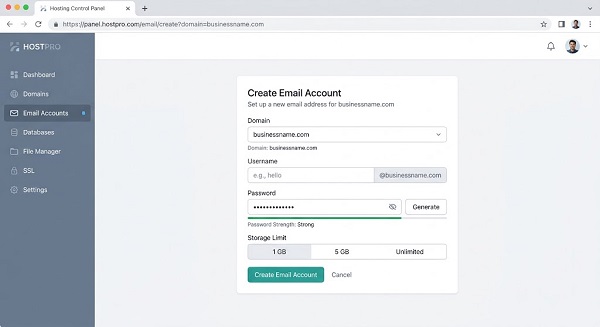
Once your domain and hosting are ready, log in to your hosting control panel.
The exact interface depends on your provider, but you will usually find an option such as:
Email Accounts, Email, or Mailboxes.
Select the option to create a new email account.
For example, you could create:
hello@yourbusiness.com
or:
yourname@yourbusiness.com
You will normally be asked to create a password for the account.
Use a strong, unique password rather than one that you already use elsewhere.
Step 4: Choose the Right Email Name
The part before the @ symbol should be appropriate for its purpose.
Here are some useful options:
| Email address | Best use |
|---|---|
hello@domain.com |
General enquiries |
info@domain.com |
General business information |
support@domain.com |
Customer support |
sales@domain.com |
Sales enquiries |
admin@domain.com |
Administration |
accounts@domain.com |
Accounting |
firstname@domain.com |
Individual employee |
For a small business, you don’t necessarily need dozens of addresses.
📖 Related Reads
Starting with hello@, support@, and a personal address may be enough.
Step 5: Configure Your Email Settings
After creating the mailbox, your provider may give you information for accessing the account through:
- Webmail
- Gmail or another email application
- Microsoft Outlook
- Apple Mail
- Android email applications
- iPhone or iPad mail applications
Some providers automatically configure these settings for you.
If manual configuration is required, you may need the provider’s IMAP, SMTP and other mail-server settings.
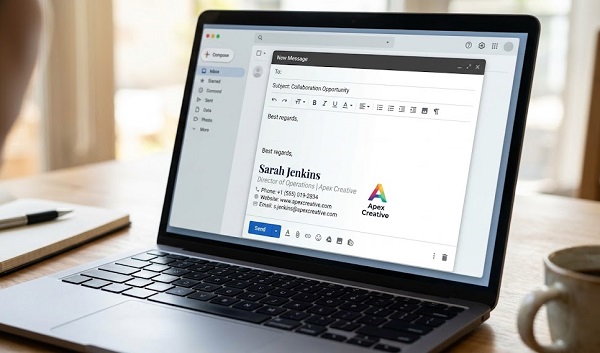
Step 6: Set Up Your Email Signature
A professional email address should ideally be accompanied by a professional email signature.
Your signature can include:
Your Name
Job Title
Company Name
Phone Number
Website
Business social-media links
For example:
David Jacob
IT & Digital Services
Your Business Name
Phone: +234 XXX XXX XXXX
Website: yourbusiness.com
Avoid making the signature excessively long or filling it with unnecessary graphics.
Step 7: Test Your New Email Address
Before using the address for important business communication, send a test email.
Send an email from your new business address to another account and reply to it.
Check that:
- The message is delivered successfully.
- Your sender name appears correctly.
- Your email signature works.
- Replies are received.
- The email does not immediately go into the recipient’s spam folder.
You should also test receiving emails at your new address.
How to Use a Professional Email With Gmail
You don’t necessarily have to abandon Gmail just because you have a business domain.
Depending on your email provider and configuration, you may be able to access your business mailbox through Gmail or use a business email service that provides a Gmail-style interface.
This can be convenient if you already use Gmail regularly.
However, the exact setup depends on your email provider and the service you choose.
How to Create a Free Professional Email Address
If you already own a domain and have suitable web hosting, your hosting provider may include email accounts at no additional cost.
For example, some hosting packages allow you to create addresses such as:
info@yourdomain.com
without purchasing separate email hosting.
However, “free” email included with hosting can have limitations involving storage, spam protection, reliability or advanced business features.
For important business communication, compare the features and reliability of the service rather than choosing solely based on price.
Professional Email Address Examples
Here are some examples for different types of businesses.
Small Business
hello@businessname.com
Online Store
sales@businessname.com
Customer Support
support@businessname.com
Freelancer
yourname@yourdomain.com
School or Organization
info@organizationname.org
Media Website
news@website.com
These addresses can make it easier for people to understand who they should contact.
Common Mistakes to Avoid
Using an Unprofessional Username
Avoid addresses such as:
coolboy123@gmail.com
or other usernames that don’t communicate your professional identity.
Using Your Business Email for Everything
Don’t use the same address for every function if your business has different departments.
Separate addresses can make communication easier to manage.
Choosing a Difficult Domain
Avoid domains that are unnecessarily long or difficult to spell.
Using a Weak Password
Your business email may contain sensitive customer and company information.
Use a strong password and enable two-factor authentication whenever your provider supports it.
Ignoring Spam Protection
Proper email authentication is important for businesses.
Depending on your setup, you may need records such as SPF, DKIM and DMARC to help authenticate your domain and improve email security and deliverability.
Your email provider or domain host should provide instructions for configuring these records.
Is a Professional Email Address Worth It?
For most businesses, yes.
A professional email address is relatively simple to set up and can provide benefits in branding, trust, organization and communication.
If you are just starting a business, you don’t need to create dozens of accounts immediately. A simple setup such as:
yourname@business.com
and
support@business.com
may be enough to get started.
As your business grows, you can create additional addresses for sales, accounts, marketing and other departments.
Final Thoughts
Creating a professional email address for work or business is one of the simplest ways to establish a stronger online identity.
The basic process is straightforward: get a domain name, choose an email hosting service, create your mailbox, configure it, and secure the account.
Whether you’re a freelancer, small-business owner, online retailer, blogger or growing company, using an email address connected to your own domain can make your communication look more professional and consistent.
If you already have a website domain, check whether your current hosting provider includes professional email before paying for another service.