WhatsApp has become one of the most popular ways to share news, discuss current events, receive business updates and communicate with family and friends. However, the same convenience that makes the messaging platform useful also makes it easy for fake information to spread quickly.
Artificial intelligence (AI) has made the problem more challenging. People can now use AI tools to generate realistic photographs, imitate voices, create convincing videos and write messages that appear to come from reliable sources. Some of these materials are created for entertainment, but others are deliberately designed to mislead people, damage reputations or steal money.
For WhatsApp users in Nigeria, a fake message could claim that the government has announced a new financial benefit, a bank is giving away money, a celebrity has endorsed an investment scheme or a relative urgently needs financial assistance.
The challenge is that AI-generated content does not always look suspicious. Some fake images and videos appear realistic even when examined closely.
This guide explains how to spot AI-generated fake content on WhatsApp, verify suspicious claims and protect yourself from misinformation and online scams.
ALSO READ: Why WhatsApp Banned My Number and How to Get It Back
What Is AI-Generated Fake Content?
AI-generated fake content is text, an image, an audio recording or a video created or altered using artificial intelligence in a way that may mislead people.
Not all AI-generated content is false or harmful. AI can be used responsibly to create educational materials, illustrations and entertainment. The problem arises when synthetic or manipulated content is presented as genuine evidence of an event, statement or identity.
Common examples include:
-
AI-generated photographs presented as pictures of real events.
-
Deepfake videos showing public figures apparently saying things they never said.
-
Voice recordings that imitate a family member, business owner or government official.
-
Fake WhatsApp screenshots showing fabricated conversations or announcements.
-
AI-written messages containing false news, fake job offers or fraudulent investment promises.
-
Manipulated videos claiming to show disasters, political events or emergencies.
A crucial distinction is that AI-generated content and misinformation are not the same thing. A genuine photograph can be shared with a false caption, while an AI-generated illustration may be shared honestly. You must check both the media and the claim attached to it.
7 Warning Signs of AI-Generated Fake Content on WhatsApp
1. Unnatural Details in Images
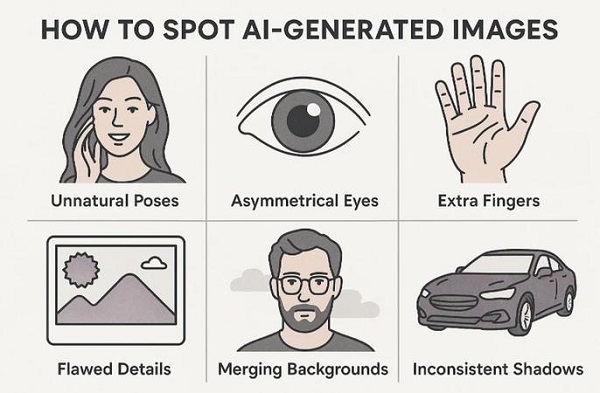
One way to investigate a suspicious image is to examine its details carefully.
Some AI image generators can produce errors involving hands, fingers, teeth, jewellery, written text, reflections and objects in the background. People may also have strangely shaped features, while objects may appear to merge into one another.
For example, a photograph supposedly showing a public official at an event might contain distorted fingers, inconsistent lighting or text on a banner that makes no sense.
However, these clues are not conclusive. Modern AI tools can produce convincing images, and genuine photographs may contain blur, compression artefacts or unusual lighting.
What to do: Zoom in on suspicious areas, examine the overall scene and compare the photograph with images from credible news organisations or official sources.
2. Videos with Strange Facial Movements or Lip Sync
AI-generated videos can imitate real people, including politicians, celebrities, business leaders and family members.
When reviewing a suspicious video, look for possible inconsistencies such as:
-
Mouth movements that do not match the speech.
-
Unnatural blinking or facial expressions.
-
Changes in facial appearance between frames.
-
Lighting or shadows that change unexpectedly.
-
Audio that sounds disconnected from the person’s movements.
These signs can help you decide whether further investigation is needed, but their absence does not prove that a video is genuine.
For example, a video claiming that a government official has announced a new grant should not be trusted solely because the official appears to speak convincingly. Look for the announcement on the relevant government’s official website or verified communication channels.
3. Voice Notes That Sound Real but Contain Suspicious Requests
AI voice-cloning technology can imitate aspects of a person’s voice using audio samples. This creates opportunities for fraudsters to impersonate relatives, colleagues, company executives or other trusted individuals.
A WhatsApp voice note might claim that a family member has been involved in an accident and urgently needs money. Another might appear to come from a business owner asking an employee to transfer funds.
Be especially cautious when a familiar voice:
-
Requests an urgent bank transfer.
-
Asks for an OTP, PIN or password.
-
Demands secrecy.
-
Provides new or unfamiliar bank details.
-
Claims to be in an emergency but refuses to answer verification questions.
A familiar voice is not sufficient proof of identity.
What to do: Call the person using a phone number you already know, preferably through a separate communication channel. Ask a question that only the genuine person is likely to answer, without relying solely on details that may be available online.
Never send money just because a voice note sounds familiar.
4. Messages That Create Panic or Promise Easy Money
AI can generate polished messages that resemble official announcements, newspaper reports or corporate communications.
A fraudulent WhatsApp message may claim that:
-
The Federal Government is distributing free money to every citizen.
-
A bank is offering an unusually large cash reward.
-
A new grant is available but requires an immediate registration fee.
-
A cryptocurrency investment will guarantee unusually high returns.
-
Your WhatsApp account will be permanently blocked unless you click a link.
Watch out for messages that pressure you to act immediately or promise benefits that seem too good to be true.
The use of professional grammar, official-looking logos or impressive formatting does not establish that a message is genuine.
Verify government programmes through the relevant official government website, financial offers through the financial institution’s official channels, and investment claims through the appropriate regulator or licensed provider.
5. Fake WhatsApp Screenshots and Fabricated Conversations
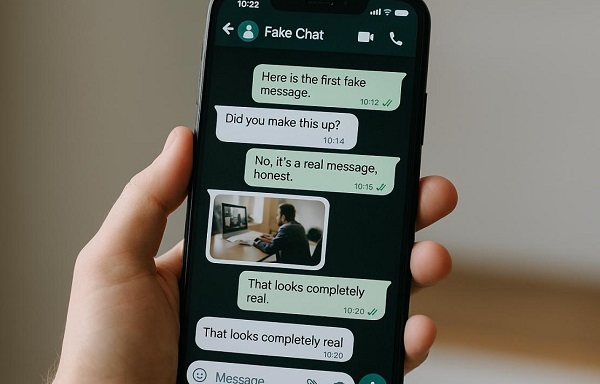
A screenshot can look like a genuine WhatsApp conversation without being authentic. Someone can create a fake chat using image-editing software, a screenshot generator or AI tools.
Be careful with screenshots supposedly showing a celebrity endorsing a product, a bank confirming a payment, a school announcing an examination result or a government agency publishing an important decision.
Look for inconsistent fonts, unusual spacing, mismatched timestamps or elements that do not align properly. These may justify further investigation, but a convincing screenshot can still be fabricated.
The best approach is to verify the original source. If a screenshot claims to show an official announcement, look for the same announcement on the organisation’s website or verified social media account.
If a friend sends a screenshot of a conversation involving someone you know, contact that person directly before accepting it as proof.
6. News Videos Shared Without a Reliable Source
Old videos are frequently recirculated with new captions, dates or locations. Some are edited, while others are entirely AI-generated.
For instance, a video shared in a WhatsApp group might claim to show a recent flood in Lagos, an explosion in Abuja or a major announcement by a Nigerian government official. The footage might actually be from another country or from an event that happened several years earlier.
To investigate a video:
-
Identify the specific claim made in the caption.
📖 Related Reads
-
Search the key phrases from the message online.
-
Check reputable news websites and official sources.
-
Take a clear screenshot of a distinctive frame and search for matching images using a reverse-image search tool.
-
Check whether the original video was published earlier or in a different context.
Do not assume that a video is genuine simply because several WhatsApp groups have shared it.
7. Messages With No Verifiable Source
Another warning sign is a message that makes major claims without identifying where the information originated.
Examples include:
-
“A friend in government confirmed this.”
-
“Share this before it is deleted.”
-
“The media will not report this news.”
-
“Forward this message to ten groups to receive your reward.”
These statements are not proof of a hoax on their own, but they can be used to discourage verification and encourage rapid sharing.
WhatsApp advises users to think carefully before forwarding messages, particularly when they do not know who wrote them or cannot establish whether the information is true.
How to Verify AI-Generated Content on WhatsApp
You do not need to be a cybersecurity expert to check a suspicious message. Follow these practical steps before believing or forwarding content.
Step 1: Search for the original claim
Copy the main sentence from the WhatsApp message and search for it online. Check whether credible news outlets or the organisation named in the message have published the same information.
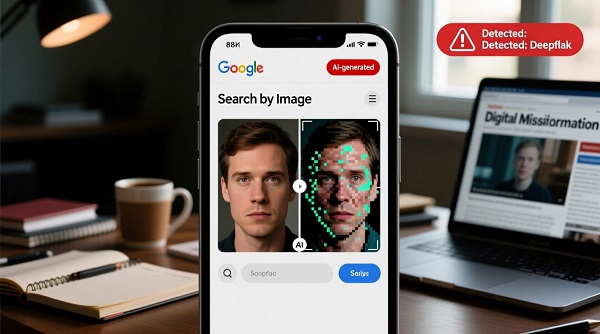
Step 2: Check the image’s history
Use Google Lens or another reverse-image search service to look for earlier appearances of the image. A matching result may reveal an older photograph, a different location or a misleading caption.
Step 3: Verify audio and video claims independently
Compare the clip with original recordings and reliable reports. For voice notes requesting money, call the alleged sender using a known number. Do not rely on how realistic the voice sounds.
Step 4: Consult official sources
For Nigerian government programmes, check the relevant ministry, agency or government website. For bank promotions, visit the bank’s official website or contact its customer support through a verified channel.
Step 5: Consult reputable fact-checkers
Look for independent fact-checking reports that examine the exact claim. Check the evidence and publication date rather than relying on a headline alone.
Can AI Detector Tools Identify Fake WhatsApp Content?
AI-detection tools can sometimes help assess whether text, images, audio or videos may have been generated or manipulated using AI. However, they should not be treated as definitive proof.
Some tools produce false positives, incorrectly labelling genuine content as AI-generated. Others may fail to identify synthetic media created with newer techniques or content that has been edited after generation.
A detector might flag a photograph as AI-generated, but that does not establish whether the accompanying claim is false. Likewise, a result indicating that an image is probably authentic does not prove that the caption is accurate.
Fact-checking organisation Full Fact has highlighted the limitations of relying on AI-detection tools and recommends examining the evidence, checking image origins and investigating inconsistencies.
Use detection tools as one source of evidence, alongside reverse-image searches, original recordings, credible reporting and official announcements.
How to Protect Yourself From AI-Generated WhatsApp Scams
Recognising fake content is only one part of staying safe. You should also protect your WhatsApp account and personal information.
1. Never Share Your Verification Code
Never give your six-digit WhatsApp registration code or two-step verification password to another person. Scammers may impersonate WhatsApp support, a friend or a family member to obtain these details and take over your account.
2. Avoid Suspicious Links and Downloads
Do not click links simply because a message claims you have won a prize or qualified for a government benefit. Check the destination carefully and avoid downloading applications from unknown websites.
3. Verify Requests for Money
If a contact sends an urgent request for money, call them using a number you already trust. Confirm the reason for the request and the recipient’s payment details before transferring funds.
4. Enable Two-Step Verification
Open WhatsApp and go to Settings → Account → Two-step verification. Follow the available instructions to enable the additional security feature. Menu wording may vary by app version.
This adds a layer of protection if someone attempts to register your number on another device.
5. Report and Block Suspicious Accounts
If a message appears fraudulent, use WhatsApp’s in-app options to report the sender and block the account where appropriate. Avoid replying to suspicious messages or forwarding them to other groups.
You can also review WhatsApp’s official guidance on suspicious messages and scams.
What Should You Do If You Have Already Shared Fake Content?
If you discover that you have forwarded AI-generated misinformation, take the following steps:
-
Delete the message you shared where possible.
-
Send a correction to the people or groups that received it.
-
Provide a reliable source explaining what is wrong with the original claim.
-
If the content was a scam, warn anyone who may have clicked its link or sent money.
-
If you shared personal information or account credentials, take immediate steps to secure the affected accounts.
If you suspect that a WhatsApp account has been taken over, follow the official WhatsApp account recovery instructions.
Correcting a false message is better than allowing it to continue circulating unchecked.
Frequently Asked Questions (FAQs)
Can AI-generated images be detected by looking at them?
Sometimes. Distorted details, unusual reflections, inconsistent lighting and malformed text may provide clues. However, modern AI-generated images can look highly realistic, so visual inspection alone cannot establish authenticity.
Can AI copy someone’s voice on WhatsApp?
Yes. AI voice-cloning tools can imitate aspects of a person’s voice. If a voice note requests money, sensitive information or urgent action, verify the sender independently before responding.
Does every forwarded WhatsApp message contain fake information?
No. Forwarded messages can be accurate, inaccurate, outdated or misleading. A forwarding label is a reason to consider the message’s source, not proof that the content is false.
Can I use Google Lens to check fake WhatsApp images?
Yes. Google Lens can help find visually similar images and earlier appearances of a photograph. However, it may not find newly created, cropped or heavily modified images, and a search result does not automatically establish whether the claim is true.
What should I do if a family member forwards AI-generated fake news?
Politely explain the problem, provide a credible source and ask them not to forward the content further. Avoid embarrassing them publicly; the goal is to correct the information and prevent further spread.
Is every AI-generated WhatsApp message dangerous?
No. AI-generated content can be useful and harmless. The risk arises when content is used to deceive people, impersonate others, spread misinformation or facilitate fraud.
Conclusion
Spotting AI-generated fake content on WhatsApp requires more than looking for strange images or unusual grammar. AI technology is improving, and fake photographs, cloned voices, manipulated videos and fabricated screenshots can be difficult to distinguish from genuine material.
The most reliable approach is to pause, question and verify. Check the original source, compare claims with credible reports, contact people independently when money is involved, and avoid sharing unverified information.
Whether you receive a message about a government grant, a bank promotion, a celebrity announcement or an urgent family emergency, take time to establish the facts before acting.
By practising these habits, you can help protect yourself, your family and your WhatsApp groups from misinformation and online scams.