
Have you opened WhatsApp and suddenly received a message saying “This phone number can’t use WhatsApp”? If so, your WhatsApp account has been banned or suspended from using the service.
A WhatsApp ban can be frustrating, especially when the number is used for personal conversations, business, school, work or important contacts. In many cases, WhatsApp takes action because it detects activity that may violate its Terms of Service or Messaging Guidelines.
WhatsApp says accounts can be banned when activity involves spam, scams or behaviour that puts users’ safety at risk. Its current Messaging Guidelines also prohibit activities such as bulk messaging, auto-messaging, automated abuse, scraping and other behaviour that can harm users or the platform.
The good news is that if you believe your number was banned by mistake, WhatsApp provides an official review process.
What Does a WhatsApp Ban Mean?
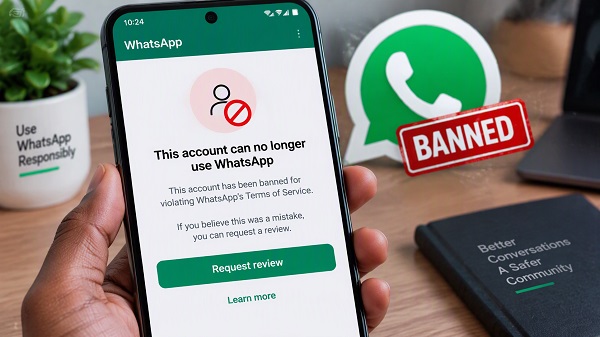
A WhatsApp ban means that WhatsApp has restricted your phone number from using its service.
When you open the app, you may see a message similar to:
“This phone number can’t use WhatsApp.”
WhatsApp may provide a Request review option directly in the application. According to WhatsApp, most reviews are completed within 24 hours, although the actual time can vary.
While an account is banned, you may be unable to access your WhatsApp chats and backups until the number is unbanned.
Why Did WhatsApp Ban My Number?
There is no single reason why a number can be banned. WhatsApp says it takes action when it believes account activity violates its Terms of Service, Messaging Guidelines or other applicable policies.
Here are some common reasons.
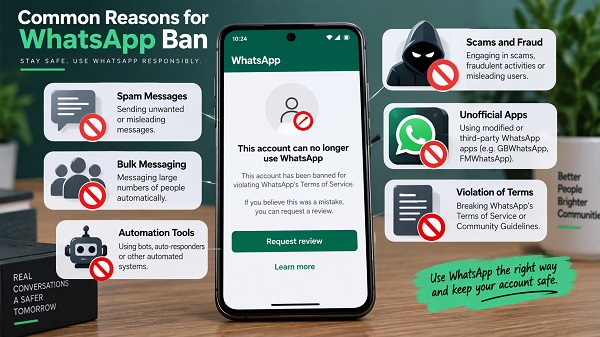
1. Sending Spam Messages
Sending large numbers of unwanted messages can result in restrictions or a ban.
For example, repeatedly sending promotional messages to people who did not request them can be considered spam.
WhatsApp specifically identifies spam and repeated unwanted contact as prohibited behaviour.
If you regularly send messages to people who do not know you or have not agreed to receive them, your account may attract reports or automated enforcement.
2. Sending Bulk Messages
Bulk messaging is another important reason an account can face enforcement.
This can happen when a user sends the same message to a large number of people within a short period.
WhatsApp’s Messaging Guidelines prohibit bulk messaging and auto-messaging that can harm WhatsApp or its users.
Businesses that need to communicate with large audiences should use WhatsApp’s appropriate business products and follow the applicable messaging policies rather than relying on unofficial automation tools.
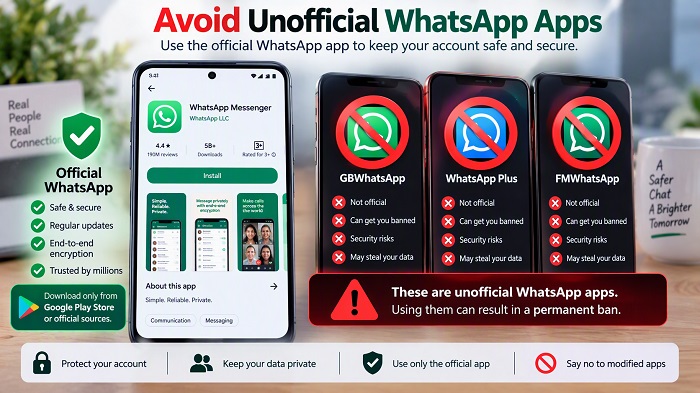
3. Using Unofficial WhatsApp Apps
Have you ever installed an app such as GB WhatsApp, FM WhatsApp or another modified version of WhatsApp?
This could be a reason for account restrictions.
WhatsApp says unofficial apps are developed by third parties and are not supported because WhatsApp cannot validate their security or privacy practices.
WhatsApp also warns that using unofficial applications can result in temporary or permanent bans or other restrictions.
If you are using a modified WhatsApp application, switch to the official WhatsApp app.
4. Using Automation Tools
Automation can be useful for legitimate business purposes when used through approved WhatsApp solutions, but unauthorized automation can create problems.
WhatsApp specifically prohibits activities involving automated messaging, auto-dialing and similar behaviour when they violate its rules or harm users.
Examples of risky activity can include:
- Automatically sending large numbers of messages
- Automatically contacting people who did not request communication
- Using unauthorized bots
- Automating account activity to avoid WhatsApp’s safeguards
- Using third-party tools to send messages at scale
5. Too Many People Reported or Blocked Your Account
User reports can contribute to WhatsApp’s enforcement systems.
WhatsApp says it can take action based on limited information available to it, including basic account, group and community information and messages reported by users.
If many recipients repeatedly report an account for spam or unwanted communication, this can become a serious problem.
However, receiving a single report does not necessarily mean your account will automatically be banned.
6. Scams or Fraudulent Activity
WhatsApp bans accounts when it believes they are involved in scams or fraudulent activity.
Its Messaging Guidelines prohibit fraud, spam, deliberate deception and impersonation.
Activities that could create problems include pretending to be another person, attempting to deceive users into sending money, or distributing fraudulent offers.
7. Impersonating Someone
Using WhatsApp to pretend to be another person or organization can violate its rules.
For example, creating an account that deliberately represents itself as a bank, government organization, celebrity, company or another individual can result in enforcement action.
WhatsApp’s guidelines specifically prohibit impersonation and deceptive activity.
8. Scraping or Collecting User Information
WhatsApp also prohibits unauthorized attempts to collect information about its users.
This can include using automated methods to scrape information from WhatsApp or attempting to gather user data in ways that violate the platform’s rules.
WhatsApp’s current Messaging Guidelines specifically mention scraping and other efforts to undermine its systems.
9. Violating WhatsApp’s Terms or Policies
A ban does not necessarily have to involve spam.
WhatsApp’s Terms of Service prohibit various activities, including illegal or unauthorized uses of the service, certain harmful activities, unauthorized automation and behaviour that compromises the security or integrity of the platform.
This means an account can face enforcement for different types of policy violations.
10. Your Account May Have Been Compromised
In some cases, unusual activity may not have been initiated by you.
If someone gains unauthorized access to your WhatsApp account and uses it to send spam, scams or other prohibited content, the activity could potentially trigger enforcement.
If you suspect that someone accessed your account, secure the account and use WhatsApp’s official recovery and review options.
WhatsApp Ban vs WhatsApp Restriction
A ban and a restriction are not necessarily the same thing.
WhatsApp currently distinguishes between restricted accounts and banned accounts.
When an account is restricted, WhatsApp may temporarily prevent certain activities. For example, a restricted account may still communicate with contacts and groups with which it has previously interacted, but it may be unable to start chats or calls with new contacts, create new groups, add members to groups or use linked devices.
WhatsApp says restrictions related to spam, automated or bulk messaging can automatically end after the allocated period.
A ban is more serious because the account may be prevented from using WhatsApp altogether.
How to Know if Your WhatsApp Number Is Banned
Open WhatsApp and try to access your account.
If you see:
“This phone number can’t use WhatsApp”
📖 Related Reads
your number has been banned.
WhatsApp may then provide a Request review button.
If the review option appears, you can use it to ask WhatsApp to reconsider the decision.
How to Request a Review of a WhatsApp Ban
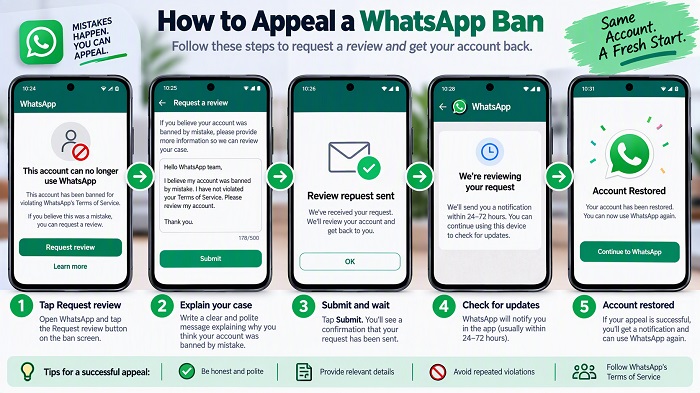
If you believe your number was banned incorrectly, the official process is straightforward.
Step 1: Open WhatsApp
Launch the official WhatsApp application on your phone.
Step 2: Check the Ban Message
Look for the message stating that your phone number cannot use WhatsApp.
Step 3: Tap “Request Review”
If WhatsApp provides the option, tap Request review.
Step 4: Explain the Situation
Follow the instructions in the application and provide a brief explanation if requested.
If you genuinely believe the ban was a mistake, explain that clearly.
Step 5: Wait for WhatsApp’s Decision
WhatsApp says you will receive a notification when the review has been completed.
Its Help Center says most reviews are completed within 24 hours.
What If There Is No “Request Review” Button?
If you do not see a Request review option, WhatsApp says the ban is final and cannot be appealed through that process.
This is important because many websites and social media posts claim to have special methods for removing WhatsApp bans.
You should be cautious about such claims.
WhatsApp specifically states that third-party services cannot ban or unban a WhatsApp account. Only WhatsApp can make that decision.
Don’t Pay Someone to “Unban” Your Number
Be careful if someone contacts you claiming they can remove your WhatsApp ban for a fee.
WhatsApp says third-party services cannot remove an account ban.
Therefore, you should not give strangers:
- Your WhatsApp verification code
- Your two-step verification PIN
- Your email password
- Your Google or Apple account password
- Banking information
- Your WhatsApp account credentials
Anyone promising a guaranteed WhatsApp unban should be treated with caution.
What Should You Do After Your Account Is Restored?
If WhatsApp restores your account, avoid repeating the activity that may have triggered the ban.
Stop Bulk Messaging
Do not send large volumes of unsolicited messages.
Remove Unofficial WhatsApp Apps
If you previously used a modified version of WhatsApp, uninstall it and use the official application.
Stop Unauthorized Automation
Remove third-party tools that automatically send messages or perform other WhatsApp activities without proper authorization.
Avoid Spam
Only send promotional or repeated messages to people who have a legitimate reason to receive them.
Keep Your Account Secure
Enable WhatsApp’s available security features, including two-step verification, and never share your registration code with anyone.
Can a Permanently Banned WhatsApp Number Be Recovered?
It depends on WhatsApp’s decision.
If WhatsApp reviews your appeal and restores the account, you can continue using the number.
However, if WhatsApp determines that the ban is final and does not provide a review option, there is no legitimate third-party service that can force WhatsApp to restore the account.
WhatsApp says that when the review option is unavailable, the ban is final and cannot be appealed through its review process.
What Happens to My WhatsApp Chats After a Ban?
While an account is banned, WhatsApp says you cannot access your chat history or backups.
Access to a WhatsApp account backup becomes possible after the phone number connected to that backup is unbanned.
This is one reason you should avoid immediately deleting the WhatsApp application or making unnecessary changes while trying to resolve the situation.
Does WhatsApp Ban Numbers Automatically?
WhatsApp uses automated systems as part of its efforts to detect and prevent abuse, while its Messaging Guidelines also state that human review teams can review account information and reported messages.
WhatsApp says its automated systems learn and improve from decisions made during enforcement.
Therefore, an account ban does not necessarily mean that an employee manually examined every message you sent.
Can a New SIM Card Fix a WhatsApp Ban?
Changing your SIM card does not automatically remove a ban on the original WhatsApp account.
A WhatsApp account is associated with its registered phone number.
If your existing number has been banned, the appropriate first step is to use WhatsApp’s official review process rather than trying to bypass the enforcement.
Frequently Asked Questions
Why was my WhatsApp number banned?
WhatsApp may ban an account when it believes the account activity violates its Terms of Service or policies. Examples include spam, scams, bulk messaging, unauthorized automation, impersonation and use of unofficial WhatsApp applications.
How long does a WhatsApp ban last?
It depends on the type of enforcement. Some account restrictions automatically expire after an allocated period, while a ban can remain until WhatsApp reviews and restores the account or determines that the ban is final.
How do I appeal a WhatsApp ban?
Open WhatsApp and tap Request review if the option is available. WhatsApp says most reviews are completed within 24 hours.
Can someone else remove my WhatsApp ban?
No. WhatsApp states that third-party services cannot remove WhatsApp account bans.
Can GB WhatsApp cause a ban?
Yes. WhatsApp says using unofficial WhatsApp applications can result in temporary or permanent bans or other restrictions.
Can spam cause a WhatsApp ban?
Yes. WhatsApp identifies spam and repeated unwanted contact as prohibited activity and says accounts may be banned for activity involving spam.
Can I create another WhatsApp account after being banned?
WhatsApp’s Terms of Service state that users whose accounts have been disabled or suspended agree not to create another account without WhatsApp’s permission.
Final Thoughts
If WhatsApp banned your number, do not immediately assume that the account is permanently lost.
First, check the message displayed by WhatsApp and look for the Request review option. If it is available, use the official in-app review process and wait for WhatsApp’s response.
To reduce the risk of future restrictions, avoid spam, unsolicited bulk messaging, unauthorized automation, scams, impersonation and unofficial WhatsApp applications.
Most importantly, do not pay third parties who claim they can guarantee an unban. WhatsApp says only WhatsApp can ban or unban an account.



Open my WhatsApp please open my WhatsApp I will not do it again but my WhatsApp buying and change phone I change my phone