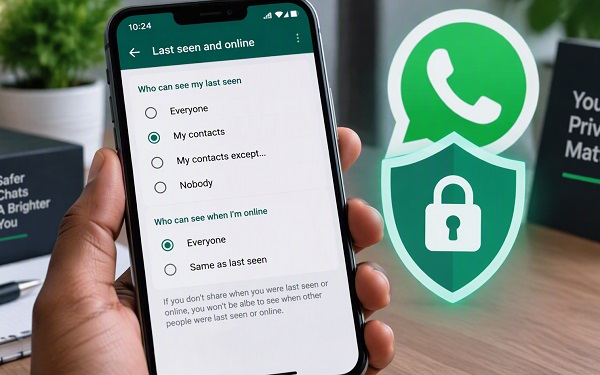
WhatsApp allows users to hide their online status when they do not want other people to know when they are actively using the messaging app. This can be useful if you want more privacy, need to use WhatsApp without immediately responding to messages, or simply do not want contacts monitoring when you are online.
The feature is available on both Android and iPhone and can be configured directly from WhatsApp’s privacy settings. You can choose who can see your last seen information and who can see when you are online.
In this guide, we explain how to hide your online status on WhatsApp, how to hide your last seen, what happens after changing the setting, and other privacy settings worth checking.
ALSO READ: How to Recover Deleted WhatsApp Photos on Android and iPhone
What Does “Online” Mean on WhatsApp?
WhatsApp’s online indicator shows that you currently have WhatsApp open on your device and that the device is connected to the internet.
Seeing someone as online does not necessarily mean that they have read your message. Someone could open WhatsApp to check another conversation while leaving your message unread.
WhatsApp provides privacy controls that allow you to decide who can see your online status.
How to Hide Online Status on WhatsApp
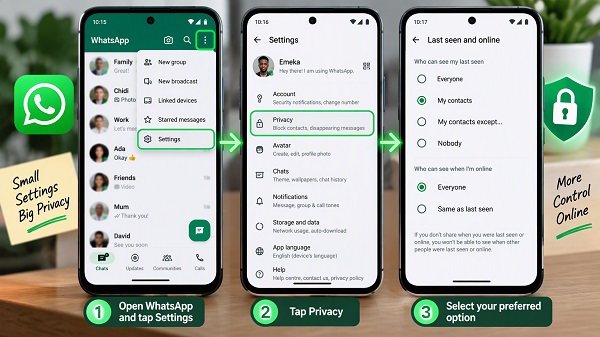
The easiest way to hide your online status is through WhatsApp’s Privacy settings.
Steps on Android
- Open WhatsApp on your Android phone.
- Tap the three-dot menu in the upper-right corner.
- Select Settings.
- Tap Privacy.
- Select Last seen and online.
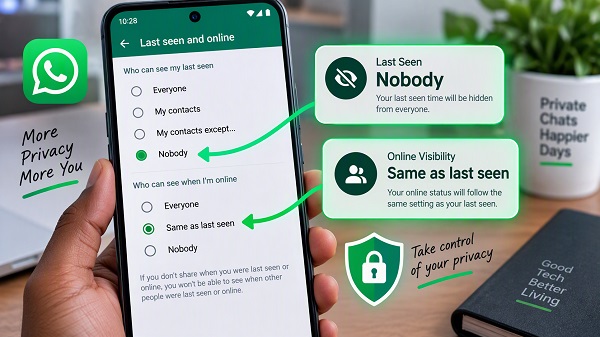
- Under Who can see my last seen, select Nobody.
- Under Who can see when I’m online, select Same as last seen.
Your online status will now follow your last-seen privacy setting.
Steps on iPhone
The process is similar on an iPhone:
- Open WhatsApp.
- Tap Settings.
- Select Privacy.
- Tap Last Seen & Online.
- Under Who can see my last seen, select your preferred option.
- Under Who can see when I’m online, select Same as Last Seen.
Once the change is applied, people excluded by your privacy settings should no longer be able to see your online indicator.
How to Hide Your Online Status From Everyone
If you want to prevent everyone from seeing when you are online, use these settings:
Last Seen → Nobody
Online → Same as Last Seen
To find these options, go to:
WhatsApp → Settings → Privacy → Last Seen & Online
This is the simplest configuration for people who want to appear offline while using WhatsApp.
Keep in mind that WhatsApp’s privacy settings work both ways. When you restrict your own last-seen or online information, you may also lose the ability to see the corresponding information from other users.
How to Hide Your Online Status From Specific People
You do not necessarily have to hide your online status from everyone.
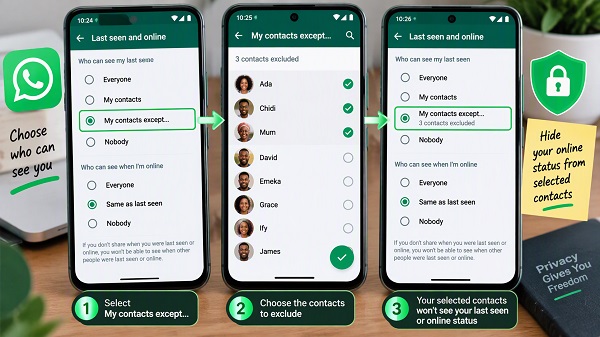
WhatsApp provides the My contacts except… option, allowing you to exclude specific contacts.
To use it:
- Open WhatsApp.
- Go to Settings.
- Tap Privacy.
- Select Last Seen & Online.
- Under last seen, choose My contacts except…
- Select the contacts you want to exclude.
- Set online visibility to Same as last seen.
This can be useful if you want most of your contacts to see your availability while keeping your online activity private from particular people.
How to Hide Last Seen on WhatsApp
Your last seen and online status are related, but they are not exactly the same.
Your last seen indicates the last time WhatsApp recorded you as active, while online indicates that you are currently using WhatsApp and connected to the internet.
To hide your last seen:
- Open WhatsApp.
- Go to Settings.
- Select Privacy.
- Tap Last Seen & Online.
- Choose Nobody.
You can also choose My contacts or My contacts except… depending on how much privacy you want.
What Happens When You Hide Your Online Status?
Hiding your online status does not stop you from using WhatsApp normally.
You can still:
- Send messages
- Receive messages
- Make WhatsApp calls
- Receive calls
- View chats
- Send photos and videos
- Post Status updates
- Participate in groups
The main difference is that people excluded by your privacy settings will not see your online indicator.
However, hiding your online status does not make every activity invisible.
For example, someone chatting with you may still be able to see when you are typing in a conversation.
Can You Hide Online Status Without Hiding Last Seen?
WhatsApp provides separate controls for last seen and online visibility.
However, the online setting includes the Same as last seen option, which makes your online visibility follow your last-seen setting.
If you want your online activity to remain private, setting your last seen to Nobody and online visibility to Same as last seen is the straightforward option.
Does Turning Off Read Receipts Hide Your Online Status?
No.
Read receipts and online status are separate WhatsApp privacy features.
Turning off read receipts primarily prevents people from seeing when you have read their messages. It does not automatically hide your online status.
To hide your online status, you need to change the Last Seen & Online settings.
You can manage read receipts separately under:
WhatsApp → Settings → Privacy → Read receipts
📖 Related Reads
ALSO READ: WhatsApp Calls Not Ringing on Android? 16 Ways to Fix It
Can People Still Know That You Are Using WhatsApp?
Yes, potentially.
Hiding your online status does not make you completely invisible on WhatsApp.
Depending on your other privacy settings, people may still interact with you through:
- Messages
- Group chats
- Calls
- Status updates
- Typing indicators
- Profile information
For example, someone chatting with you may be able to see that you are typing even when your online status is hidden.
Therefore, hiding your online status should be viewed as one privacy feature rather than a complete invisible mode.
Other WhatsApp Privacy Settings You Should Check
If you want to improve your WhatsApp privacy, hiding your online status is only one step.
Profile Photo
You can control who can see your WhatsApp profile photo.
Depending on your version of WhatsApp, available options can include:
- Everyone
- My contacts
- My contacts except…
- Nobody
About Information
You can also control who can see your WhatsApp About information.
This can reduce the amount of personal information visible to other users.
Status Updates
WhatsApp lets you control who can see your Status updates.
You can choose from options such as:
- My contacts
- My contacts except…
- Only share with…
Group Privacy
WhatsApp also provides controls over who can add you to groups.
This can help reduce unwanted additions to unfamiliar or unnecessary groups.
Silence Unknown Callers
WhatsApp includes a Silence unknown callers feature that can reduce interruptions from calls made by unknown numbers.
You can find additional privacy controls through WhatsApp’s Privacy settings.
Should You Use Third-Party Apps to Hide WhatsApp Online Status?
No.
You do not need a third-party application to hide your WhatsApp online status.
The feature is already built into WhatsApp.
Avoid unofficial WhatsApp versions or applications that claim to provide special invisible modes. Such applications can introduce security and privacy risks and may request unnecessary access to your device or account.
The safest approach is to use the privacy controls provided by the official WhatsApp application.
Why Can’t I See Someone’s Online Status?
If you suddenly stop seeing another person’s online status, it does not automatically mean that they have blocked you.
There are several possible explanations.
The person may have:
- Changed their privacy settings
- Hidden their online status
- Hidden their last seen information
- Not saved your number
- Not previously chatted with you
- Blocked you
- Experienced a temporary connection problem
Therefore, the absence of an online indicator alone is not enough to determine why you cannot see someone’s activity.
Frequently Asked Questions
Can I hide my WhatsApp online status from everyone?
Yes. Go to Settings → Privacy → Last Seen & Online, set Last Seen to Nobody, and set Online to Same as Last Seen.
Can I hide my online status from only one person?
Yes. You can use My contacts except… to exclude selected contacts and then set online visibility to Same as last seen.
Will people know when I am online after hiding my status?
People excluded by your privacy settings should not see your online indicator. However, other activity, such as typing in a chat, can still be visible in certain situations.
Can I still see when other people are online?
WhatsApp’s privacy system limits your ability to see other users’ corresponding online or last-seen information when you restrict your own visibility.
Does hiding online status affect WhatsApp messages?
No. You can continue sending and receiving messages normally.
Do I need an app to hide my WhatsApp online status?
No. WhatsApp provides this feature directly through its Privacy settings.
Final Thoughts
Hiding your online status on WhatsApp is a simple way to gain more control over your privacy.
For users who want to appear offline while using WhatsApp, the key settings are:
Settings → Privacy → Last Seen & Online → Last Seen: Nobody → Online: Same as Last Seen
You can also use My contacts except… when you want more selective privacy.
Remember that hiding your online status does not make you completely invisible. Typing indicators, messages, calls, group activity and other interactions can still reveal that you are active.
For better privacy, review your other WhatsApp settings as well.
ALSO READ: Why WhatsApp Is Taking So Much Storage on Your Phone