WhatsApp is one of the most widely used messaging apps, making it an attractive target for scammers and people trying to gain unauthorized access to accounts. In some cases, you may not immediately know that someone has accessed your WhatsApp account.
The good news is that there are several warning signs you can check. WhatsApp also provides security features that allow you to review connected devices, protect your account and recover it if someone has taken it over.
In this guide, we explain how to know if someone has access to your WhatsApp account and what to do if you suspect your account has been compromised.
ALSO READ: How to Transfer WhatsApp From an Old Phone to a New Phone
Signs Someone May Have Access to Your WhatsApp Account
1. You Receive an Unexpected WhatsApp Verification Code
One of the clearest warning signs is receiving a WhatsApp registration or verification code when you did not request one.
WhatsApp says this can happen when another person enters your phone number and attempts to register an account using it. It could be a simple mistake, but it may also indicate an attempted account takeover.
Never send the six-digit verification code to another person, even if they claim to be a WhatsApp representative, friend or family member.
Without the verification code, someone attempting to register your number generally cannot complete the registration process.
2. You Find an Unknown Device Under Linked Devices
Another important thing to check is your list of linked devices.
WhatsApp allows you to connect your account to devices such as computers, tablets and other supported devices. If someone gained access to your phone and linked their device, it may appear in this section.
To check:
On Android:
- Open WhatsApp.
- Tap the three-dot menu.
- Select Linked devices.
- Review the devices listed.
On iPhone:
- Open WhatsApp.
- Go to Settings.
- Tap Linked Devices.
- Review the devices connected to your account.
If you see a computer, browser or device that you do not recognize, select it and choose Log out.
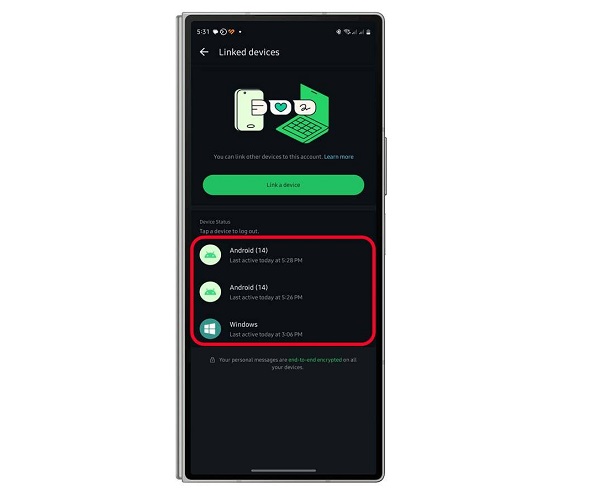
WhatsApp recommends checking linked devices regularly and allows users to remove devices they do not recognize.
3. WhatsApp Logs You Out Unexpectedly
If WhatsApp suddenly logs you out and you receive a message indicating that your phone number has been registered on another device, take it seriously.
This can mean someone has attempted to register your WhatsApp account using your phone number.
WhatsApp states that if you see a notification saying your phone number was registered on a new device, you can log back into your account using the verification code sent to your phone. Re-registering your number automatically logs other devices out.
4. Friends Receive Strange Messages From Your Account
Another warning sign is when friends or family tell you that they received unusual messages from your WhatsApp account that you did not send.
For example, someone may send messages asking contacts for:
- Money
- Bank details
- Verification codes
- Personal information
- Links
- Cryptocurrency
- Favour or emergency assistance
If this happens, immediately check your linked devices and account security settings.
You should also warn your contacts that your account may have been compromised.
5. You Notice Unusual Changes to Your Account
Unexpected changes to your WhatsApp account can also be a warning sign.
Pay attention to things such as:
- An unfamiliar profile picture
- Changes to your WhatsApp About information
- Messages marked as read that you did not open
- Conversations you do not remember sending
- Unusual activity in groups
- Unexpected status updates
These signs alone do not necessarily prove that someone has hacked your account. For example, another person with physical access to your unlocked phone could make changes.
However, several unusual signs occurring together should prompt you to investigate.
How to Check If Your WhatsApp Account Is Compromised
The first thing you should do is check Linked Devices.
📖 Related Reads
Remove anything you do not recognize. WhatsApp’s official security guidance recommends regularly reviewing linked devices and logging out devices you do not recognize.
Next, check whether you recently received an unexpected registration code.
If you received one without requesting it, do not share the code.
You should also make sure you are using the official WhatsApp application and keep the app updated.
What to Do If Someone Has Access to Your WhatsApp
If you believe someone has gained unauthorized access, take action immediately.
Step 1: Log Out Unknown Devices
Go to WhatsApp > Linked Devices and remove every device you do not recognize.
Step 2: Re-register Your Phone Number
If you have been completely locked out of WhatsApp, re-register your phone number using the six-digit code sent to your phone.
According to WhatsApp, successfully re-registering your number automatically logs other devices out of the account.
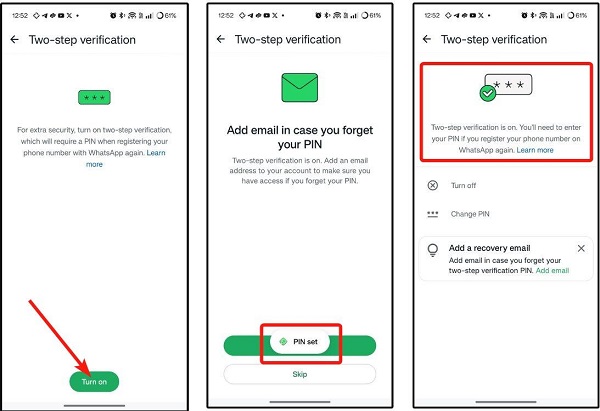
Step 3: Enable Two-Step Verification
After recovering your account, enable two-step verification.
WhatsApp says this adds another layer of security to your account. Depending on the version and rollout available to you, WhatsApp may refer to the additional credential as a PIN or password.
You can also add and verify an email address where supported, which can provide an additional recovery option.
Step 4: Warn Your Contacts
If someone may have used your account, tell your friends, family and important contacts.
This is particularly important if the person may have sent messages pretending to be you.
Step 5: Protect Your Phone
Your WhatsApp account is also affected by the security of the phone itself.
Use a strong screen lock, fingerprint or Face ID where available. WhatsApp also recommends being careful about who has physical access to your device.
How to Prevent Someone From Accessing Your WhatsApp
You can significantly reduce the risk of account takeover by following these practices:
- Never share your WhatsApp registration code.
- Never share your two-step verification password or PIN.
- Regularly check Linked Devices.
- Enable two-step verification.
- Keep WhatsApp updated.
- Use a strong phone screen lock.
- Avoid unofficial WhatsApp applications.
- Do not scan suspicious WhatsApp Web QR codes.
- Be careful with links and messages asking for verification information.
- Do not give strangers physical access to your unlocked phone.
WhatsApp specifically warns users against unofficial apps and websites because their security and privacy practices cannot be validated by WhatsApp.
Can Someone Read Your Old WhatsApp Messages If They Hack Your Account?
Not necessarily.
WhatsApp states that messages are end-to-end encrypted and stored on your device. Therefore, someone attempting to take over your account on another device does not automatically gain access to your previous conversations stored on your phone.
However, unauthorized access can still be dangerous because an attacker may impersonate you, send messages to your contacts or gain access through a linked device.
That is why it is important to check your linked devices and secure your account as soon as you notice suspicious activity.
Final Thoughts
If you suspect that someone has access to your WhatsApp account, don’t panic. Start by checking Linked Devices, remove anything you don’t recognize and never share your six-digit verification code.
If you have been logged out, re-register your phone number with the verification code sent to you. WhatsApp says this will automatically log other devices out of the account.
Finally, enable two-step verification and regularly review your account’s security settings. Taking these simple precautions can make it much harder for scammers to take control of your WhatsApp account.