The internet has transformed how Nigerians work, communicate, shop, study and manage their money. Mobile banking, social media, online marketplaces and digital government services have made everyday activities more convenient. However, this growing dependence on digital technology has also created new opportunities for cybercriminals.
Today, cybersecurity threats affect more than large companies and government institutions. Individuals, students, small business owners, bloggers, online vendors and everyday smartphone users can all become targets.
Nigeria’s Computer Emergency Response Team, ngCERT, warned in an April 2026 advisory about escalating cyber incidents involving phishing, ransomware, business email compromise and data breaches. The team also highlighted the growing role of artificial intelligence in making attacks more convincing. Read the official advisory.
In this guide, TechFalz examines the biggest cybersecurity threats facing Nigerians today, how these attacks work, and the practical steps individuals and businesses can take to protect themselves.
1. Phishing Scams and Fake Websites
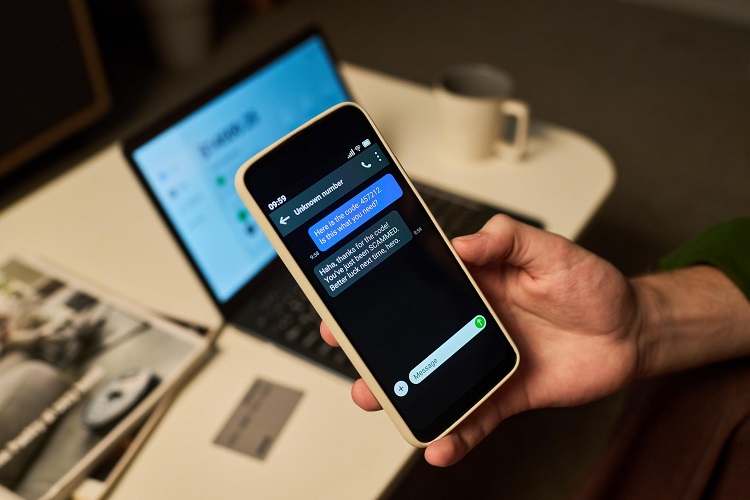
Phishing is one of the most common ways cybercriminals attempt to steal passwords, banking information and other sensitive data.
A fraudster may send an SMS, email, WhatsApp message or social media direct message pretending to represent a bank, government agency, delivery company or popular online service.
The message may claim that your bank account has been restricted, your BVN needs verification, your parcel is waiting for delivery or your social media account will be suspended unless you act immediately.
A link takes you to a fake website designed to look like a legitimate service. If you enter your login credentials, the attacker may capture them.
How Nigerians can stay safe:
- Avoid clicking unexpected links requesting passwords, OTPs or banking details.
- Visit official websites directly rather than using links in suspicious messages.
- Check website addresses carefully before entering personal information.
- Do not trust a message simply because it uses a familiar logo or company name.
- Enable multifactor authentication wherever available.
2. Mobile Banking and Electronic Payment Fraud
Digital banking and instant transfers are convenient, but criminals may exploit careless transactions, stolen credentials and social engineering to steal money.
Common methods include fake bank alerts, fraudulent transfer requests, impersonation of bank representatives, account takeover and scams involving payment reversals.
For example, a seller may receive a screenshot claiming that a buyer has paid for an item. The screenshot looks convincing, but no money has entered the seller’s account.
Another victim may receive a phone call from someone pretending to be a bank employee and asking for an OTP to prevent an alleged account suspension.
How to protect yourself:
- Never disclose your banking PIN, password or OTP.
- Confirm incoming payments in your own banking app or account statement.
- Verify recipients before approving transfers.
- Contact your bank immediately if you notice an unauthorised transaction.
- Use transaction alerts and reasonable transaction limits where available.
Read our related guide on safe mobile banking practices every Nigerian should follow.
3. WhatsApp Account Hijacking
WhatsApp is widely used in Nigeria for personal communication, business transactions and customer support. This makes compromised accounts valuable to criminals.
One common technique involves tricking a victim into sharing a registration verification code. An attacker may also misuse linked-device access or exploit a compromised phone to access conversations.
Once an account is taken over, the criminal may impersonate the owner and ask family members, friends or customers to send money urgently.
The request may appear trustworthy because it comes from a familiar account.
Protection tips:
- Never share your WhatsApp registration code with anyone.
- Enable two-step verification and add a recovery email if available.
- Review linked devices and remove unfamiliar sessions.
- Verify urgent requests for money through a separate call or communication channel.
- Warn your contacts promptly if your account is compromised.
If your account has been hijacked, follow WhatsApp’s official account recovery process and alert your contacts using another channel.
4. SIM-Swap Fraud and Mobile Number Takeover
SIM-swap fraud occurs when a criminal fraudulently obtains control of a victim’s mobile number, often by abusing a SIM replacement or account recovery process.
Because some financial and online services use SMS verification, control of a phone number can help criminals attempt password resets or account takeovers.
A related risk is mobile signal hijacking. In a 2026 advisory, the Nigerian Communications Commission’s Computer Security Incident Response Team discussed the potential risk posed by rogue cellular networks used to intercept communications and support banking fraud.
Warning signs may include:
- Your SIM unexpectedly stops receiving calls or messages.
- You receive unexpected account recovery notifications.
- Your mobile provider reports an unrequested SIM replacement.
- You notice unusual banking or email account activity.
A network outage does not automatically mean a SIM swap has occurred, but unexplained service loss should be investigated.
What to do:
Contact your mobile network operator through an official channel if you suspect SIM compromise. Notify your bank, secure your email account and review important accounts for suspicious activity.
5. AI-Powered Scams, Deepfakes and Voice Cloning
Artificial intelligence is making some scams more convincing. Criminals can use AI tools to generate polished phishing messages, imitate writing styles, create fake images and produce synthetic audio or video.
A fraudster might send a voice note that appears to come from a relative asking for emergency money. A business owner might receive a message that looks like it was written by a manager requesting an urgent payment.
The voice, grammar and presentation may appear genuine, but these signals are not reliable proof of identity.
How to defend yourself:
- Verify unusual requests for money using a trusted, independent channel.
- Establish a family or workplace verification procedure for urgent payments.
- Do not rely on voice or video alone to authenticate someone.
- Avoid publishing unnecessary personal information that scammers could use to impersonate you.
- Treat sensational videos and screenshots cautiously until their source is verified.
AI-generated content is not always fraudulent, and not every unusual message is AI-generated. The key is to verify sensitive requests before taking action.
6. Investment, Cryptocurrency and Online Business Scams
Fraudulent investment schemes continue to exploit people’s interest in making money online.
Scammers may advertise guaranteed profits from cryptocurrency trading, forex, online investment platforms, artificial intelligence businesses or referral programmes.
Some schemes display fabricated account balances or small early withdrawals to persuade victims to invest more money. Later, the operators may demand additional fees before allowing withdrawals or disappear entirely.
Other scams involve fake online jobs that require applicants to pay registration fees, purchase packages or deposit money to unlock supposed earnings.
Protect yourself by:
- Being suspicious of guaranteed or unusually high returns.
- Checking the identity, regulatory status and track record of a financial service before investing.
- Avoiding pressure to invest immediately.
- Never giving strangers access to your cryptocurrency wallet or recovery phrase.
- Refusing requests to pay extra money to unlock supposedly guaranteed profits.
- Independently verifying job offers through the employer’s official website.
A professional website, social media following or positive testimonial does not prove that an investment is legitimate.
7. Malware and Malicious Android Applications
Malware is software designed to steal information, monitor activity, disrupt systems or give attackers unauthorised access.
It can reach smartphones and computers through malicious applications, infected attachments, compromised websites and unofficial software downloads.
Some malicious Android apps imitate legitimate services. Others request excessive permissions or hide harmful functions behind seemingly harmless features.
Depending on its capabilities, malware may steal credentials, display fraudulent screens, collect personal information or interfere with normal device operation.
How to reduce the risk:
- Download apps from official stores and verify the developer.
- Avoid unknown APK files sent through messaging platforms.
- Review app permissions before granting access.
- Keep Android, Windows, browsers and other software updated.
- Remove applications you do not recognise or trust.
- Investigate unusual battery consumption, data usage or unexpected pop-ups.
An unusual phone symptom alone does not prove that malware is present. Investigate suspicious changes rather than assuming every performance problem is a cyberattack.
8. Ransomware Attacks Against Businesses and Institutions
Ransomware is malware that can encrypt files or disrupt access to systems. Some attackers also steal sensitive data and threaten to publish it unless a ransom is paid.
Businesses, schools, hospitals, financial institutions and government organisations can suffer serious disruption when their systems are compromised.
Small businesses are also at risk because they may lack dedicated cybersecurity staff, reliable backups or formal incident-response procedures.
A ransomware incident can result in lost records, interrupted operations, recovery expenses and reputational damage.
Recommended protection measures:
- Maintain regular backups of important files.
- Keep at least one backup isolated from ordinary network access.
- Test whether backups can actually be restored.
- Apply security updates promptly.
- Use multifactor authentication and restrict administrative access.
- Train staff to recognise suspicious attachments and links.
- Establish an incident-response and recovery plan.
If an organisation is attacked, isolate affected systems where appropriate and seek qualified incident-response assistance. Do not assume that paying a ransom guarantees file recovery or prevents data exposure.
📖 Related Reads
9. Business Email Compromise and Payment Diversion
Business email compromise, or BEC, occurs when criminals impersonate or compromise a trusted email account to manipulate payments or obtain confidential information.
For example, a supplier may appear to email a company requesting that future payments be sent to a new bank account. The email may look authentic, but the payment details have been changed by a fraudster.
Attackers may also impersonate executives and instruct staff to make urgent, confidential transfers.
Nigeria’s ngCERT issued a dedicated advisory on business email compromise and social engineering attacks targeting government and critical institutions in August 2026.
How businesses can prevent BEC:
- Confirm bank-account changes through a previously verified phone number.
- Require additional approval for high-value transfers.
- Use multifactor authentication for business email accounts.
- Restrict access to financial systems.
- Train staff to recognise impersonation and urgency tactics.
- Investigate unusual requests, even when they appear to come from senior management.
Never rely solely on the email address or display name to confirm a payment instruction.
10. Identity Theft and Personal Data Exposure
Identity theft occurs when someone uses another person’s identifying information without permission, potentially to commit fraud or impersonate that person.
In Nigeria, sensitive information may include BVN, NIN, phone numbers, dates of birth, identity documents and account recovery details.
Criminals may collect these details through phishing, fraudulent job applications, fake giveaways, compromised databases or deceptive social media requests.
Personal information can also be combined from several sources to make impersonation attempts more convincing.
Protect your identity:
- Share identity documents only when there is a legitimate reason.
- Use verified websites and secure submission channels.
- Avoid posting sensitive documents publicly.
- Secure your email and social media accounts.
- Be cautious when responding to unsolicited requests for BVN, NIN or financial information.
- Review account notifications and investigate suspicious activity promptly.
Your BVN or NIN does not automatically grant someone unrestricted access to your bank account, but exposing personal information can make certain fraud attempts easier.
11. Social Media Account Takeover and Impersonation
Facebook, Instagram, TikTok and other social media accounts can be valuable targets because they contain personal information, contacts and access to business audiences.
Criminals may steal login credentials through fake verification pages, malicious links or reused passwords. They may then impersonate the account owner, solicit money from contacts or publish fraudulent advertisements.
Business accounts are particularly vulnerable when several people share access without appropriate controls.
Protect your social media accounts:
- Use unique passwords for each platform.
- Enable multifactor authentication.
- Secure the email address and phone number used for account recovery.
- Review logged-in devices and active sessions.
- Restrict administrative access to trusted people.
- Verify unexpected messages claiming to be from platform support.
If your account is compromised, use the platform’s official recovery process and warn your audience through another trusted channel.
12. Public Wi-Fi and Unsecured Internet Connections
Public Wi-Fi in hotels, restaurants, airports and other public spaces can create privacy and security risks, particularly when networks are poorly secured or impersonated by criminals.
An attacker may attempt to direct users to fake login pages or exploit vulnerable devices and services.
Using public Wi-Fi does not automatically mean your information will be stolen. However, you should avoid unnecessary exposure when handling sensitive information.
Safety tips:
- Verify the network name with the venue.
- Avoid clicking unexpected pop-ups or login links.
- Keep your device and browser updated.
- Use mobile data for sensitive transactions when practical.
- Disable automatic connection to unfamiliar networks.
- Never ignore certificate warnings or enter credentials into suspicious pages.
A VPN can provide additional privacy in some circumstances, but it does not make phishing links, infected devices or fraudulent websites safe.
13. Website Hacking and Outdated Software
Businesses, publishers, schools and online vendors increasingly rely on websites to serve customers. Poorly maintained websites can expose organisations to attacks.
Common weaknesses include outdated content management systems, vulnerable plugins, weak passwords, insecure configurations and excessive user permissions.
For WordPress publishers, an outdated plugin or compromised administrator account may allow attackers to alter pages, redirect visitors, inject malicious code or access information.
Website owners should:
- Update WordPress, themes and plugins promptly.
- Remove unused themes and plugins.
- Use strong administrator passwords and multifactor authentication.
- Maintain tested backups.
- Apply least-privilege access controls.
- Use HTTPS and appropriate security monitoring.
- Review administrator accounts and investigate unexpected changes.
Website security is an ongoing responsibility. Installing a security plugin alone does not guarantee that a website is protected.
14. Online Shopping Scams and Fake Vendors
Fraudulent online sellers may advertise phones, electronics, fashion items, appliances and other products at attractive prices.
After receiving payment, the seller may stop responding, block the buyer or deliver an item that differs significantly from the advertisement.
Some criminals also impersonate established retailers or create fake social media stores.
Before paying an online seller:
- Research the seller’s identity and independent reputation.
- Check the website address and contact details.
- Be cautious of prices that seem implausibly low.
- Understand the payment and refund policies.
- Use payment methods that offer appropriate buyer protections.
- Avoid making rushed transfers to unverified personal accounts.
Screenshots of testimonials and payment receipts can be fabricated. Seek independent evidence before trusting a seller.
15. Insider Threats and Unauthorised Access
Not every cybersecurity threat originates from an unknown hacker. Employees, contractors or other authorised users may accidentally expose information or deliberately misuse their access.
Examples include sending customer records to the wrong recipient, sharing passwords, copying confidential files to personal devices or retaining access after leaving an organisation.
Businesses can reduce these risks through clear policies, training, access reviews and technical controls.
Only give staff access to the information required for their roles. Remove access promptly when responsibilities change or employment ends, and maintain appropriate records of sensitive activities.
Practical Cybersecurity Checklist for Nigerians
You do not need to be a cybersecurity expert to improve your digital safety. Start with these essential measures.
- Use a different, strong password for every important account.
- Enable multifactor authentication, preferably a phishing-resistant option where available.
- Keep your phone, computer, browser and applications updated.
- Never share banking PINs, passwords, OTPs or cryptocurrency recovery phrases.
- Verify unexpected requests for money through an independent channel.
- Download applications from trusted sources.
- Back up important personal and business files.
- Review account sessions and remove unknown devices.
- Limit the personal information you publish online.
- Report suspected fraud promptly to your bank, service provider or appropriate authorities.
Where to Report Cybercrime in Nigeria
If you become a victim of cybercrime, act quickly.
For suspected banking fraud: Contact your bank immediately through its official customer service channel and ask about securing the affected account, blocking transactions where possible and initiating a complaint.
For cyber incidents affecting organisations: Nigeria’s Computer Emergency Response Team publishes security advisories and provides incident-reporting guidance through its official website at cert.gov.ng.
For suspected criminal activity: You can consult the Nigeria Police Force National Cybercrime Centre’s official reporting portal.
Preserve transaction references, suspicious messages, email headers where available, relevant screenshots and other evidence. Avoid paying unknown individuals who promise to recover stolen money.
Reporting an incident does not guarantee that funds will be recovered, but prompt reporting can support investigation and response.
Conclusion
The biggest cybersecurity threats facing Nigerians today range from phishing and mobile banking fraud to AI-powered impersonation, malware, ransomware and identity theft. These attacks can affect anyone who uses digital services, regardless of technical knowledge or income.
The best defence is a combination of awareness, secure account settings, updated devices, careful financial decisions and prompt action when something appears suspicious.
Do not assume that a familiar phone number, professional-looking website, convincing voice note or message from a friend’s account is automatically genuine. Verify important requests independently and protect your sensitive information.
Cybersecurity starts with everyday decisions. Stay alert, secure your accounts and help others recognise online threats.
Disclaimer: This article is for general educational purposes and does not replace professional cybersecurity advice or instructions from relevant authorities.