5G has become increasingly available in many parts of the world, including Nigeria. It offers faster mobile data speeds, lower latency and improved network capacity compared with older generations of mobile technology.
However, having access to a 5G network does not automatically mean that your smartphone can connect to it. The phone itself must have 5G hardware and support the relevant network bands.
If you are planning to buy a smartphone or want to determine whether your current device supports 5G, there are several simple ways to check.
1. Check the Phone’s Network Settings
One of the quickest methods is to look through your smartphone’s mobile network settings.
On many Android phones, open:
Settings → Network & Internet / Connections → Mobile Network → Preferred Network Type
Depending on the manufacturer, you may see options such as:
- 5G/4G/3G/2G
- 5G preferred
- 5G Auto
- 4G/3G/2G
If a 5G option appears, the phone may support 5G.
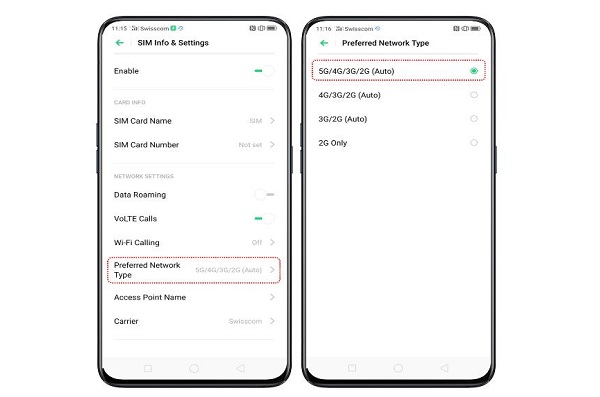
However, the absence of a 5G option does not always provide conclusive evidence because network settings can vary between manufacturers, software versions and carriers.
On an iPhone, go to:
Settings → Mobile Service/Cellular → Mobile Data Options → Voice & Data
Compatible 5G iPhones can display options such as 5G Auto and 5G On.
2. Find Your Exact Phone Model
Another reliable method is to identify the exact model number of your smartphone.
Go to:
Settings → About Phone
Look for information such as:
- Model name
- Model number
- Device name
- Model code
Different versions of the same smartphone can have different network capabilities. Therefore, searching only for the general product name may not be enough.
For example, a manufacturer may release both 4G and 5G versions of phones with similar names.
3. Check the Manufacturer’s Specifications
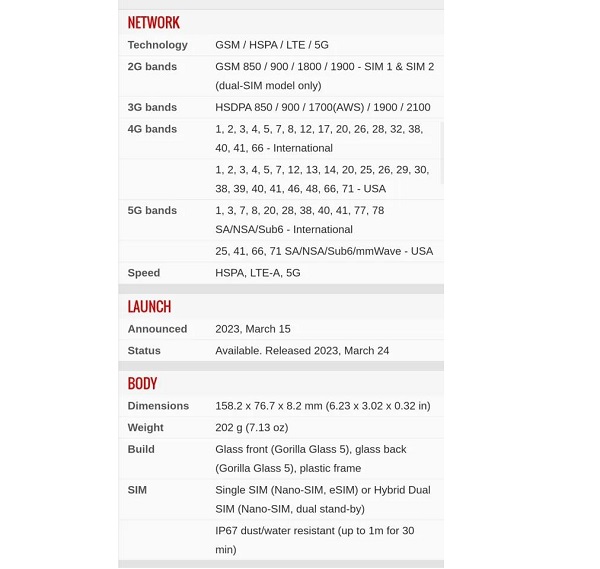
Once you know the exact model, visit the manufacturer’s official website and look at the technical specifications.
Search for sections such as:
Network, Connectivity, Mobile Network or Wireless.
A 5G-compatible device will normally list 5G, along with supported network technologies or bands.
📖 Related Reads
This is generally more reliable than relying on the name of the phone or information from an online seller.
4. Check the Phone’s Product Box
If you still have the original smartphone packaging, check the box for network information.
Some manufacturers prominently display 5G on the packaging of compatible devices.
You can also look for the exact model number and use it to verify the device on the manufacturer’s website.
Don’t rely solely on a seller’s description, particularly when buying from a marketplace where different variants may be listed under the same product name.
5. Check Whether 5G Actually Appears on the Phone
If your smartphone supports 5G and you are in an area with compatible 5G coverage, the phone may display a 5G indicator near the signal bars.
However, seeing no 5G icon does not necessarily mean that the phone is not 5G-compatible.
The icon may not appear if:
- 5G coverage is unavailable in your location.
- Your SIM or mobile plan does not provide 5G access.
- 5G is disabled in the phone’s settings.
- The phone is connected to a 4G network because it currently offers a better connection.
- The particular phone variant does not support your carrier’s 5G bands.
6. Check the Supported 5G Bands
For a more advanced check, look at the smartphone’s supported 5G frequency bands.
A phone can technically support 5G but still have compatibility problems with a particular mobile network if it does not support the bands used by that network.
Therefore, when purchasing an imported smartphone, compare its supported 5G bands with those used by your mobile operator.
This is particularly important when buying phones designed for another region.
7. Ask Your Network Provider
Your mobile network operator can also help determine whether your device and plan can access its 5G service.
You may need to confirm:
- Whether 5G is available in your area.
- Whether your SIM is compatible.
- Whether your current plan supports 5G.
- Whether your smartphone model is supported.
Remember that 5G support involves more than just the smartphone. The device, network, SIM/service plan and coverage all have to work together.
Final Thoughts
Checking whether a smartphone supports 5G is relatively easy. Start by checking the phone’s network settings, then confirm the exact model number and verify its specifications on the manufacturer’s official website.
If you are buying a phone, don’t assume that a similar-looking model or product name means it supports 5G. Check the exact model and, especially for imported devices, the supported network bands.
This simple verification can help you avoid buying a 4G-only smartphone when you specifically want 5G connectivity.