Buying a laptop as a student does not mean you have to spend millions of naira. For assignments, online classes, research, Microsoft Office, presentations, PDFs and everyday browsing, there are several affordable laptops that can get the job done.
The key is knowing which specifications actually matter. A cheap laptop with 4GB RAM and slow storage may look attractive because of its price, but it can become frustrating when you open several browser tabs or run multiple applications.
For most students, an 8GB RAM laptop with an SSD and a Full HD display is a sensible starting point. If your budget allows it, 16GB RAM and a 512GB SSD can provide more room for multitasking and future use. Recent Nigerian buying guides similarly recommend at least 8GB RAM and SSD storage for ordinary student workloads.
ALSO READ: Google Drive Storage Full? What to Do and How to Free Space
What Should Students Look for in a Budget Laptop?
Before choosing a laptop, consider these specifications:
1. At least 8GB RAM
RAM affects how many applications and browser tabs your computer can comfortably handle at the same time.
While some very cheap laptops still come with 4GB RAM, 8GB should be your target for a modern student laptop. If you frequently use Zoom, Microsoft Word, Chrome, Canva and other applications simultaneously, 16GB is even better.
2. SSD storage
Choose a laptop with an SSD rather than an old mechanical hard drive.
An SSD can make Windows start faster, applications open more quickly and file transfers feel much more responsive.
For most students, 256GB is the minimum practical capacity, while 512GB gives you considerably more space for school documents, applications, videos and other files.
3. A Full HD display
A 1920 × 1080 Full HD screen is preferable for reading documents, watching lectures and working on presentations.
A 14-inch screen offers better portability, while a 15.6-inch display provides more workspace.
4. A recent processor
You do not necessarily need a high-end Core i7 or Core Ultra processor.
For basic schoolwork, entry-level Intel processors and AMD Ryzen processors can be sufficient. However, students who use programming tools, statistical software, graphics applications or other demanding programs should consider a more powerful processor.
5. Battery life
Students often move between classrooms, libraries, hostels and lecture halls. A laptop with decent battery life can therefore be more useful than one with a slightly faster processor.
If you are buying a used laptop, pay particular attention to battery health.
Best Budget Laptops for Students in Nigeria
Here are some laptop options worth considering at different budget levels.
1. Lenovo IdeaPad 1 – Affordable Everyday Student Laptop
The Lenovo IdeaPad 1 is one of the entry-level options students can consider when working with a limited budget.
Current Nigerian retail listings show IdeaPad 1 configurations with 8GB RAM and 256GB storage around the ₦375,000–₦420,000 range, depending on the exact configuration and Windows inclusion.
The laptop is suitable for basic tasks such as:
- Microsoft Word
- PowerPoint presentations
- Web browsing
- Online research
- PDF reading
- Online classes
- Basic spreadsheet work
However, students should check the exact processor before purchasing because IdeaPad 1 models are sold with different specifications.
Best for: Students with a tight budget who mainly need a laptop for schoolwork.
Target budget: Around ₦375,000–₦450,000, depending on configuration.
2. ASUS Vivobook Go 14 – Compact Budget Choice
The ASUS Vivobook Go 14 is another option for students who want something relatively compact and portable.
One current Nigerian listing shows an 8GB RAM/256GB configuration using an Intel N150 processor at about ₦405,000.
Its smaller form factor can be convenient for students who carry their laptop around campus every day.
It can handle everyday activities such as document creation, browsing, email, presentations and online classes.
The major consideration is performance. An entry-level processor is designed for everyday productivity rather than demanding video editing, gaming or professional 3D applications.
Best for: Students who prioritise portability and basic productivity.
Target budget: Around ₦400,000–₦450,000.
3. Dell Pro 15 Essential – Good 512GB Storage Option
Students who want more storage without moving into premium laptop prices can consider the Dell Pro 15 Essential.
A current Nigerian retailer listing shows an 8GB RAM/512GB configuration with a Core 3 100U processor around ₦570,000–₦580,000.
The 512GB SSD is particularly useful for students who store lots of documents, videos, software and course materials.
The 15-inch class display also provides more working space than smaller laptops.
Best for: Students who need more storage and a larger screen.
Target budget: Around ₦570,000–₦650,000.
4. HP 240R G10 – Balanced Student Option
The HP 240R G10 is worth considering if you want a newer laptop with more storage.
Current listings show configurations with 8GB RAM and 512GB storage starting around ₦650,000, with more powerful Core 5 configurations around ₦850,000.
The Core 3 configuration can be suitable for normal student productivity, while the Core 5 version provides more performance headroom for heavier multitasking.
Before buying, check whether the RAM is upgradeable and confirm the exact processor and operating-system configuration.
Best for: Students who want a modern Windows laptop with 512GB storage.
Target budget: Around ₦650,000–₦900,000.
5. HP 15 – Good General-Purpose Student Laptop
HP’s 15-inch laptops are widely available in Nigeria in several configurations.
📖 Related Reads
For example, current listings include an HP 15 with 8GB RAM and 512GB storage using a newer Core 5 processor at about ₦810,000.
This class of laptop is appropriate for students who need more than basic browsing.
Depending on the configuration, it can be useful for:
- Microsoft Office
- Online classes
- Programming
- Research
- Canva
- Basic photo editing
- Video conferencing
- Multitasking
The exact processor is important, however. Do not buy an HP 15 simply because it has the HP name; compare the processor, RAM, storage and display specifications of the particular model.
Best for: Students who want a stronger all-round Windows laptop.
Target budget: Around ₦750,000–₦900,000.
What About UK-Used Laptops?
A used business-class laptop can sometimes offer better specifications for the money.
Popular used models include older Lenovo ThinkPad, Dell Latitude and HP EliteBook machines.
However, buying used comes with additional risks.
Before paying, check:
- Battery health
- SSD health
- Keyboard
- Screen
- USB ports
- HDMI port
- Wi-Fi
- Webcam
- Speakers
- Charger
- BIOS password
- Physical damage
- Windows activation
- Serial number
A used laptop with 16GB RAM and an SSD may provide better everyday performance than a brand-new low-end machine, but its condition matters enormously.
If you choose a used laptop, buy from a reputable seller and test it thoroughly before making payment. Nigerian buying guides also highlight battery health as an important consideration when purchasing UK-used laptops.
ALSO READ: How Students Can Use Google Drive to Store School Documents
How Much Should a Student Spend on a Laptop?
Your course should influence your budget.
Around ₦350,000–₦450,000
Look for:
- 8GB RAM
- 256GB SSD
- Entry-level Intel or AMD processor
- Full HD display where possible
This range is suitable for basic academic work.
Around ₦500,000–₦700,000
You can start looking for:
- 8GB RAM
- 512GB SSD
- Better processors
- Larger displays
- Newer models
This is a useful range for students who want more storage and better overall performance.
Around ₦700,000–₦1 million
You can target:
- Core 5/Core i5-class processors
- 8GB–16GB RAM
- 512GB SSD
- Better displays
- More capable multitasking
Students studying engineering, computer science, data-related courses or creative subjects may benefit from spending toward the higher end of this range.
Which Laptop Should You Buy for Your Course?
Your course is one of the most important factors.
Arts, Education, Law and Humanities: An 8GB RAM laptop with a 256GB or 512GB SSD should generally be sufficient for documents, research, presentations and online learning.
Business and Accounting: Look for 8GB RAM, SSD storage and a comfortable keyboard. A larger 15.6-inch screen can also be useful for spreadsheets.
Computer Science: Consider a more powerful processor and preferably 16GB RAM if your budget allows. Programming environments, virtual machines and development tools can require more memory.
Engineering: Check the software requirements for your specific course. CAD, simulation and engineering applications may require considerably more processing power and RAM than ordinary schoolwork.
Mass Communication and Creative Courses: A good display, 16GB RAM and a larger SSD can be useful for photo, audio and video projects.
New or Used: Which Should You Choose?
There is no single answer.
A new laptop generally gives you the advantage of a manufacturer warranty, a fresh battery and lower risk of hidden hardware problems.
A used business laptop can provide stronger specifications for the same money, but you need to inspect it carefully.
If you have limited technical knowledge, buying a new laptop from a reputable retailer with a valid warranty may reduce the risks associated with purchasing used equipment.
Avoid These Budget Laptop Mistakes
Don’t buy based only on storage
A laptop advertised with a large storage capacity is not necessarily fast.
A 1TB HDD can be slower in everyday use than a 256GB SSD.
Don’t automatically choose 4GB RAM
4GB can become restrictive with modern browsers and multiple applications. Aim for 8GB or more.
Don’t ignore the processor
Two laptops with the same RAM and storage can perform very differently because of their processors.
Don’t forget the operating system
Check whether Windows is installed and activated. Some laptops are sold with FreeDOS or without Windows.
Don’t ignore warranty
A slightly more expensive laptop from a reputable seller may be preferable to a suspiciously cheap machine with no meaningful warranty or return option.
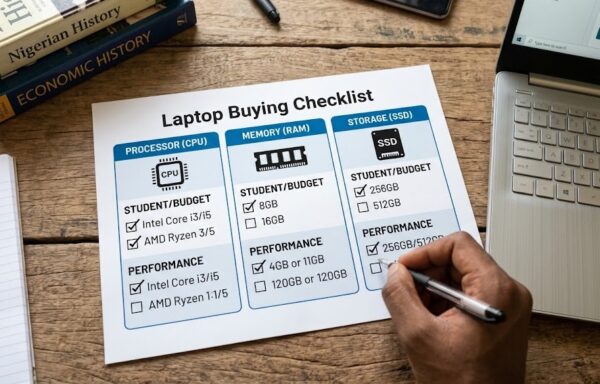
Final Buying Checklist for Students
Before paying for your laptop, confirm:
- At least 8GB RAM
- SSD storage
- At least 256GB storage
- Full HD display if possible
- Suitable processor for your course
- Good battery life
- Genuine charger
- Working webcam
- Working Wi-Fi and Bluetooth
- Functional keyboard and touchpad
- Windows activation if Windows is advertised
- Warranty or return policy
- Exact model number
- Current seller price
Final Thoughts
The best budget laptop for a student is not necessarily the cheapest laptop available. It is the machine that provides enough performance for your course without wasting money on specifications you do not need.
For basic academic work, an 8GB RAM laptop with a 256GB SSD can be a reasonable starting point. If you can afford more, moving to 512GB storage and 16GB RAM can give you considerably more room for multitasking and future use.
Current Nigerian listings demonstrate how widely prices vary: entry-level models can be found around ₦375,000–₦450,000, while stronger 512GB machines can range from roughly ₦570,000 to ₦900,000 or more depending on the processor and configuration.
Most importantly, compare the processor, RAM, SSD, display, warranty and exact model number before making your final decision. Laptop prices can change quickly, so verify the current price and specifications with the retailer before paying.