Your Google Account may contain access to Gmail, Google Drive, Google Photos, YouTube and other services. If someone gains access to your account, they could potentially see private information, access stored files or make changes to your account.
Fortunately, Google provides security tools that allow you to review devices and account activity.
If you notice unusual activity or simply want to make sure your account is secure, you can check where your Google Account is signed in and investigate devices you do not recognize.
Here is how to check your Google Account for suspicious sign-ins.
1. Open Your Google Account
Start by signing into the Google Account you want to check.
On a computer, open your Google Account settings and go to the security section.
On a phone, you can also access Google Account settings through supported Google apps or your device’s account settings.
Look for the section relating to your account’s security and signed-in devices.
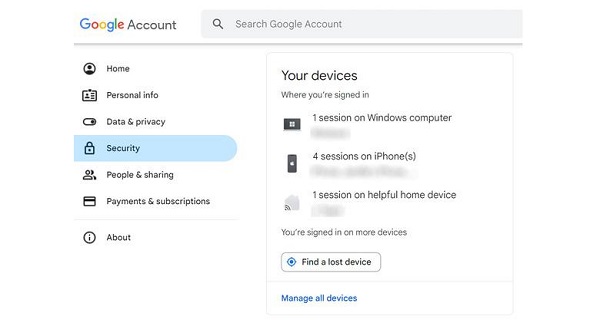
2. Check Your Devices
Google provides a section where you can review devices that have recently accessed your account.
Look for Your devices or a similarly labelled device-management section.
Depending on the interface, you may see information such as the type of device, approximate location and recent activity.
The list can include phones, tablets, computers and other devices connected to your Google Account.
Do not immediately assume that an unfamiliar location means your account has been hacked. Locations can sometimes be approximate, particularly when a mobile network, VPN or other network configuration is involved.
Instead, look at the complete information and consider whether you recognize the device.
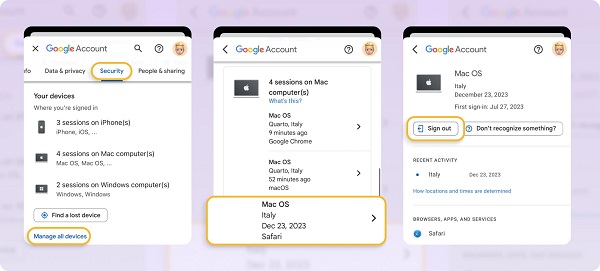
3. Look for Devices You Do Not Recognize
Go through the list carefully.
Ask yourself:
- Do I own this phone or computer?
- Have I recently signed into Google on a new device?
- Did I use a friend’s or public computer?
- Could the device belong to an old phone I no longer use?
- Does the device type match something I own?
If you see a device you definitely do not recognize, treat it as a potential security warning.
You can select the device to see more information and, where available, sign it out.
4. Review Recent Security Activity
Your Google Account security page can also show recent security-related events.
These may include activities such as a new sign-in, password changes or other important account-security events.
Review the dates and times carefully.
If you see an event that you do not remember performing, investigate it instead of ignoring it.
For example, a notification about a password change that you did not make should be treated as a serious warning.
5. Check Gmail for Suspicious Activity
If you use Gmail, there is another useful security feature.
Open Gmail on a computer and scroll to the bottom of your inbox. Look for the Last account activity information.
Selecting the details can provide information about recent Gmail access, including activity associated with different access methods and IP addresses.
The information may look complicated, so do not panic if you see an unfamiliar IP address.
An IP address can change depending on your internet provider, mobile network or location.
Focus on whether the activity itself makes sense based on when and where you used Gmail.
📖 Related Reads
6. Check for Unexpected Changes
Suspicious account access is not always obvious from the device list.
Look through your Google Account and Gmail for changes you did not make.
For example, check whether:
- Emails have been sent without your knowledge.
- Messages have been deleted or moved.
- Gmail forwarding settings have changed.
- Recovery information looks different.
- An unfamiliar phone number has been added.
- Unknown devices are connected to the account.
- Your password has changed unexpectedly.
Unexpected changes can indicate that someone else has accessed your account.
7. Sign Out of an Unrecognized Device
If you identify a device that does not belong to you, Google may provide an option to sign it out.
Select the unfamiliar device and follow the instructions provided by Google.
If you are unsure whether a device is yours, investigate before removing it.
For example, an old smartphone or computer may appear under a name you do not immediately recognize.
8. Change Your Google Password
If you believe someone has accessed your account, changing your password is one of the most important steps.
Create a strong password that you do not use for another website or service.
Avoid passwords based on easily guessed information such as your name, birthday or phone number.
After changing your password, review your account’s security settings again and check for unfamiliar devices or changes.
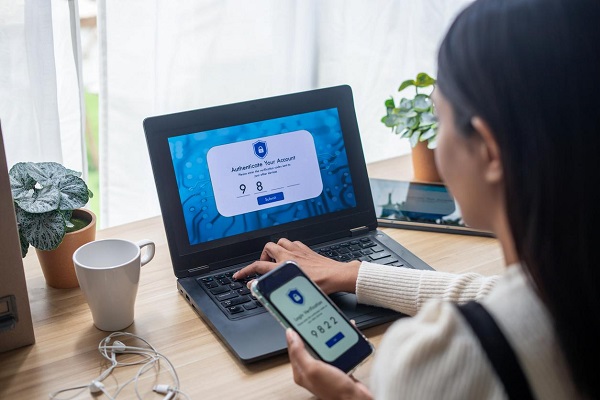
9. Turn On Two-Step Verification
Two-step verification provides an additional layer of protection.
When enabled, signing in may require something in addition to your password, depending on the verification method configured for your account.
This means that knowing your password alone may not be enough to access the account.
Google offers several security and verification options. Choose an option that is practical for you and follow Google’s current setup instructions.
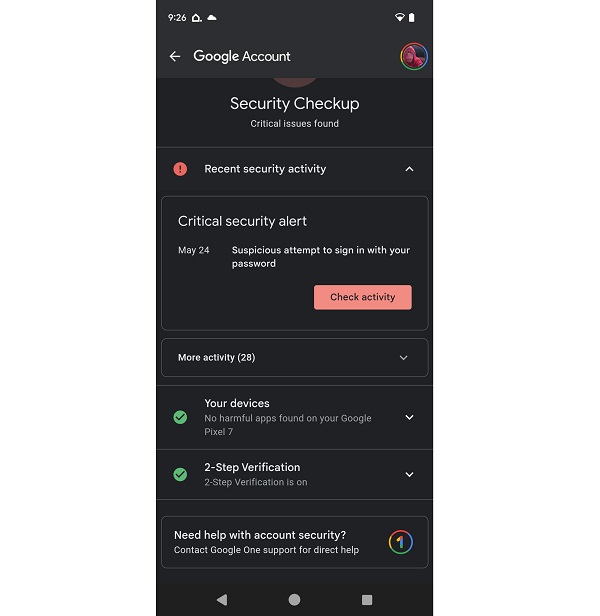
10. Be Careful With Suspicious Login Alerts
Google may send security alerts when it detects unusual account activity.
If you receive an alert about a sign-in you do not recognize, do not simply dismiss it.
Check your account’s security activity and investigate the device or event.
Also be careful about messages pretending to be Google security alerts. Instead of clicking suspicious links in an unexpected email or text message, open your Google Account directly through Google’s official services and check the security information there.
What If Someone Has Already Accessed Your Account?
If you are confident that someone accessed your Google Account without permission, act quickly.
First, secure the account by changing the password and reviewing security settings. Sign out unfamiliar devices where possible and check your recovery information.
You should also review Gmail and other important Google services for suspicious activity.
If you use the same password on other websites, change those passwords as well. Password reuse can allow an attacker who obtains one password to attempt access to multiple accounts.
Final Thoughts
Checking your Google Account’s signed-in devices and security activity is a simple way to spot potential unauthorized access.
Do not rely only on unfamiliar locations when investigating activity because location information can sometimes be approximate. Look at the device, timing and activity together.
If something genuinely looks suspicious, change your password, remove unfamiliar access, review your recovery settings and enable two-step verification.
Most importantly, make account security a regular habit rather than waiting until you notice something unusual.