
Preparing for examinations can become easier when you have a simple way to review important facts, definitions, formulas and concepts repeatedly.
One useful method is digital flashcards. Unlike traditional paper flashcards, digital flashcards can be created, stored and reviewed using a smartphone, tablet or computer. They are particularly useful for students who want to revise while travelling, during free periods or at home.
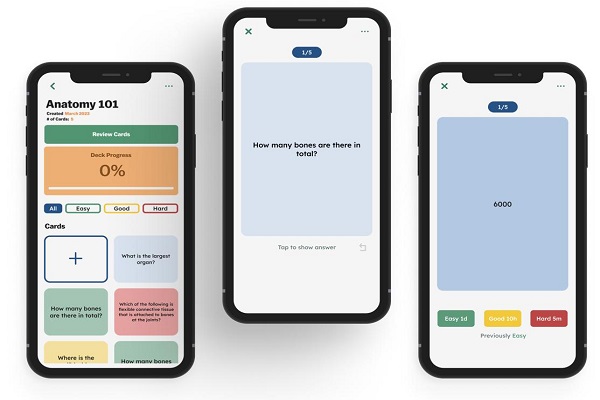
Digital flashcards can contain questions on one side and answers on the other. For example, a student preparing for a Biology examination could create a card that asks:
Question: What is photosynthesis?
Answer: Photosynthesis is the process by which green plants use light energy to convert carbon dioxide and water into glucose, releasing oxygen as a by-product.
The idea is simple, but creating your flashcards properly can make your revision much more effective.
What Are Digital Flashcards?
Digital flashcards are electronic versions of traditional study cards. Each card normally contains a question, term or concept on one side and its answer or explanation on the other.
For example:
Front: What is the capital of Nigeria?
Back: Abuja.
You can create hundreds of cards covering different subjects and topics and access them from your device whenever you need to study.
Some flashcard applications also provide features such as quizzes, progress tracking, spaced repetition, images, audio and automatic review schedules.
Why Use Digital Flashcards for Revision?
Flashcards can be useful because they encourage active recall rather than simply reading your notes repeatedly.
Instead of looking at a textbook and recognising an answer, you attempt to remember the answer before revealing it.
Other benefits include:
- Easy to carry: Your flashcards can be stored on your phone.
- Quick revision: You can review a few cards in just a few minutes.
- Easy to update: Incorrect information can be corrected without creating a new card.
- Organised studying: Cards can be grouped by subject or topic.
- Multimedia support: Some applications allow pictures, audio and other content.
- Progress tracking: Some apps show which topics require more revision.
- Repeated practice: Cards can be reviewed multiple times before an examination.
How to Create Digital Flashcards
1. Choose a Flashcard App or Tool
Start by choosing a digital flashcard platform that works on your device.
You can use a dedicated flashcard application or create simple flashcards using tools that allow you to organise questions and answers.
When choosing a tool, consider whether it supports:
- Multiple subjects or decks
- Images
- Audio
- Spaced repetition
- Offline access
- Synchronisation between devices
- Progress tracking
Choose a tool that is easy for you to use rather than one with features you will never need.
2. Select One Subject or Topic
Avoid putting your entire syllabus into one huge collection of cards.
Instead, divide your material into smaller topics.
For example, an SS2 Biology student could create separate decks for:
- Cell Structure
- Nutrition
- Respiration
- Reproduction
- Genetics
- Ecology
A JAMB candidate could similarly create separate decks for English Language, Mathematics, Biology, Chemistry and Physics.
Breaking your material into smaller groups makes revision easier to manage.
3. Turn Your Notes Into Questions
The most important part of creating flashcards is deciding what should go on each card.
Take an important fact or concept from your notes and convert it into a question.
For example:
Poor flashcard:
“Photosynthesis — process involving plants.”
Better flashcard:
“What is photosynthesis?”
Answer:
“The process by which green plants use light energy to make food from carbon dioxide and water.”
The second example forces you to retrieve the information from memory.
4. Keep Each Card Simple
Avoid putting an entire page of notes on a single flashcard.
A good flashcard should usually test one key idea.
For example, instead of creating one card containing everything about the human heart, create several cards:
Question: How many chambers does the human heart have?
Answer: Four.
Another:
Question: What are the four chambers of the heart?
Answer: Right atrium, right ventricle, left atrium and left ventricle.
This makes each revision session more focused.
5. Add Images Where They Help
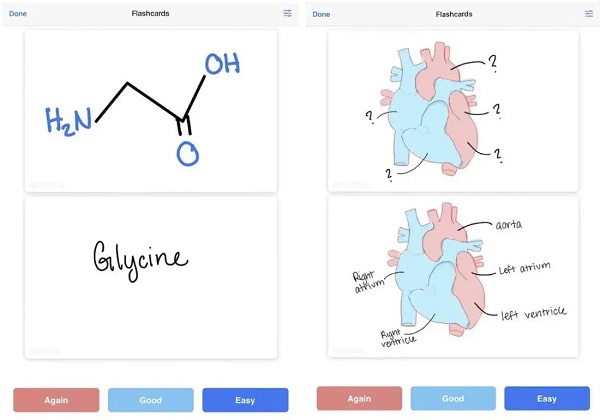
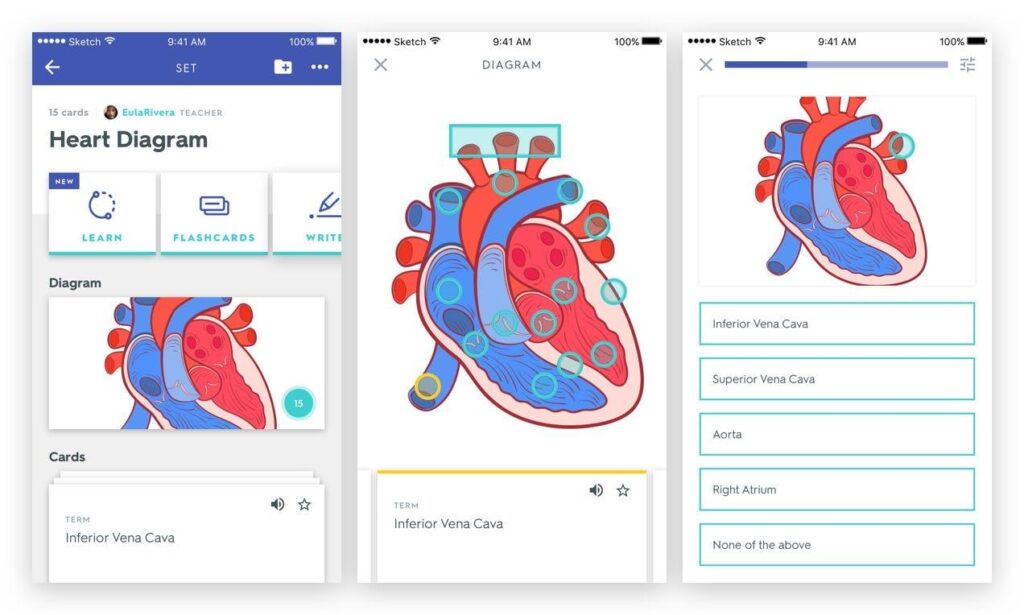
Images can be particularly useful for subjects that involve diagrams or visual information.
For example, students studying Biology can create cards containing labelled diagrams of the:
- Human heart
- Digestive system
- Eye
- Respiratory system
- Plant cell
Students studying Geography can also use maps, while students studying Computer Science can use diagrams of computer components.
However, don’t add images simply to make a card look attractive. Use them when they improve understanding or memory.
6. Add Formulas and Definitions
Digital flashcards are especially useful for subjects that require memorising formulas, terminology and definitions.
For example, a Mathematics flashcard could contain:
Question: What is the formula for the area of a circle?
Answer: A = πr².
Another card could ask:
Question: What is the SI unit of force?
Answer: Newton (N).
For difficult formulas, consider creating a separate card explaining what each symbol represents.
📖 Related Reads
7. Use AI to Help Create Flashcards
Artificial intelligence can speed up the process of converting your study materials into revision questions.
You can provide an AI tool with your notes and ask it to generate questions and answers based only on the material you provide.
For example, you could prompt:
“Turn these Biology notes into 30 revision flashcards. Put one question on each card and provide a short, accurate answer. Focus on important examination concepts.”
However, don’t blindly trust AI-generated study material. Check the answers against your textbook, teacher’s notes or another reliable educational source before using them for revision.
This is particularly important for subjects where a small error can lead to an incorrect answer in an examination.
8. Review Your Cards Using Active Recall
Creating flashcards is only half of the process.
You need to use them properly.
When reviewing a card, read the question and try to answer it before looking at the answer.
For example:
Question: What is the chemical symbol for sodium?
Pause and answer:
Na
Then reveal the answer and check whether you were correct.
If you remembered it correctly, continue. If you got it wrong, mark it for additional review.
9. Use Spaced Repetition
Don’t wait until the night before an examination to review all your flashcards.
Instead, revisit difficult cards at increasing intervals.
For example:
Day 1: Learn the cards.
Day 2: Review them.
Day 4: Review difficult cards again.
Day 7: Test yourself.
Day 14: Review the cards again.
This approach helps you revisit information before you completely forget it.
Some digital flashcard applications can automatically schedule cards for review using spaced-repetition algorithms.
10. Create Flashcards From Past Questions
Past examination questions can also be converted into digital flashcards.
For example:
Question: Which organelle is responsible for energy production in a cell?
Answer: Mitochondrion.
You can also create cards from questions you previously answered incorrectly.
This is particularly useful because it helps you focus on areas where you need additional practice.
Common Mistakes to Avoid
While digital flashcards can be useful, avoid these mistakes:
Making Cards Too Long
A flashcard containing several paragraphs is difficult to revise. Break it into smaller cards.
Memorising Without Understanding
Flashcards should support understanding, not replace it. Make sure you understand a concept before trying to memorise it.
Creating Too Many Cards
You don’t need a card for every sentence in your textbook. Concentrate on important concepts, definitions, formulas and facts.
Looking at the Answer Too Quickly
Give yourself enough time to recall the answer before revealing it.
Ignoring Difficult Cards
Cards you repeatedly get wrong should receive additional attention rather than being ignored.
Waiting Until Exam Week
Start creating and reviewing your flashcards early. Regular short revision sessions are easier to manage than trying to memorise everything at once.
How to Make Flashcard Revision More Effective
You can improve your revision by combining flashcards with other study techniques.
For example:
Read → Create → Recall → Test → Review
First, study the topic. Then create flashcards from the important information. Test yourself without looking at the answers and later use past questions to measure your understanding.
You can also explain difficult concepts aloud as if you were teaching another student. If you cannot explain something clearly, return to your notes and study that topic again.
Can You Create Digital Flashcards on Your Phone?
Yes. You don’t need a computer to create digital flashcards.
A smartphone can be enough to create, store and review your cards. This makes digital flashcards convenient for students who want to revise outside the classroom.
You can create cards while studying and review them later during short periods of free time.
For students preparing for examinations such as WAEC, NECO, JAMB and school examinations, flashcards can be organised according to subjects and individual topics.
Final Thoughts
Digital flashcards provide a convenient way to turn ordinary study notes into an interactive revision system. Instead of repeatedly reading the same material, you can test your memory, identify weak areas and revisit important information regularly.
The key is not simply to create hundreds of cards. Create focused questions, test yourself actively and review difficult information regularly.
With a smartphone, suitable flashcard tool and well-organised study material, you can build a portable revision system that can be used almost anywhere.
Quick Flashcard Checklist
Before starting your revision session, make sure your cards:
- Contain one main idea each
- Use clear questions and answers
- Cover important examination topics
- Include diagrams where useful
- Have accurate information
- Are reviewed using active recall
- Include difficult topics for repeated practice
- Are reviewed regularly using spaced repetition
Digital flashcards work best when they become part of a consistent study routine rather than a last-minute examination strategy.