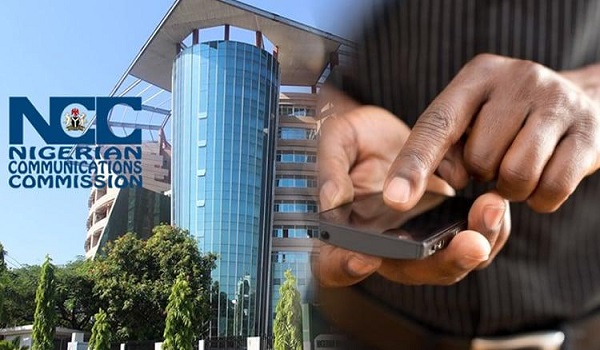
The Nigerian Communications Commission (NCC) has introduced a technology-based Device Management System (DMS) to strengthen the verification of mobile devices used on Nigerian telecommunications networks. The system is designed to help identify counterfeit, cloned, stolen and non-compliant devices while improving consumer protection.
The initiative has become particularly important following the NCC’s October 2026 rollout of device verification requirements. According to the Commission’s official guidance, the system took effect on October 7, 2026, with different procedures for devices already in use, devices sold locally and newly imported devices.
For Nigerian mobile phone users, the main questions are straightforward: Will your current phone continue to work? How can you check its IMEI? What should you do if you receive a message about device verification?
This guide explains how the NCC Device Management System works, how to check your phone’s status and what to do if your device requires further verification.
What Is the NCC Device Management System (DMS)?
The Device Management System is a technology platform used to support the NCC’s enforcement of device Type Approval requirements. It helps the Commission verify whether SIM-enabled devices meet applicable regulatory standards and are authorised for use on Nigerian mobile networks.
The system uses device identifiers, particularly the International Mobile Equipment Identity (IMEI), to establish device identity and check verification status.
According to the NCC, the framework is intended to make it easier to identify non-compliant devices, improve network integrity and prevent devices reported stolen from being used on Nigerian networks.
The system is not the same as SIM registration. SIM registration identifies a subscriber, while device verification checks the regulatory status of the phone or other connected device.
When Did the NCC Device Management System Take Effect?
The NCC’s official Device Checker guidance states that the system took effect on October 7, 2026. Under the framework, newly imported devices must undergo the applicable verification process before being supplied for use on Nigerian networks.
The implementation also involves manufacturers, importers, suppliers and other businesses responsible for ensuring that devices meet the Commission’s requirements.
However, the rollout does not mean every Nigerian with a working phone must immediately register their device.
The NCC states that phones already connected to Nigerian networks before the system took effect have been automatically verified. Devices purchased within Nigeria generally do not require owners to obtain Type Approval themselves. If a device has a verification problem or is affected by a compliance restriction, the owner should follow the official instructions and contact the seller or service provider.
Will the NCC DMS Stop Your Current Phone From Working?
For most users with devices already in use on Nigerian networks before October 7, 2026, the NCC says no action is required.
The Commission’s guidance states that phones already connected to Nigerian networks before the effective date were automatically verified and should continue to work normally.
The following categories generally do not require immediate action from the owner:
-
Phones already in use on Nigerian mobile networks before the effective date.
-
New phones purchased through the Nigerian market.
-
Second-hand phones purchased locally.
-
Phones received from family members or friends.
These general rules do not override a specific verification issue. If you receive an official notification that your phone cannot be verified or is subject to a compliance restriction, contact your seller or mobile network provider for clarification.
How to Check Your Phone’s IMEI Number
The IMEI is a unique 15-digit identification number assigned to a mobile device that connects to a cellular network. Some phones support multiple SIMs and may have more than one IMEI.
You can find your IMEI using any of these methods.
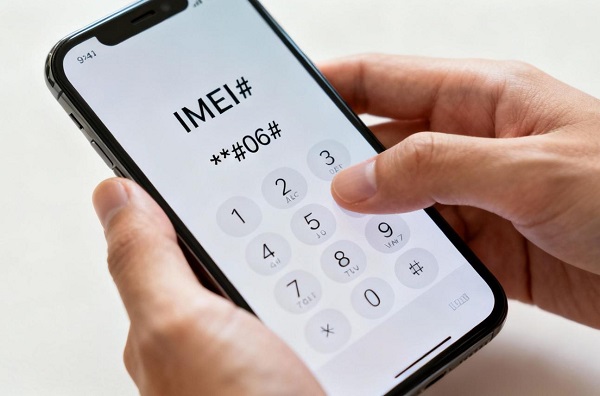
Method 1: Dial the IMEI code
-
Open your phone’s dialler.
-
Enter
*#06#. -
Your phone should display its IMEI number or numbers.
-
Record the number if you need it for an official verification process.

Method 2: Check your phone settings
On Android, open Settings and look for About phone, Status or Device information. The exact menu varies by manufacturer.
On an iPhone, open Settings, select General, and tap About. Scroll down to find the IMEI.
Method 3: Check the original packaging
The IMEI may also be printed on the device’s original packaging or included in its documentation.
Keep your IMEI private where possible. Only provide it when necessary through an official verification channel or to a trusted service provider.
How to Check Your Phone’s Verification Status With the NCC
The NCC provides an official Device Checker service for checking device Type Approval and verification status.
You can use the following options:
-
Dial
*315#: Follow the prompts provided by the official Device Checker service. -
Visit the official portal: Open the NCC Device Checker.
-
Call 315: Contact the NCC’s toll-free support line for guidance.
If you are checking a different phone from the one you are using, the service may ask for that device’s 15-digit IMEI. Follow the official instructions and check whether the result confirms that the device is Type Approved and verified for use on Nigerian networks.
Do not use unofficial websites that claim to offer NCC device verification. Also, never disclose a one-time verification code to a caller, seller or stranger. The NCC specifically warns consumers to enter verification codes only within the official verification process.
What Happens If Your Phone Is Not Verified?
If the Device Checker reports that your phone is not yet verified, do not immediately assume it is fake or stolen.
The NCC explains that an unsuccessful verification result does not automatically establish that a device is counterfeit. There may be an outstanding verification requirement or another issue that needs clarification.
Here is what you should do:
-
Check that you entered the correct IMEI.
-
Repeat the check through the official NCC Device Checker.
-
If you recently purchased the phone, contact the seller and request clarification.
-
If you already own the phone, contact your mobile network provider or the NCC for assistance.
-
Keep your purchase receipt and other ownership documents in case they are needed.
📖 Related Reads
If you are buying a phone and its status cannot be confirmed, the safest approach is to delay payment until the seller resolves the issue.
Which Devices Are Covered by the DMS?
The framework covers SIM-enabled devices designed to connect to Nigerian mobile networks. According to the NCC, these include:
-
Android smartphones and iPhones.
-
Feature phones.
-
Cellular-enabled tablets.
-
Eligible cellular Internet of Things (IoT) devices.
-
SIM-enabled laptops.
-
SIM-enabled point-of-sale (POS) terminals.
-
Other cellular-connected devices covered by the applicable requirements.
The relevant requirement concerns devices connecting to mobile networks, not simply whether a gadget has Wi-Fi connectivity.
Can the NCC Read Your WhatsApp Messages or Track Your Phone?
The NCC says the Device Checker system uses device identification information, including IMEI numbers, to verify compliance with its Type Approval requirements.
The Commission also states that the system does not give it access to the personal contents of your device, such as messages, photographs or stored files. It does not enable the NCC to monitor the contents of personal communications or track users’ physical movements through the Device Checker system.
This distinction is important because device verification and access to personal communications are two different things.
Nevertheless, users should remain cautious about fraudulent messages claiming that they must install an application, provide their password or disclose a verification code to prevent their phones from being blocked.
Why Did the NCC Introduce the Device Management System?
The NCC identifies several objectives behind the framework.
1. Reduce the use of counterfeit devices
Device verification helps the regulator identify devices that do not satisfy applicable requirements. This can help consumers avoid phones that are falsely marketed as genuine.
2. Identify cloned IMEI numbers
IMEI cloning occurs when multiple devices use the same device identifier. This can undermine reliable device identification and complicate efforts to detect fraud.
3. Help prevent the use of stolen phones
The NCC says devices reported stolen can be blocked from Nigerian mobile networks after the appropriate reporting and ownership-verification process.
4. Improve regulatory compliance
The system helps the Commission enforce existing Type Approval requirements for devices supplied to the Nigerian market.
5. Strengthen consumer confidence
Consumers can check device status before buying, helping them make better-informed purchasing decisions.
Does DMS Mean You Must Register Your SIM Again?
No. SIM registration and device verification serve different purposes.
SIM registration relates to the subscriber and their mobile line. The DMS checks whether a device meets the applicable Type Approval and device-verification requirements.
If you buy a phone from a Nigerian seller, the NCC says you are not normally expected to obtain Type Approval or submit the IMEI yourself. The relevant obligations fall on manufacturers, importers, suppliers and other businesses in the supply chain.
What Should You Know Before Buying a Second-Hand Phone?
If you plan to buy a used Android phone or iPhone, check its status before paying.
-
Dial
*#06#to display the IMEI. -
Use the official NCC Device Checker to verify its status.
-
Confirm that the phone’s IMEI matches the information displayed by the device and its documentation, where available.
-
Ask the seller for a receipt or proof of purchase.
-
Avoid devices with suspiciously altered identification details.
-
If verification fails, ask the seller to resolve the issue before completing the transaction.
A successful verification result does not guarantee that every component is genuine or that the phone is in good condition. It confirms the reported regulatory and verification status, so you should still inspect the device and buy from a trustworthy seller.
Frequently Asked Questions About the NCC Device Management System
Is the NCC DMS already active in Nigeria?
Yes. The NCC’s official guidance states that the system took effect on October 7, 2026.
Do I need to register my existing phone?
If your phone was already connected to a Nigerian mobile network before the effective date, the NCC says it was automatically verified and no action is required. Follow official guidance if you receive a specific compliance notice.
How do I check my phone’s IMEI?
Dial *#06# or check your device settings. The IMEI is usually a 15-digit number.
Where can I verify my phone?
Use the official NCC Device Checker portal, dial *315#, or call 315 for assistance.
Will a phone bought abroad work in Nigeria?
It may work if it meets the applicable NCC Type Approval and verification requirements. The NCC says a newly imported phone that has never been used in Nigeria can be used with a Nigerian SIM for up to 30 cumulative days within a one-year period without verification. Different procedures may apply to personal imports and commercial imports.
What should I do if my phone fails verification?
Check the IMEI and repeat the process using the official portal. If the problem persists, contact the seller, your mobile network provider or the NCC. A failed check does not automatically mean the phone is counterfeit.
Can the DMS read my private messages?
The NCC states that its Device Checker system does not give it access to personal content stored on your device or enable it to monitor the content of personal communications.
Conclusion
The NCC Device Management System is an important development in Nigeria’s efforts to improve mobile-device verification, reduce counterfeit and cloned devices, and strengthen regulatory compliance.
For most people whose phones were already connected to Nigerian networks before October 7, 2026, the NCC says no immediate action is required. If you are buying a new or used phone, however, checking its verification status before payment is a sensible precaution.
If you receive a notification about your phone’s status, use the official NCC Device Checker, dial *315# or call 315 for guidance. Avoid unofficial verification websites and never share your one-time codes with strangers.