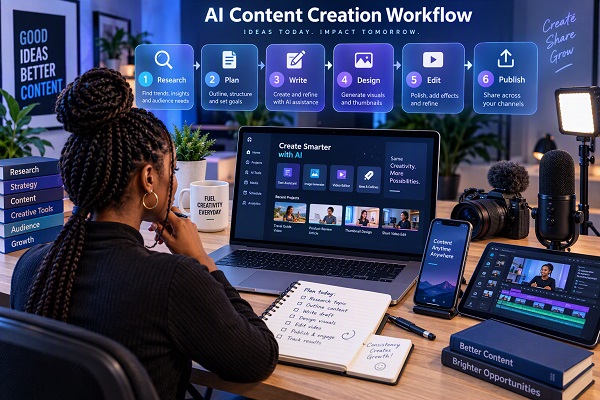
Creating quality content consistently can be challenging. Whether you run a blog, YouTube channel, TikTok account, Instagram page, podcast or online business, there are many tasks involved before a piece of content is ready to publish.
You may need to research a topic, write a script, create graphics, edit videos, record voiceovers, correct grammar, create captions and turn one piece of content into several social media posts.
Artificial intelligence is changing how creators handle many of these tasks. The best AI tools do not necessarily replace the creator. Instead, they can reduce repetitive work and give creators more time to focus on ideas, storytelling, accuracy and audience engagement.
In 2026, there are AI tools for almost every stage of the content creation process.
Here are some of the most useful AI tools content creators should know about.
ALSO READ: Best ChatGPT Prompts for Students
1. ChatGPT – For Ideas, Writing and Content Planning
ChatGPT is one of the most versatile AI tools available to content creators.
A creator can use it to brainstorm topics, develop content calendars, create outlines, write first drafts, develop video scripts, generate social media ideas and rewrite existing content.
It can also help turn one content idea into several formats. For example, a creator could start with a 1,500-word blog article and ask AI to turn it into a YouTube script, Instagram caption, X post, newsletter and short-video script.
ChatGPT can also work with uploaded documents and other files, which can be useful when researching or transforming existing material.
Useful tasks for creators
- Blog post outlines
- YouTube scripts
- Social media captions
- Content calendars
- Headlines and title ideas
- Video hooks
- Email newsletters
- Content repurposing
- Editing and rewriting
- Brainstorming
The important thing is to treat AI-generated information as a starting point. Facts, statistics, quotations and claims should be checked against reliable sources before publication.
2. Canva AI – For Graphics and Visual Content
Good visual design is important for bloggers, social media creators, businesses and YouTubers.
Canva’s AI-powered tools can help creators move from an idea to a visual design without having advanced graphic-design skills.
Canva AI can assist with creating social media graphics, presentations, images, videos and other visual assets. Its AI features also support image editing, content generation and resizing for different formats.
For example, a blogger can create a featured image for an article and then adapt the same design for Facebook, Instagram, X or other platforms.
Useful tasks for creators
- Featured images
- Instagram posts
- YouTube thumbnails
- Posters
- Presentations
- Social media graphics
- Image editing
- Background removal
- Content resizing
- Short visual content
Canva is particularly useful when you want to maintain consistent branding across multiple pieces of content.
3. CapCut – For AI Video Editing
Video has become one of the most important content formats, but editing can take considerable time.
CapCut provides AI-powered tools for video creation and editing. Creators can use it to work with video clips, captions, audio, images and other elements within a video-editing workflow.
Its AI features include video generation, text-to-speech, image generation, background removal, image enhancement and other editing functions.
This makes it useful for creators producing TikTok videos, Instagram Reels, YouTube Shorts and other short-form videos.
Useful tasks for creators
- Short-form videos
- YouTube Shorts
- TikTok content
- Instagram Reels
- Captions
- AI voiceovers
- Video enhancement
- Background removal
- Image-to-video projects
- Social media video editing
Creators should still review AI-generated captions, transitions and voiceovers before publishing because automated tools can occasionally make mistakes.
4. Adobe Express – For Branded Content
Adobe Express is another useful platform for creators who need to produce visual content quickly.
Its AI-powered features allow creators to generate and edit content using prompts. Adobe has also introduced conversational AI features designed to help users create and modify content through natural-language instructions.
This can be particularly useful for creators who produce branded content regularly.
For example, instead of manually rebuilding a social media design every time, a creator can use templates, branding elements and AI-assisted editing to speed up the process.
Useful tasks for creators
- Social media posts
- Flyers
- Posters
- Promotional graphics
- Branded content
- Image editing
- Marketing materials
- Short videos
Adobe Express can be especially useful for creators who already work with Adobe’s wider creative ecosystem.
5. Grammarly – For Editing and Polishing Content
Creating a first draft is only part of the writing process. Editing is what can turn a rough piece of content into something easier to read.
Grammarly provides AI-powered writing assistance for drafting, rewriting, proofreading and adjusting tone.
Content creators can use it to identify grammar, spelling, punctuation and clarity problems before publishing.
It can also help rewrite sections of content while maintaining the original idea.
Useful tasks for creators
- Blog editing
- Grammar checking
- Sentence improvement
- Rewriting
- Tone adjustment
- Social media captions
- Email writing
- Proofreading
- Improving readability
For bloggers and professional publishers, an editing tool can be useful for the final review before an article goes live.
6. Descript – For Podcasts and Video Content
Creators who work with podcasts and video can use Descript to simplify editing.
One of its useful approaches is allowing creators to work with transcribed audio and video as text. This can make it easier to identify and edit sections of a recording.
Descript also provides AI features for tasks such as summarization, social-post generation, audio enhancement and other content-production activities.
This makes it useful for creators who record long interviews, podcasts, tutorials or YouTube videos and want to turn them into multiple pieces of content.
Useful tasks for creators
- Podcast editing
- Video editing
- Transcription
- Show notes
- Social media posts
- Audio cleanup
- Video repurposing
- YouTube content
For example, a one-hour podcast can become a long-form video, several short clips, a written summary, social media posts and an email newsletter.
7. ElevenLabs – For AI Voice and Audio Content
Audio is another area where AI is becoming increasingly useful.
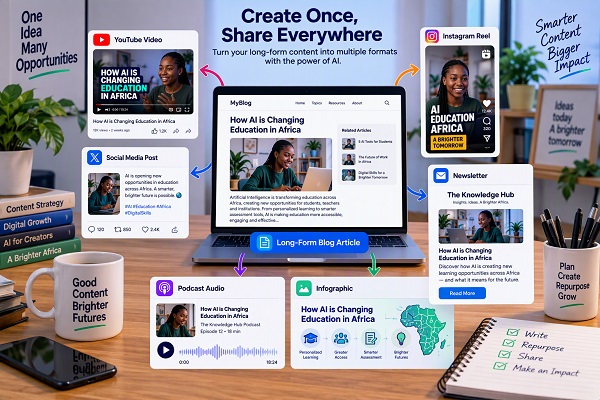
ElevenLabs provides AI-powered voice and audio tools that creators can use for voiceovers, narration, dubbing and other audio projects.
Its current creative platform also includes tools for video, image, music and sound-effect generation.
For creators who do not want to record every narration themselves, AI voice technology can provide another production option.
Useful tasks for creators
- Video narration
- Podcast production
- Voiceovers
- Audiobook projects
- Dubbing
- Multilingual content
- Sound effects
- Audio production
Creators should be particularly careful with voice cloning. Only clone or reproduce voices when they have the appropriate rights or permission.
8. Perplexity – For Research and Fact Checking
Research is one of the most important stages of content creation, especially for technology, finance, education, health and news websites.
Perplexity is designed around AI-powered web research and provides cited answers that allow users to examine the underlying sources.
📖 Related Reads
This makes it useful when a creator needs to investigate a topic before writing.
For example, a technology blogger could research a newly announced smartphone, compare specifications from different sources and then open the cited references to verify important information.
Useful tasks for creators
- Topic research
- Fact checking
- Finding sources
- Researching trends
- Comparing products
- Investigating statistics
- Finding primary sources
- Developing article briefs
However, creators should not automatically assume that an AI answer is correct. Always open important sources and verify claims before publishing.
How to Combine These AI Tools
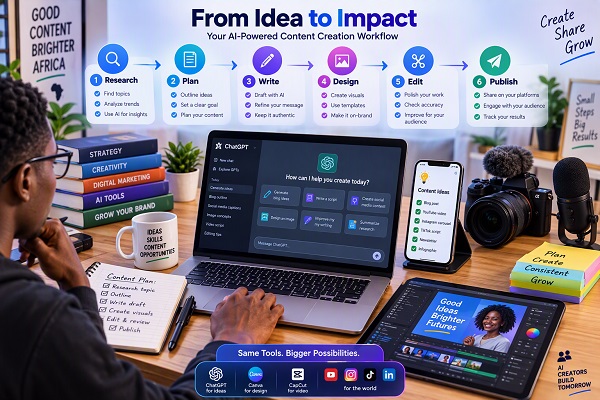
The biggest benefit does not come from using every AI tool separately. It comes from creating a workflow in which each tool handles a particular part of the production process.
For example, a technology blogger could use this workflow:
Step 1: Research
Use Perplexity to investigate the topic and identify reliable sources.
Step 2: Planning
Use ChatGPT to turn the research into an article outline and content structure.
Step 3: Writing
Draft the article and use ChatGPT or another writing assistant to improve the structure.
Step 4: Editing
Use Grammarly to check grammar, clarity, tone and readability.
Step 5: Graphics
Use Canva AI or Adobe Express to create the featured image and supporting graphics.
Step 6: Video
Turn the article into a short video using CapCut.
Step 7: Voice
Use ElevenLabs when an AI-generated narration is appropriate for the video or audio version.
Step 8: Repurposing
Use ChatGPT or Descript to turn the original article or video into social media posts, captions, short clips and other formats.
This workflow can turn one original idea into several pieces of content without starting from scratch every time.
One Article Can Become Multiple Pieces of Content
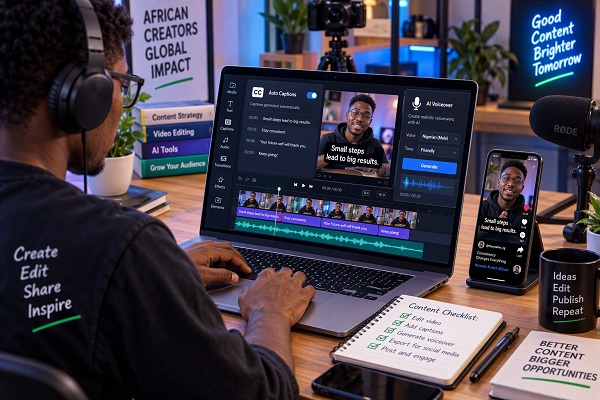
One of the biggest advantages of AI for content creators is content repurposing.
Suppose you publish an article titled:
“10 Hidden Android Features You Should Know.”
Instead of publishing only the article, you could create:
- A YouTube video
- A YouTube Short
- Three Instagram Reels
- An Instagram carousel
- An X thread
- A Facebook post
- A newsletter
- A Pinterest graphic
- A short infographic
- A podcast-style audio version
AI can help with the repetitive parts of this process.
The creator still needs to decide what information is valuable, verify facts, add personal experience and make sure the final content sounds authentic.
AI Should Assist the Creator, Not Replace the Creator
It can be tempting to allow AI to generate everything from beginning to end.
That approach can produce content quickly, but speed alone does not guarantee quality.
Good content still needs human judgment.
Before publishing AI-assisted content, ask:
- Is the information accurate?
- Are the sources reliable?
- Does the article actually answer the reader’s question?
- Is the information original or simply repeating what everyone else has published?
- Does the content sound natural?
- Have I added useful examples?
- Are statistics and dates verified?
- Are images properly licensed or generated legitimately?
- Does the content provide something useful to the audience?
For a website such as TechFalz, this final human review is particularly important for technology, education, financial and other information that readers may rely on.
Best AI Workflow for Different Types of Creators
| Creator Type | Useful AI Tools |
|---|---|
| Blogger | ChatGPT, Perplexity, Grammarly, Canva |
| YouTuber | ChatGPT, CapCut, Canva, ElevenLabs |
| TikTok Creator | ChatGPT, CapCut, Canva |
| Podcaster | ChatGPT, Descript, ElevenLabs |
| Social Media Manager | ChatGPT, Canva, Adobe Express, Grammarly |
| Tech Blogger | Perplexity, ChatGPT, Canva, Grammarly |
| Education Creator | ChatGPT, Canva, Grammarly, CapCut |
| Small Business Creator | ChatGPT, Canva, Adobe Express, CapCut |
You do not need to subscribe to every AI service. Start with the tools that solve the biggest problems in your own workflow.
Tips for Using AI Tools More Effectively
1. Give AI enough context
Instead of asking:
“Write a post about smartphones.”
Try:
“Create an 800-word beginner-friendly article for Nigerian smartphone users explaining how to check whether an Android phone supports 5G.”
Specific instructions usually produce more useful results.
2. Keep your own voice
AI can help with drafting and editing, but your experience and perspective are what make your content distinctive.
3. Verify important information
AI systems can make factual errors. Check important claims against official websites, documentation, government sources, company announcements or other authoritative references.
4. Do not copy competitors
Use AI for brainstorming and research, but create your own structure, explanations, examples and conclusions.
5. Check licensing
Before using an image, music track, voice or other asset commercially, check its licensing conditions.
6. Build a repeatable workflow
The goal is not simply to collect dozens of AI tools. The goal is to build a workflow that allows you to move from idea to published content efficiently.
Final Thoughts
AI tools can make content creation faster, but they do not eliminate the need for creativity, research and human judgment.
ChatGPT can help with ideas and writing. Perplexity can support research. Canva AI and Adobe Express can help with visuals. CapCut can simplify video production. Grammarly can improve written content. Descript can help with podcast and video workflows, while ElevenLabs provides tools for AI-powered audio and voice production.
The most effective approach is to use AI for the repetitive and time-consuming parts of content production while keeping human control over the ideas, facts, storytelling, editing and final publishing decisions.
For content creators, the goal should not be to create the most content possible. It should be to create useful, accurate and engaging content more efficiently.