
Artificial intelligence is changing the way students prepare for tests and examinations. Instead of spending hours searching through notes or trying to understand difficult topics alone, students can now use AI tools to explain concepts, create practice questions, generate flashcards and identify areas that need more revision.
However, there is an important difference between using AI to learn and using AI to cheat.
Students can use AI responsibly as a study assistant while still doing the actual learning, answering questions themselves and following the academic-integrity rules of their school or examination body.
This guide looks at some of the AI tools students can use for ethical exam preparation and explains how to get more value from them.
ALSO READ: How to Recover a Forgotten Gmail Password
What Does It Mean to Use AI Ethically for Exams?
Using AI ethically means using it to improve your understanding rather than allowing it to do your academic work for you.
For example, a student can ask AI to:
- Explain a difficult topic.
- Turn notes into revision questions.
- Create flashcards.
- Generate a mock examination.
- Explain why an answer is wrong.
- Help organise a study timetable.
- Provide examples of difficult concepts.
- Test the student’s knowledge.
- Identify topics that need more revision.
On the other hand, students should not use AI to secretly complete a restricted examination or submit AI-generated work as their own when their school or instructor prohibits it.
The rules can differ between schools, courses and examinations, so students should always check the applicable requirements.
1. ChatGPT Study Mode
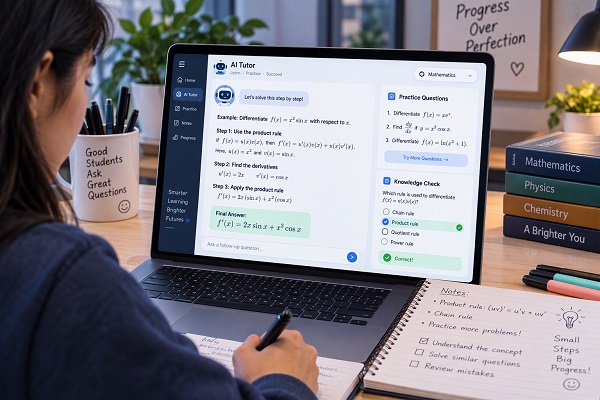
ChatGPT can be used as an interactive study partner, particularly through Study Mode.
OpenAI says Study Mode is designed to guide students through problems step by step rather than simply providing an answer. It can ask questions, provide hints, explain concepts at different levels, create practice questions and check understanding. It can also work with uploaded class notes, PDFs, worksheets, slides and other study materials.
This makes it useful for subjects such as mathematics, science, accounting, economics, computer studies and other courses where understanding the reasoning behind an answer matters.
Example prompt
Instead of asking:
“Give me the answer to this question.”
Try:
“Teach me how to solve this problem step by step. Ask me questions and let me attempt each step before giving me the next hint.”
You can also use:
“Quiz me on this topic one question at a time. Don’t show the answer until I attempt each question.”
This turns ChatGPT into a revision partner rather than an answer-copying tool.
2. Gemini Study Notebooks
Google’s Gemini app now includes Study Notebooks, a learning environment designed around personalised study.
Google says Study Notebooks can use uploaded syllabuses, notes and reading materials to create a diagnostic quiz, identify knowledge gaps and generate bite-sized lessons with practice quizzes. A progress dashboard can then help students see strengths and areas that require more attention.
This can be particularly useful when preparing for a large examination with many topics.
For example, a student could upload a syllabus and ask Gemini to help determine which areas should be studied first.
Useful prompt
“Use these course materials to identify the topics I need to revise. Create a study plan that starts with my weakest areas and includes a short quiz after each topic.”
The student should still compare important information with their official course materials.
3. Gemini Notebook
Google has also renamed NotebookLM as Gemini Notebook. It remains focused on working with sources supplied by the user. Google describes it as a tool where students can upload materials and generate summaries, study guides, quizzes, flashcards and other learning resources based on those sources.
This makes it useful when you have a large collection of study materials.
You could upload:
- Lecture notes
- Course PDFs
- Study guides
- Your own revision notes
- Google Docs
- Relevant reading materials
Then ask it to create a revision resource from those materials.
Example
“Create a revision guide from these notes. Divide it into 10 topics and give me five questions to test my understanding of each topic.”
Because the tool can ground its responses in supplied materials, it can be particularly useful for studying a specific course rather than asking a general chatbot about a broad subject.
4. Quizlet AI Study Tools
Quizlet offers several AI-powered study features, including AI-generated practice tests, study guides, flashcards and PDF summarisation. Its tools can transform notes, slides and other study materials into revision resources.
Its AI Practice Test Generator can create questions from uploaded notes or readings, while its AI Flashcard Generator can turn study materials into editable flashcards.
This can be useful for students who prefer learning through repeated questions rather than simply reading their notes.
Example workflow
- Upload your notes.
- Generate flashcards.
- Review the flashcards.
- Generate a practice test.
- Take the test without looking at your notes.
- Review incorrect answers.
- Return to the relevant topic.
That approach makes AI part of an active study process.
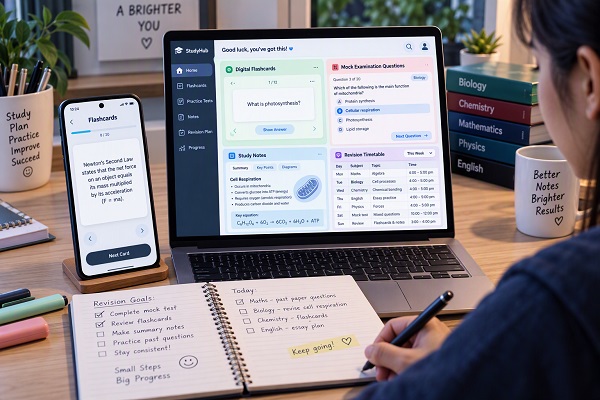
5. Use AI to Turn Notes Into Revision Questions
One of the easiest ways to use AI for exam preparation is converting passive study material into questions.
For example:
“Turn these biology notes into 30 revision questions. Include 10 easy, 10 medium and 10 difficult questions. Don’t provide the answers until I have attempted them.”
The important part is attempting the questions yourself.
Simply reading AI-generated answers does not prove that you understand the subject.
After completing the questions, ask:
“Check my answers against the supplied notes. For each mistake, explain what I misunderstood and give me another similar question.”
6. Create Digital Flashcards With AI
Flashcards are useful for subjects that require remembering facts, definitions, formulas, terminology or key concepts.
AI can help create the first version of a flashcard set from your notes.
For example:
“Create flashcards from these notes. Put the question on one side and a short answer on the other. Focus on definitions, important concepts and formulas.”
Quizlet’s current AI flashcard tools can create flashcards from uploaded documents, lecture slides and handwritten notes, and students can edit the generated cards.
Do not simply memorise the flashcard answers. Try to recall the answer before revealing it.
ALSO READ: How Artificial Intelligence Is Redefining the Classroom: The Future of Education Is Here
7. Generate Mock Examinations
AI can help you practise under examination-like conditions.
Ask an AI tool to create a mock test based on your syllabus.
For example:
“Create a 60-minute mock examination based only on these five topics. Include 20 multiple-choice questions and five written questions. Do not give me the answers until I finish.”
Once you finish the test, review your mistakes.
You can then ask:
“Analyse the questions I got wrong and identify the three topics I should revise next.”
Quizlet also provides AI-generated practice tests based on uploaded notes, readings and slides, with options for different question types and test lengths.
8. Ask AI to Explain Difficult Concepts
Sometimes students understand a topic poorly because the explanation in their textbook is too complicated.
AI can provide another explanation.
For example:
“Explain photosynthesis in simple language for a secondary school student.”
Then ask:
“Now explain the same topic at a more advanced level.”
Finally:
“Give me five questions that test whether I actually understand it.”
This creates a progression from explanation → practice → assessment.
9. Use AI to Find Your Weak Areas
Knowing what you do not understand is an important part of exam preparation.
After completing a practice test, give the AI your results.
📖 Related Reads
For example:
“I answered 40 questions and got 27 correct. Here are the questions I missed. Group my mistakes by topic and tell me which areas I should revise first.”
The AI can help organise your mistakes into categories.
However, treat its assessment as guidance rather than an unquestionable diagnosis.
10. Build a Personal Study Timetable
Students often struggle not because they have no study materials but because they do not know how to organise their time.
AI can help create a realistic revision timetable.
For example:
“I have 21 days before my examination. I have six subjects and can study for two hours Monday to Friday and four hours on Saturday and Sunday. Create a revision timetable that gives additional time to difficult subjects.”
You can then modify the plan according to your actual progress.
If you finish a topic early, move to another weak area instead of continuing to follow an outdated timetable.
11. Practise Explaining Answers in Your Own Words
One of the best ways to discover whether you understand something is to explain it without looking at your notes.
Ask AI to act as a teacher:
“Ask me to explain this topic in my own words. Don’t correct me until I finish. Then identify the important points I missed.”
This is particularly useful for essay-based subjects.
The objective is not to produce a perfect AI-generated explanation. The objective is to make your own understanding stronger.
12. Use AI to Review Past Questions
Past examination questions can be valuable revision material.
AI can help you understand a difficult question or create similar practice questions.
For example:
“Explain what this question is testing and show me how I should approach it. Do not give me the final answer until I have attempted it.”
After solving it, ask:
“Create three new questions that test the same concept but use different examples.”
This gives you additional practice without simply memorising the original answer.
Where official past questions are available, students should prioritise authentic materials and follow the relevant examination body’s rules.
13. Use AI for Active Recall Instead of Passive Reading
Reading the same notes repeatedly can create the feeling that you know the material without actually testing whether you can recall it.
Instead, ask AI to test you.
For example:
“Ask me 15 questions about this topic one at a time. Don’t show me the answer until I respond.”
Answer each question without looking at your notes.
If you get an answer wrong, review the relevant material and attempt another question.
Quizlet’s Learn and Test features are also built around different forms of practice and retrieval, including multiple-choice and written questions.
14. Always Verify AI-Generated Information
AI is not infallible.
Even ChatGPT’s Study Mode documentation warns that the system can make mistakes and recommends double-checking important information.
This is particularly important when studying:
- Mathematics
- Science
- History
- Law
- Medicine
- Economics
- Current affairs
- Technical subjects
Compare important information with your textbook, teacher’s notes, official documents and other reliable sources.
If AI gives you an answer that conflicts with your textbook, do not automatically assume the AI is correct.
15. Don’t Use AI During an Examination If It Is Prohibited
AI can be useful before an examination without being appropriate during an examination.
If your school, university, examination body or lecturer prohibits AI assistance, do not use ChatGPT, Gemini, Quizlet or another AI tool to answer questions during the assessment.
The purpose of ethical AI-assisted studying is to help you develop knowledge before the examination so that you can demonstrate what you know independently.
16. Don’t Submit AI-Generated Work as Your Own
Students should also understand the difference between AI-assisted learning and academic dishonesty.
For example, if an assignment requires you to write an essay independently, copying an AI-generated essay and submitting it as your own may violate your institution’s rules.
Instead, where AI use is permitted, use it to:
- Understand the assignment.
- Brainstorm ideas.
- Explain unfamiliar concepts.
- Create practice questions.
- Check your understanding.
- Suggest areas for further research.
- Give feedback on a draft when permitted.
Then do the intellectual work required by the assignment yourself.
A Simple Ethical AI Exam-Preparation Method
Students can use this five-stage system:
1. Learn
Study your textbook, class notes and teacher-provided materials.
2. Explain
Use AI to explain topics you do not understand.
3. Practise
Generate questions, flashcards and mock examinations.
4. Check
Review your answers and identify your mistakes.
5. Repeat
Return to weak topics and test yourself again.
This approach keeps the student at the centre of the learning process.
Best AI Tools for Different Study Tasks
| Study task | AI tool to consider |
|---|---|
| Step-by-step tutoring | ChatGPT Study Mode |
| Explaining difficult concepts | ChatGPT or Gemini |
| Personalised revision | Gemini Study Notebooks |
| Studying from your own materials | Gemini Notebook |
| Flashcards | Quizlet or Gemini Notebook |
| Practice tests | Quizlet, ChatGPT or Gemini |
| Turning notes into questions | ChatGPT, Quizlet or Gemini |
| Study guides | Gemini Notebook or Quizlet |
| Revision timetable | ChatGPT or Gemini |
| Identifying weak areas | ChatGPT or Gemini |
These tools have different features, availability and access requirements, so students should check the current version of the service they are using. Google’s current Study Notebooks, for example, are rolling out across supported accounts and languages, while availability can differ by account type and platform.
AI Study Prompts Students Can Copy
For revision questions
“Create 20 examination-style questions from these notes. Give me the questions first and wait for my answers before showing the solutions.”
For difficult topics
“Explain this topic in simple language, then give me an example and three questions to test my understanding.”
For weak areas
“Here are the questions I got wrong. Identify the topics I need to revise and create a seven-day revision plan.”
For flashcards
“Turn these notes into concise flashcards covering definitions, formulas, key concepts and important facts.”
For a mock examination
“Create a 60-minute mock examination from these topics. Do not provide answers until I submit my completed responses.”
For checking understanding
“Ask me questions about this topic one at a time. Don’t give me the answer immediately. Give me a hint if I get stuck.”
Common Mistakes Students Should Avoid
Relying completely on AI
AI should supplement textbooks, teachers and personal study rather than replace them.
Copying answers without understanding
A correct answer is not useful if you cannot explain how you reached it.
Trusting every AI response
AI can make factual and reasoning errors.
Using AI secretly during restricted exams
Always follow the examination rules.
Studying only summaries
Short summaries can leave out important details. Use the original learning material as well.
Letting AI do all the thinking
Ask for hints, questions and explanations instead of immediately requesting final answers.
ALSO READ: How to Create Digital Flashcards for Exam Revision
Final Thoughts
AI tools can make exam preparation more organised and interactive when students use them as learning assistants rather than shortcuts.
ChatGPT Study Mode can provide step-by-step guidance and knowledge checks, Gemini Study Notebooks can personalise revision around knowledge gaps, Gemini Notebook can work with student-provided sources, and Quizlet provides AI-powered flashcards, study guides and practice tests.
The most important principle is simple: use AI to help you learn, not to pretend that you have learned.
Read the material, attempt the questions yourself, check your mistakes, verify important information and follow your school’s academic-integrity rules.
AI can help make studying more efficient, but the knowledge you take into the examination should ultimately be knowledge you understand and can demonstrate yourself.